
Crosstune
v2.27.0Screenshots
(12)About Application
Crosstune
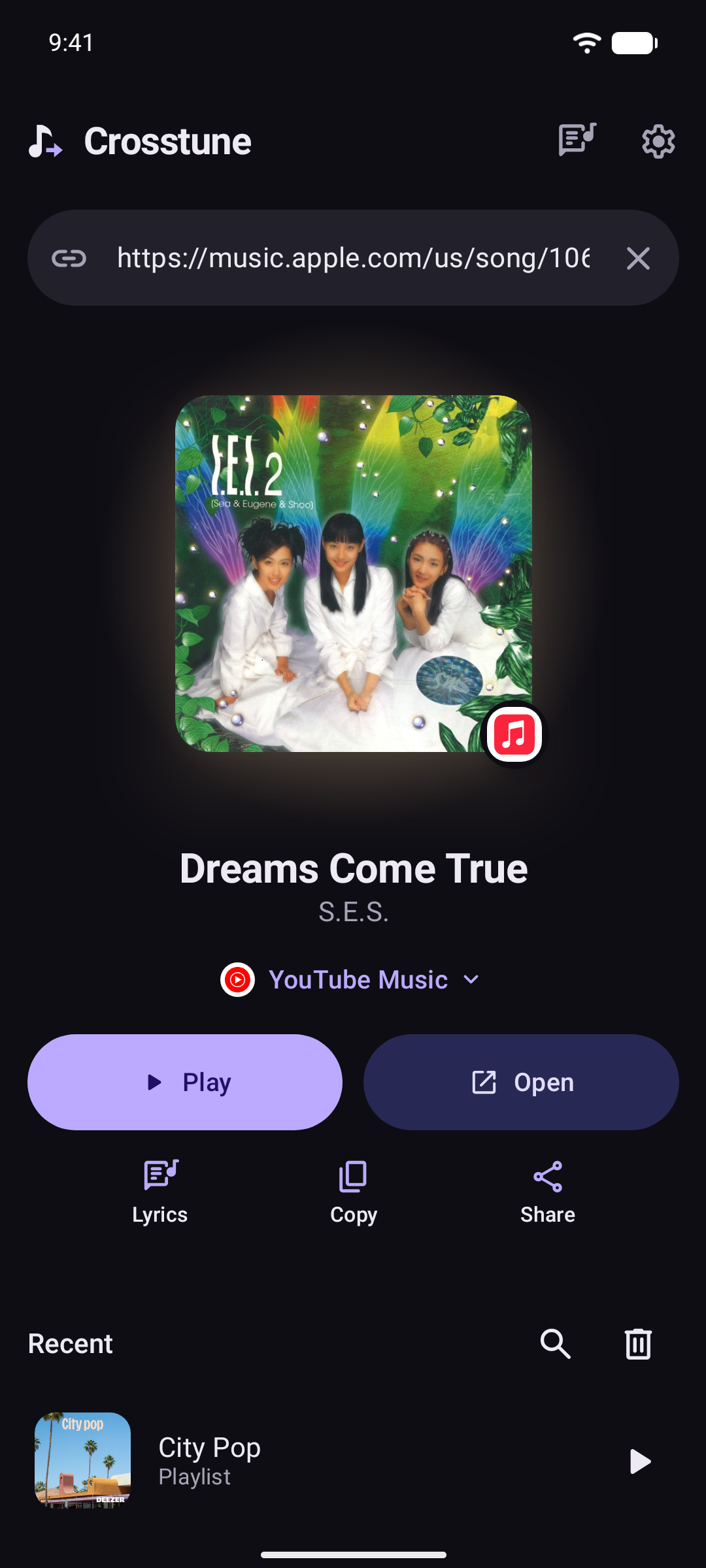
Open a link from any service in the app you listen on, name the song playing nearby, and follow its lyrics and chords. Learn the words, and practice them with the music.
⬇️ Install
Needs Android 8.0 or newer.
- Get the APK from Releases, or add
https://github.com/astrovm/crosstuneto Obtainium for updates. - Or on Google Play, which is in testing: join the testers group, tap Become a tester on the testing page, then install from Google Play.
🚀 Set up
Pasting or sharing a link to Crosstune works with no setup. Crosstune opens on its main screen, and under the link field lists what Android has to allow, each with what it gets you:
- Allow links in Crosstune, so music links you tap in any app open here.
- Let lyrics follow your music, so the words of what's playing show in time.
- Tap one to see its steps and open Android's settings. Where a small guide floats over the page, it shows all steps and says when the fix is done. Make the guide big to return to Crosstune. Notification-access steps stay in Crosstune on every phone. On Android 12 or newer, link steps also stay in Crosstune, except on Samsung and Xiaomi. This keeps the guide clear of Android's dialog buttons. With Shizuku or root on Android 12 or newer, tap Fix all instead. It's one tap.
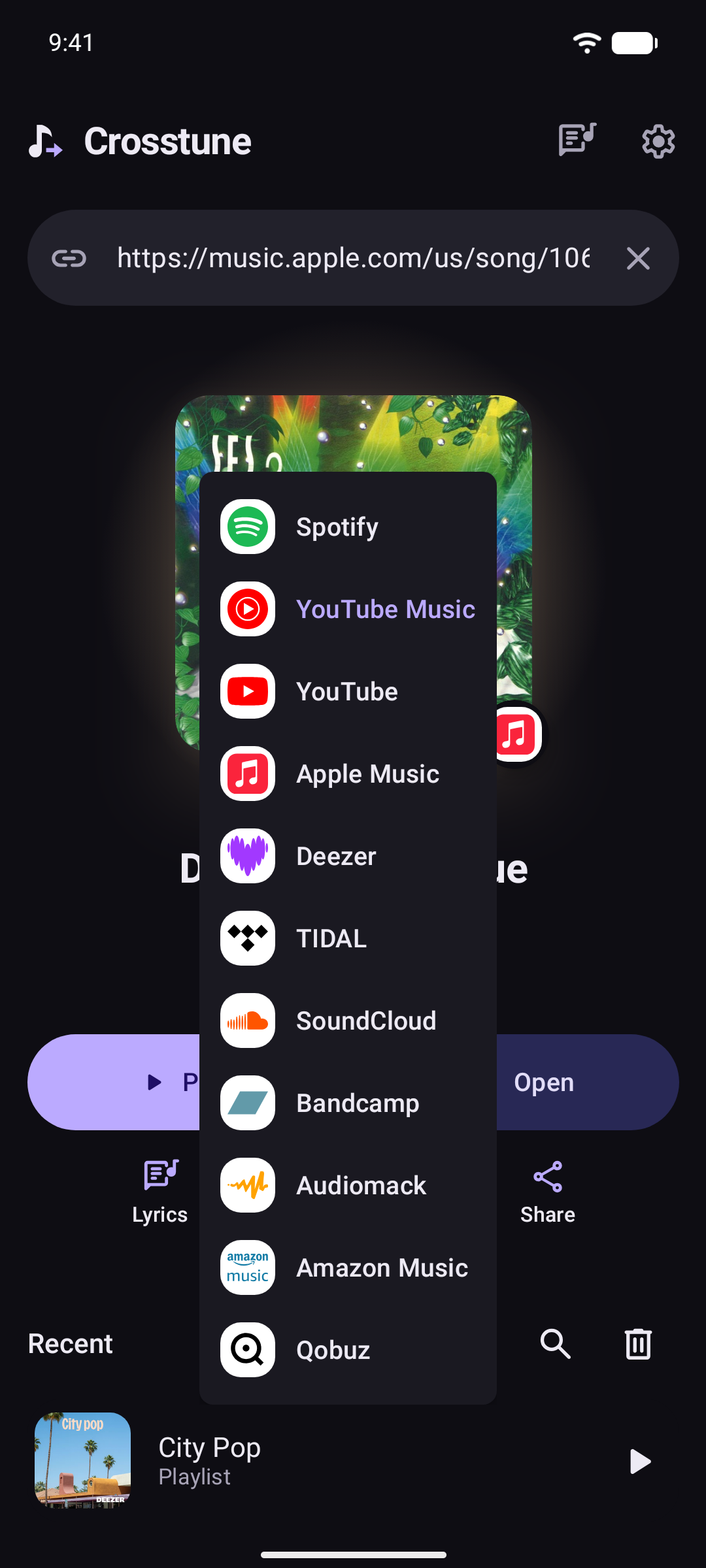
Links from Spotify, YouTube Music, Apple Music, Deezer and TIDAL open here from the start. Turn on YouTube in Settings → Open links from. SoundCloud, Bandcamp, Audiomack, Invidious and Piped links open here when shared or pasted.
With one music app on your phone, songs play there. With more, the first one you pick on a song is where they play from then on. Change it in Settings.
Once you've opened something, anything left or broken later shows as Things to fix at the bottom of the main screen: Fix all with Shizuku or root, or Fix one by one.
Features
- Tap and go. A link from one service opens in another, at the exact song, album or artist when the app supports it: Spotify to YouTube Music, Apple Music to Deezer, TIDAL to Apple Music.
- Choose where. Pick your music app once. Links go straight to it, or show in Crosstune first, with the song playing in that app. Set one app per service. YouTube and YouTube Music patched by ReVanced, RVX, Morphe or Vanced count as apps of their own, next to the official ones. Or add any app or site with a search URL like
https://example.com/search?q={query}. - Not in the app you picked? Crosstune says so, then opens the song where it's from or searches anyway. Choose in Settings → When a song isn't found.
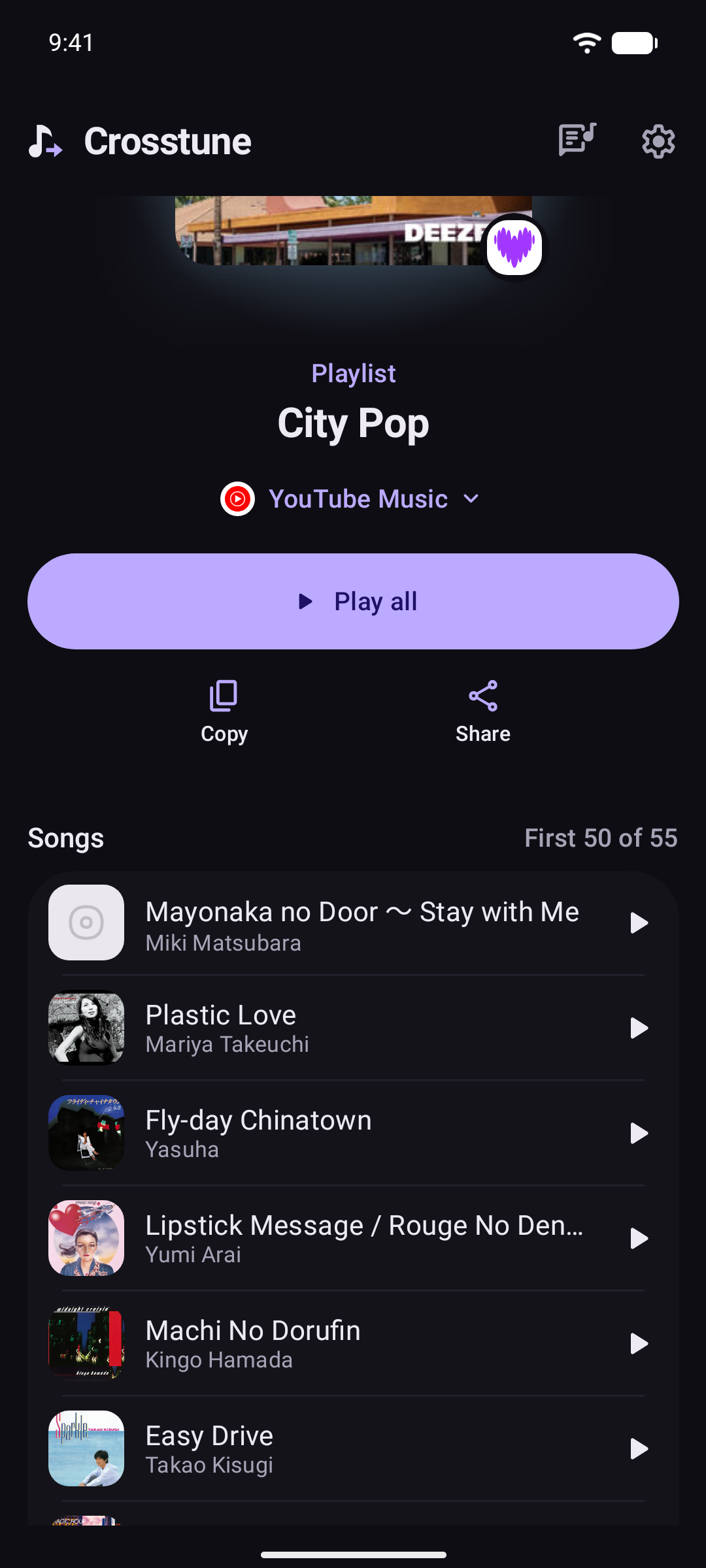
- Playlists and albums. See their songs and open any one, or play the lot, in order or shuffled, in YouTube Music, YouTube, TIDAL or Spotify. With the phone locked, Spotify waits paused at each song's end until it's unlocked; on a phone with no PIN, pattern or password, Wake for Spotify's next song in Settings → Advanced turns the screen on at each song's end so it plays on. It stays on until it times out, as Android counts it as using the phone.
- Recent. Search your recent songs, and swipe one away to remove it. Its play button goes where links do.
- Play and stay. Play a song in your music app while you stay in Crosstune, with its own player: cover, progress, pause, skip, shuffle, repeat, seek and the app's own like. Swipe the cover to skip, play anything from what's up next, or set a sleep timer. The line being sung shows at the bottom, and the title opens the song's links. Whatever is playing waits in a bar on the home screen. Swipe up for the player, up again for the words, and down to go back. An app that only plays in front, like YouTube Music without Premium, plays under Crosstune's full screen, once Crosstune may show over other apps.
- Name that song. Crosstune listens for up to 12 seconds and shows the song playing nearby, like a pasted link. Or type a song's name to find it. If Shazam can't be reached, it opens the Shazam app or Google's song search instead, when you have them.
- Names what plays when the app doesn't say. Any app that doesn't say what song it plays, like a radio app that sends only the station's name, a file with no tags, or a video, shows in the bar as it is, with its controls, but never as a song by itself: it isn't opened, searched, reported or kept in Recent unless you tap it as below. A file shows by its title, without an audio file's extension, like
.mp3. A video file keeps its own, like.mp4. Paused, it stays on the bar with its Play button, as a paused song does, and Crosstune doesn't listen. A song paused in another app keeps the bar over a video that doesn't say it's music, or a file with no title, but a station takes its place. When it plays on a speaker, a TV or a computer, it shows with its controls too, but Crosstune doesn't listen, as its sound isn't on the phone. While Crosstune is open with that bar showing, it names what plays by itself, only if you already allowed the microphone. It hears the phone's own sound, through headphones too, and more cleanly with Shizuku or root. It uses the microphone only when the phone won't share its sound, only while the phone plays aloud, and never on a TV, where it hears only the TV's own sound. Tap the bar for the song while it's known to be still on: where it should be by now, from where the app says it is, or else from the time gone by, is still inside the song. A song of unknown length shows but doesn't open, as it may be over any time. A song heard only by the microphone may be another one playing in the room, so it shows but doesn't open either. With no song to open, a tap opens the player on what the app plays. So does a tap on a video that doesn't say it's music, or a file with no title, as there's no title to open as a song. When the song can't be named by ear, as nothing can hear it, it plays on a speaker, a TV or a computer, or the last listen named no song, a tap opens the app's title instead, as a song: its card and its player. A song heard stays on the bar until it should be over. After a skip, a seek or a song up next played, from the bar, the player or the app itself, it goes at once and Crosstune listens again, as the app may play another file under the same name. So does a new queue, a new length, or a new session in the app. Then it listens again, or in a while after talk or a failure, and at once when it can hear another way, like once the microphone or Shizuku is allowed, or headphones come or go. Its lyrics are looked up like any song's. The lyrics button on the main screen tries the song heard on the bar first, when a tap would open it, then the phone's own sound, then the microphone. The microphone button still names a song playing nearby. When the app names a song itself, the app's name wins. - Lyrics in time. The words follow your music app, even one on your computer that KDE Connect shows on the phone, or Crosstune listens along, song after song. Each line lights a moment before it's sung, so you've read it by then: set how early, and how far ahead the next line brightens (only its first word, when the words light one by one), in Settings → Lyrics. Tap a line to jump there, make the words bigger or smaller or center them, and fix the timing by tapping the line you hear or nudging it half a second at a time. Lyrics timed for another take offer the fix themselves. A cover with no lyrics of its own shows the original's, when its title says it's a cover or Apple credits the same songwriters. Also works with YouTube and YouTube Music patched by ReVanced, RVX or Morphe.
- Chords. Chord sheets over the words, with the capo, lined up letter by letter.
- Offline. Download on a song's, album's or playlist's card keeps it for offline: its lyrics, translation, chords and cover come over Wi-Fi and stay, up to the space set in Settings → Advanced. Each of its songs is also liked in your music app the first time it plays with Crosstune open, so the app downloads it too once it's set to download what you like: in Spotify, by downloading Liked Songs. Only apps that show whether a song's liked get it, Spotify, YouTube Music and TIDAL, so a song's never unliked; Download in your music app too turns it off. Offline, an icon says so, and a link waits until you're back online.
- Recording timing. Lyrics and corrections stay with their recording. With microphone access already allowed, lyrics briefly listen when a video, or a release longer or shorter than the one they're timed for, plays: they find how far ahead or behind it is and remember it after three agreeing audio fingerprints. Played once as the release they're timed for, they also learn how far Shazam's place in the song is from theirs, so another release Shazam matches the same way lines up too. They hear the phone's own sound, through headphones too, and the microphone only when the phone won't share it. With Shizuku or root, they hear what music apps play more cleanly, which places more lines under loud crowds in live recordings; Spotify won't share its sound this way, so it's heard as before. On phones with 3 GB of memory or more, they also hear the singing, 20 seconds at a time, and move each line to where it's sung, which Reset undoes: through the song the first time it plays from the start, and once whenever you pick it up partway or skip within it. Lyrics found with no timing at all get it the same way: they listen as the song plays, about twice through, and from the next play each line heard lights where it's sung. A line stays unlit until it's heard, and also while what's heard fits nearly as well with it sung at another time, or with another line sung in its place, as with a chorus sung twice. What's heard stays on your phone, so they're in time from the start next time. That runs on your phone with whisper.cpp, whose 32 MB model downloads once, on Wi-Fi.
- Report a problem. Wrong words or timing? In the lyrics, one tap sends the song, its timing and what you write straight to the developer, kept private. Say yes once and Crosstune reports songs with missing lyrics, timing or chords, timing you fix, and words it hears off from the singing, by itself. It asks where you can see it, once each time the app starts: Not now three times means no. Timing you fix by hand waits on your phone either way, and goes too, once a song, when you say yes or turn the switch on. A song with no words to find, like an instrumental, a medley, a playlist or a whole concert, isn't one. When no lyrics are found for a song your phone plays, Crosstune first listens for singing, up to four times for 20 seconds through the song. It reports the song only if it hears someone sing, even when the song's genre made it look like an instrumental. It listens the same way to a song with lyrics found when LRCLIB marks the recording as an instrumental, or its title says it's one, like "Song (Instrumental)". It hides those lyrics only when it hears the music and no one singing, through all four listens. Otherwise they show: at once when it can't listen, as without the microphone, or when the song plays on another device or in an app Crosstune can't see, and after one listen's time at most. A cover's or a karaoke track's lyrics, from the song it's sung to, always show. With automatic reports turned off, it listens only when the genre, the title or LRCLIB made the song look like an instrumental, so a voice can show that someone may sing. Report song problems automatically in Settings turns it on or off any time. In Settings, Report a problem opens a GitHub issue or an email instead, for you to send.
- Floating lyrics. Float them over any app.
- MilkDrop visuals. 152 projectM visuals behind the lyrics, moving to what your phone plays. Pick which show in Settings → Visuals.
- Learn the words. Kana, pinyin, romaji and any other script in Latin letters under each line, translations, and the meaning of any word. A reading looks wrong? Flag it on the word, add the right one if you know it, and it goes to the developer.
- Practice with the music. Save lines and they come back as cards. Crosstune stays in front while you practice: a card plays its line in the music app that already has the song open, when that app can move to the line and keep playing, and otherwise in a small YouTube player at the foot of the card. A card never opens a music app, wakes one or asks one for the song, so an app that wants you to sign in never takes over the card. The small player needs no notification access. With none, or with no YouTube video of the song, as offline, the card has no sound and is still practiced. Crosstune remembers on the phone which apps could move and kept playing. One that couldn't is skipped for a week, then tried again. One that stopped short of the line, as at the end of a preview, is skipped for the rest of that run and tried again the next time Crosstune starts. Choose the text layers and sizes for each side, and make more than one kind of card from a line, each on its own schedule. Rate each one: Again, Hard, Good or Easy. Tap the bell when a session ends and the cards that are due come back as a notification once a day, around the time you practiced. Settings or the bell on Practice turns it off. When a session ends, Back to the song that played before practice plays it again where it was, in its app. If that app no longer has it, only that app is asked for it, or opened on it once Crosstune may show over other apps.
- ChatGPT, if you have it. Sign in to translate whole songs, explain a line or a song, find the words worth learning, and find songs by describing them.
- On your TV. Runs on Android TV and Google TV too: what's playing, its lyrics and visuals on the big screen, all with the remote. Play opens a song in YouTube with its lyrics over it.
- Your colors. Light or dark, your wallpaper's colors, and pure black for OLED screens.
- Shortcuts. One-tap paste, home screen widgets, Quick Settings tiles and a long-press shortcut on the app icon.
- No tracking. Drops tracking bits like
?si=from links. - 16 languages. Follows your phone, or pick one in Settings.
- On your computer. The browser extension, for Chrome, Edge, Brave and Firefox, opens music links in the service you pick, and shows the lyrics of what's playing on a music site in its side panel, in time where the site says how far in the song is.
Supported links
| Service | Reads | Exact match |
|---|---|---|
| Spotify | Songs, albums, artists, playlists, spotify.link, spotify: URIs, track IDs | Songs |
| YouTube Music | Songs, videos and playlists | Songs, albums, artists |
| YouTube | Videos, Shorts, live streams, playlists, youtu.be | Songs |
| Apple Music | Songs, albums, artists, playlists | Songs, albums, artists |
| Deezer | Songs, albums, artists, playlists, link.deezer.com | Songs, albums, artists |
| TIDAL | Songs, albums, artists, playlists | Songs, albums, artists |
| SoundCloud | Tracks, artists, sets, on.soundcloud.com | Songs, albums, verified artists |
| Bandcamp | Tracks, albums | Songs, albums |
| Audiomack | Songs, albums, playlists | Songs, albums, verified artists |
| Amazon Music | Can't read its links | Search |
| Qobuz | Can't read its links | Songs, albums |
Songs shared from Pixel Now Playing, Shazam links and songs shared from Google's search work too. "Search" means Crosstune opens a search for the title and artist.
Bandcamp's app opens no song page and plays nothing it's asked for, only searches. In it Crosstune opens a search for the song, so there's no Play, and the song is one tap away. Logged out of Bandcamp's app, a search can be lost if the app wasn't already open, and it shows its home. In the browser, the song's page opens.
🛠️ Troubleshooting
Links still open in another app. Turn the service on in Settings → Open links from. Then in Android, go to Settings → Apps → Crosstune → Open by default → Add link and turn on its links.
I got a search, not the song. Crosstune found no confident match. Choose what happens then in Settings → When a song isn't found.
Practice reminders arrive late. In Settings → Practice, use Allow exact time. Without that access, Android can hold a reminder. A pending reminder can arrive after midnight or when Crosstune opens again. If several days pass, only the latest due reminder is shown.
Privacy
- No account, analytics or ads. History stays on your device.
- A link's service is asked only for its title, artist and cover. To open the song itself, the title and artist also go to the search of the app it opens in. When YouTube Music's or YouTube's search finds nothing named like the song, they also go to Apple's song search, in the store of the phone's region; only when that store finds no match or its search fails, in the US one; and only when neither search gives a match, for a name in Chinese, Japanese or Korean, in Japan's, South Korea's, Taiwan's, Hong Kong's and China's. Apple is then asked about the song it found in those five stores, for its names there, and when Apple doesn't say how long the song is, the title and artist go to Deezer's search too. For Spotify, whose search needs an account, they go to ListenBrainz instead, which knows Spotify's songs by name, and Spotify's public song pages are read. A song ListenBrainz doesn't know yet is looked for among its artist's most played: the artist's name goes to MusicBrainz, and Spotify's public page for the artist is read. Going straight to the app with Play right away off, a search opens there instead, and nothing is sent.
- Play all or Shuffle on a playlist or album sends each song's title and artist to YouTube Music's search, and on to Apple's and Deezer's as for a link, then the list of videos found to YouTube, which answers with a temporary playlist. In Spotify, each song is found through ListenBrainz instead, as its turn comes.
- Lyrics, chords and translations are looked up by title and artist on LRCLIB, YouTube Music, NetEase Cloud Music, Letras, Genius, Apple's song search and song pages, which also say who first sang and wrote a cover's song, Ultimate Guitar, Cifra Club, LaCuerda, U-FRET, J-Total Music, ChordWiki, Google Translate, MyMemory and Wiktionary. Readings are worked out on your phone. For a Japanese song with readings or Latin letters on, or its words shown in only kana or only Latin letters, its title and artist also go to UtaTen, which writes the kana over kanji as they're sung. For Japanese, a bigger dictionary, UniDic, is downloaded once from Maven Central, on Wi-Fi.
- Signed in with ChatGPT, the AI features send OpenAI the song, its lyrics and what you ask. When a YouTube Music or YouTube search finds nothing named like a song, the song's title and artist and what the search found go to ChatGPT too, so it picks the one that's the song. Your sign-in stays on your phone.
- A song's meaning also asks MusicBrainz, by MetaBrainz, for the year it came out and its album, by title and artist, so ChatGPT is told them instead of searching for them. What it answers is kept on your phone.
- Naming a song uses the microphone only while listening, and only a fingerprint goes to Shazam, never the audio. When an app plays without naming a song, like a radio station or a video, Crosstune listens the same way by itself, only while it's open with that app's bar showing, and only if the microphone is already allowed. It hears the phone's own sound, through headphones too, more cleanly through Android's playback capture with Shizuku or root, while a notification shows it. It uses the microphone only when the phone won't share its sound, only while the phone plays aloud, and never on a TV, where it hears only the TV's own sound. Android shows that the microphone is on. A song heard only by the microphone shows on the bar but doesn't open. It listens when the app starts playing or you come back to Crosstune, again when the song it heard should be over, or after a while, and at once when it can hear another way, or when what plays may have changed, like after a skip or a seek, when the app goes on to another file, or when it stops saying where it is in it. The sound heard is never saved. The song it names has its title and artist looked up for its lyrics, like any song on the bar, and the lyrics found are kept on the phone. It stops when you leave Crosstune, hide the bar, or the app stops playing. Offline, the sound heard waits in the app's memory, never saved, until the phone is back online. Apple is then asked how long the recording Shazam named is, so its lyrics are timed for it. The visuals use it to move to your music, and record and send nothing. Lining the words up to the singing, timing words found with none, or listening for singing in a song with no lyrics found, or one LRCLIB or its title says is an instrumental, hears it on your phone and sends nothing. The words heard in a song whose lyrics have no timing stay on your phone, to time them next time. With automatic reports turned off, that listen happens only when the genre, the title or LRCLIB made the song look like an instrumental. Its speech model is downloaded once from Hugging Face.
- Report a problem in the lyrics sends the Crosstune and Android versions, the song's title, artist and length, where its lyrics came from and how they're timed, the words and times of each line you put in time by hand (at most the 300 that tell the most, fewer to stay under 48 KB), the name of the app Crosstune follows, and what you write to Crosstune's only server, on Cloudflare, when you tap Send. A report about timing also carries the package name of the app playing the song (like
com.spotify.music), its playback speed, how far ahead Crosstune shows the words, and the last minute of Crosstune's own timing notes: positions, times, speeds and Shazam's number for the recording, nothing about you, your other apps or your phone. It keeps no IP address: to limit how many reports one network can send, it counts them for the day under a code made with a secret key from the network part of the address, and deletes those counts the next day. Without the key, a code can't be traced back to the network. Only the developer reads reports, and each is deleted after 180 days; the database's backups keep what's deleted up to 30 days more. With Report song problems automatically on, problems Crosstune finds go too, once per song, and with words you put in time by hand, at most 23 in a day; the rest wait on your phone for a later day. Words you put in time by hand are kept on your phone as a report, whatever you answered, until it's sent; turning it on or saying yes sends the ones kept for earlier songs too. A report Crosstune sends by itself that can't get there waits on your phone for the next start: the latest 20 put in time by hand, the latest 20 problems found, and every timing an earlier version kept. One the server never takes is deleted and never sent again. Each one kept from this version on carries a random id, made for that report alone and saying nothing about you or your phone, so the server keeps it once if it gets there twice. Turning automatic reports off deletes the problems found that wait; what you put in time by hand and the timings an earlier version kept stay, and go only once reports are on again. A report you send yourself with Send isn't kept: if it can't get there, Crosstune says so. It carries a random id too. Send it again unchanged and the same id goes, so the server keeps it once if the first try got there but the answer didn't. Change it, or reopen the report, and it gets a new id. Timings an earlier version kept, for songs put in time by hand or by the singing it heard, go then too, once each: only the song's name as it was kept, its recording and length when known, the times of its lines, and whether the singing was heard. - Flagging a word's reading as wrong, in the word's details, sends the same server, when you tap Send, only the word, the reading shown, what made it (like a dictionary on your phone, the lyrics themselves or ChatGPT), the whole line of lyrics it's in, its script, the right reading if you type one, the song's title and artist, where its lyrics came from, the Crosstune and Android versions, and a random id, made for that report alone. It's kept and read like the reports above.
- A card plays its line only in a music app that Android's notification access shows already has the song open, so nothing about the song is sent for it: no app is opened or asked for it, and no service is searched for it. Which apps could move to a line and kept playing is remembered on the phone, and nothing about it is sent. Back to a song after practice asks only the app it played in for it again: a song YouTube Music plays is looked up on YouTube Music's search, and one Spotify plays is opened on its own link, found through ListenBrainz as above, only once Crosstune may show over other apps.
- When no music app that has the song open can move to a card's line, a small YouTube player on the card plays it. The song's title and artist go to YouTube Music's search for its video and, as for a link, on to Apple's and Deezer's, once, and once more only if the search fails, as when the phone is offline. YouTube sees the video and the line's time, and your phone's address, as for any video. You aren't signed in there, and no audio is sent. It loads only while a card has sound.
- Practice reminders are worked out on the phone: it counts its own cards, and nothing is sent.
- Shizuku or root is used only to change Android's link, microphone, lyrics, alarms and reminders, and floating settings for Crosstune, and to let lyrics hear what music apps play without Android asking each time. That sound stays on your phone, while a notification shows it.
- The browser extension asks a link's service for its title and artist, and the search of the service it opens in, or ListenBrainz for Spotify, as the app does. Its lyrics panel reads the song's title and artist from the music site's page. Only while the panel is open, it asks LRCLIB, YouTube Music, NetEase Cloud Music, Letras and Genius for the words by title and artist, and a video that doesn't say it's music isn't looked up. Its settings stay in your browser, and it sends nothing to the developer.
Full privacy policy.
Verify your download
Release APKs are signed with this certificate. Its SHA-256 fingerprint is also listed on each release:
64:EC:D5:52:E3:4B:B4:15:8A:04:6B:DE:1B:BD:BC:C9:04:23:9D:59:33:CF:74:C4:62:B6:FD:02:A7:B0:F6:FA
Building
Clone with git clone --recurse-submodules, and use the Android SDK and JDK 17 or newer.
./gradlew :app:assembleDebug   # "Crosstune Dev", installs next to the released app
./gradlew :app:ci            # the checks CI runs
More in CONTRIBUTING.md.
Crosstune is licensed under the GNU General Public License v3.0 only (GPL-3.0-only).
Crosstune includes, or downloads when it's needed, these works by others. The app lists them in its language, with each license's full text as published, in Settings → About → Licenses, from notices.txt. Rebuild the app from the cloned source to replace projectM with a changed copy.
| Work | By | License |
|---|---|---|
| JMdict | Electronic Dictionary Research and Development Group | CC BY-SA 4.0 |
| Kuromoji | Atilika Inc. and contributors | Apache License 2.0 |
| IPADIC | Nara Institute of Science and Technology (NAIST), with entries from ICOT Free Software | NAIST and ICOT licence |
| UniDic | The UniDic Consortium | BSD 3-Clause License |
| projectM | The projectM Team | GNU LGPL 2.1 or later |
| MilkDrop's FFT | Nullsoft, Inc. | BSD 3-Clause License |
| projectM's expression parser | The projectM Team | MIT License |
| HLSLParser | Unknown Worlds Entertainment, Inc. | MIT License |
| OpenGL Mathematics (GLM) | G-Truc Creation | MIT License |
| SOIL2 | Martín Lucas Golini and Jonathan Dummer | Public domain, and MIT License |
| stb_image and stb_image_write | Sean Barrett and contributors | Public domain |
| Independent JPEG Group's JPEG software | Thomas G. Lane and the Independent JPEG Group | IJG License |
| ETC1 texture code | Google Inc. | Apache License 2.0 |
| PowerVR SDK texture decompressor | Imagination Technologies Ltd. | MIT License |
| SDL | Sam Lantinga | zlib License |
| MilkDrop presets | Their authors, named in each preset's name | None stated |
| MilkDrop textures | Their authors, from MilkDrop and its presets | None stated |
| whisper.cpp and ggml | The ggml authors | MIT License |
| YaRN | Jeffrey Quesnelle and Bowen Peng | MIT License |
| Arm Optimized Routines | Arm Limited | MIT License |
| Whisper | OpenAI | MIT License |
| LLVM libc++, libc++abi, libunwind, compiler-rt and clang's headers | The LLVM Project | Apache License 2.0 with LLVM Exceptions |
| Android's C library headers | The Android Open Source Project and others | BSD and Apache License 2.0 |
| Material Symbols and Material Icons | Apache License 2.0 | |
| Simple Icons | Simple Icons contributors | CC0 1.0 |
| Roboto | The Roboto Project Authors | SIL Open Font License 1.1 |
| Shizuku API | RikkaW | MIT License |
| OkHttp and Okio | Square, Inc. | Apache License 2.0 |
| Guava | The Guava Authors | Apache License 2.0 |
| Error Prone and J2ObjC annotations | Apache License 2.0 | |
| JSpecify | The JSpecify Authors | Apache License 2.0 |
| AndroidX, Jetpack Compose and Media3 | The Android Open Source Project | Apache License 2.0 |
| Protocol Buffers | Google Inc. | BSD 3-Clause License |
| Compose Multiplatform | JetBrains s.r.o. and the Android Open Source Project | Apache License 2.0 |
| Kotlin and kotlinx.coroutines | JetBrains s.r.o. and Kotlin Programming Language contributors | Apache License 2.0 |
| Reorderable | Calvin Liang | Apache License 2.0 |
The Japanese word readings in jmdict-readings.txt and the words in kana in old-kana.txt are made from JMdict by the Electronic Dictionary Research and Development Group, under the Group's licence, and changed. The readings: only words of two kanji or more that JMdict reads one way only, where Crosstune reads them otherwise. The words in kana: only the common ones with い or う after their first kana, each with how it's looked up, and those with ひ or ふ there, which are no old spelling. Both are under CC BY-SA 4.0 too.
Release Notes & Changelog
Signing certificate SHA-256: 64ecd552e34bb4158a046bde1bbdbcc904239d5933cf74c462b6fd02a7b0f6fa
What's Changed
- test(offline): tell the kept fetch's rounds apart in the network-back test by @astrovm in https://github.com/astrovm/crosstune/pull/993
- build(deps): update filelock and commons-lang3, and keep the JDK and the widths browser pinned by @renovate[bot] in https://github.com/astrovm/crosstune/pull/988
- test(matcher): hold main's YouTube Music matcher still, with the link's length, two editions and versions without brackets by @astrovm in https://github.com/astrovm/crosstune/pull/947
- fix(reports): keep each report on the phone until the box has it, send it once, and let the box keep it once by @astrovm in https://github.com/astrovm/crosstune/pull/995
- test(practice): make each card's player on the test thread, and read the card's own state for what it played by @astrovm in https://github.com/astrovm/crosstune/pull/1007
- fix(notices): check each notice and own file, read licences off the main thread, and translate Crosstune's own words by @astrovm in https://github.com/astrovm/crosstune/pull/1016
- ci(play)!: never cancel a Google Play review, send each release to review once, and promote to production by hand by @astrovm in https://github.com/astrovm/crosstune/pull/1015
- fix(chords): place J-Total chords as Windows draws them and read pages in linear time, with the build and CI fixes found on the way by @astrovm in https://github.com/astrovm/crosstune/pull/933
- feat(playback): name what plays when the app doesn't say by @astrovm in https://github.com/astrovm/crosstune/pull/999
- ci(play)!: read the existing Play secret and drop the path for fixes to older versions by @astrovm in https://github.com/astrovm/crosstune/pull/1022
- fix(reports): keep manual retries from storing duplicate reports by @astrovm in https://github.com/astrovm/crosstune/pull/1023
- test(readings): lock readings that already match the song by @astrovm in https://github.com/astrovm/crosstune/pull/931
- fix(lyrics): keep untimed lines ordered with owned word evidence by @astrovm in https://github.com/astrovm/crosstune/pull/917
- fix(practice): retain overdue reminders and allow exact timing in one tap by @astrovm in https://github.com/astrovm/crosstune/pull/926
- fix(practice): save moved reading corrections together by @astrovm in https://github.com/astrovm/crosstune/pull/1026
- fix(practice): stop stale and stalled small-player playback by @astrovm in https://github.com/astrovm/crosstune/pull/1025
- fix(chords): preserve lookup fallbacks and incomplete offline downloads by @astrovm in https://github.com/astrovm/crosstune/pull/1028
- fix(app): repair playback covers, practice audio and large-font layouts by @astrovm in https://github.com/astrovm/crosstune/pull/1027
Full Changelog: https://github.com/astrovm/crosstune/compare/v2.26.0...v2.27.0
Declared Android Permissions
16 totalShizuku API Permissions
This application connects to the Shizuku service to execute system-level operations with ADB elevated privileges.
Standard Android Permissions
Specifications
Install via ShizuStore to enable automatic updates and silent installations using Shizuku.
More in Entertainment
Other applications in this category

Mihon
mihonapp
Manga reader using Shizuku plugin management. Independent successor of Tachiyomi.