
flowpilot
v2.3.0Screenshots
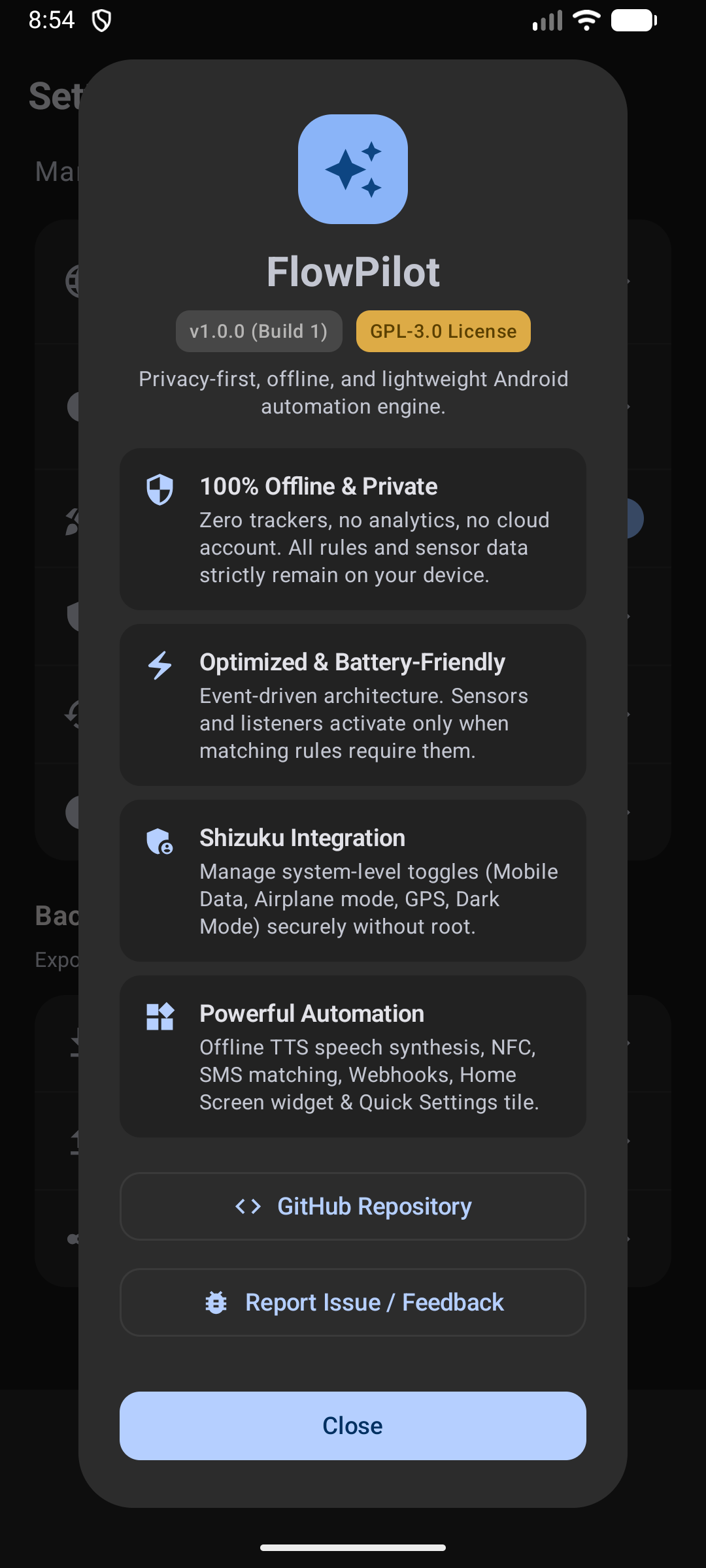
(12)About Application
⚡ FlowPilot
The private, battery-first Android automation engine — without root.
Automate your device with event-driven triggers, privileged system actions via Shizuku, and a fluid Material 3 interface. No telemetry or cloud accounts, with battery-efficient demand-driven listeners.











[!NOTE] 📱 Device Compatibility & Community Testing Notice FlowPilot is an independent open-source project, primarily tested on Xiaomi HyperOS (Xiaomi 15T Pro). When Android or build inputs change, CI runs JVM unit suites, Android lint, debug/release builds, and the SDK-free
scripts/checks; other changes can pass the required check without those steps. Device and OEM behavior is verified by hand and through community reports.Because OEM skins (Samsung One UI, Google Pixel, Motorola, OxygenOS, etc.) implement background process limits differently, your test reports, feedback, and pull requests are warmly welcomed!
🌟 Why FlowPilot?
Most Android automation tools force you to choose between steep complexity, heavy battery drain, or intrusive cloud logins. FlowPilot was built to fix this.
🔋 Battery-First & Event-DrivenThe running engine periodically processes events. Hardware sensors and relevant broadcast receivers register only when enabled rules need them and unregister when no longer needed. |
🔒 Private by DesignNo analytics, telemetry, or remote accounts. Release builds check GitHub for updates by default; this can be disabled in Settings. Webhook and SMS actions send the data you configure. |
🛡️ Rootless System SuperpowersHarness the power of Shizuku to toggle Mobile Data, Airplane Mode, GPS, Dark Mode, and Force Stop apps using elevated ADB permissions—without rooting or voiding warranties. |
🎨 Modern Material 3 & ComposeCrafted completely in native Jetpack Compose. Experience fluid 60/120 FPS transitions, dynamic Material You theming, haptic feedback, and glanceable Home Screen widgets. |
🔊 Offline Text-to-Speech (TTS)Let your phone speak notification text, SMS codes, caller names, battery levels, and other trigger data with on-device TTS. Messages synthesize on demand and are cached offline—zero internet required. |
🔐 JSON Export & Encrypted BackupsJSON exports remove webhook URL, headers, and body but may retain other personal data; review before sharing. Protect full backups with AES-256-GCM password encryption (PBKDF2 with 100,000 iterations). |
📸 Screenshots
| Home Screen | Ready Presets | Rule Builder | Settings & Backup | About Dialog |
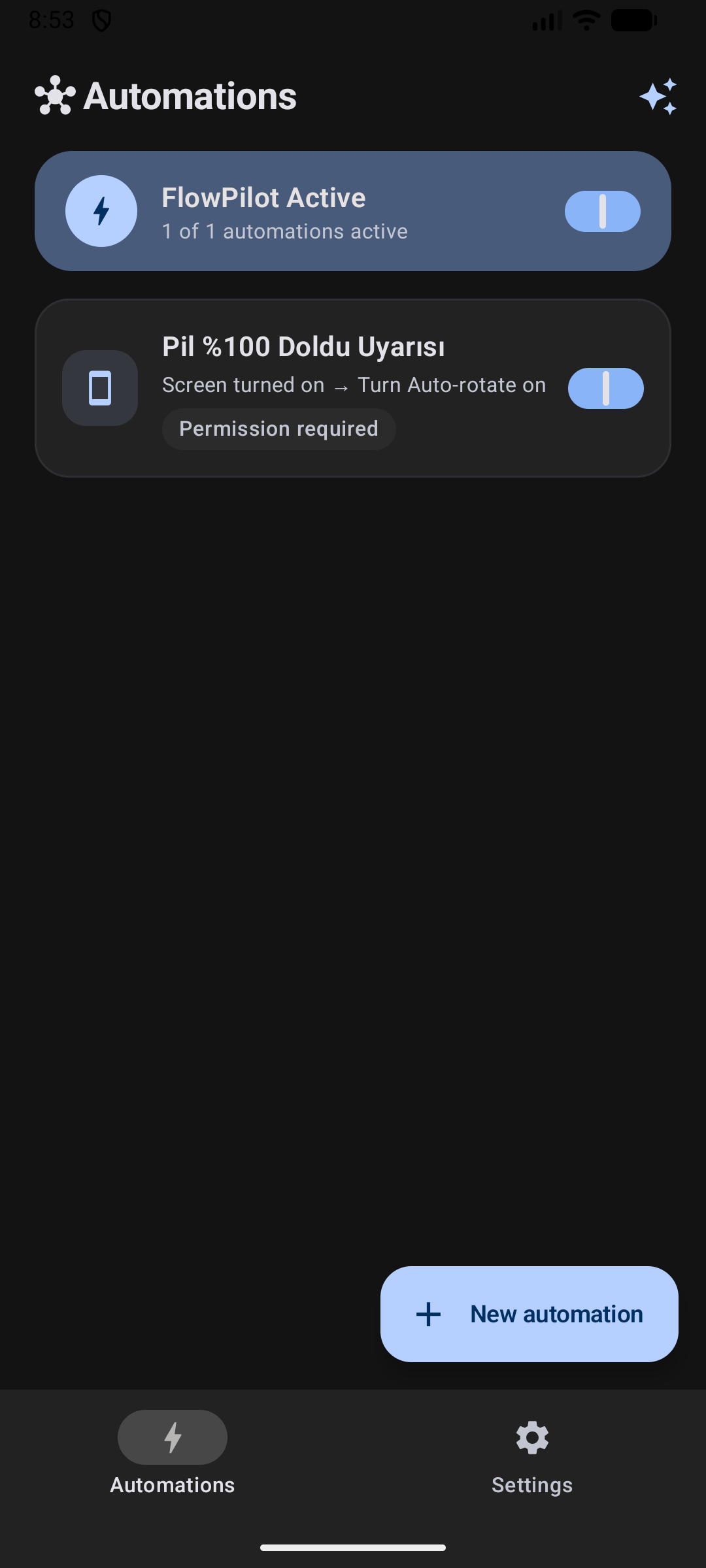 | 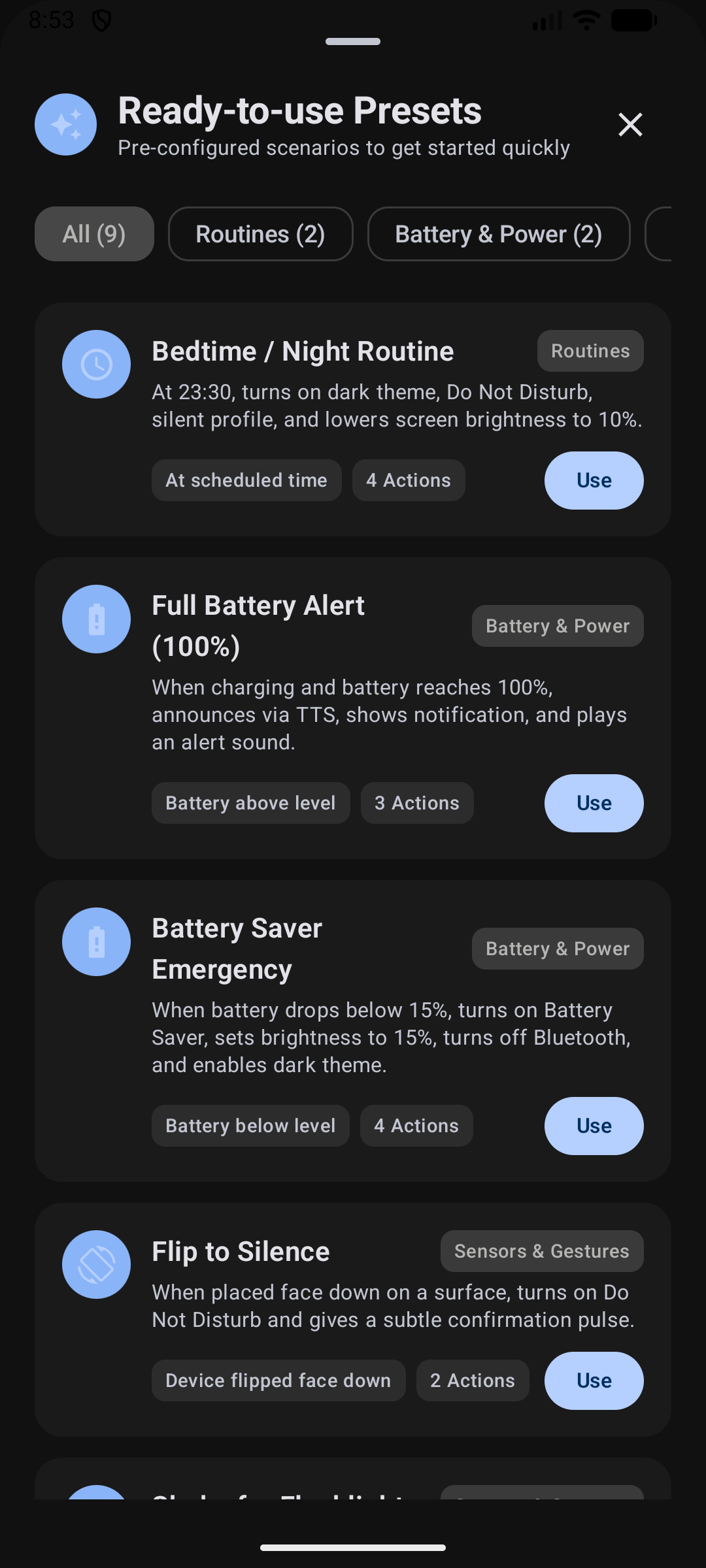 | 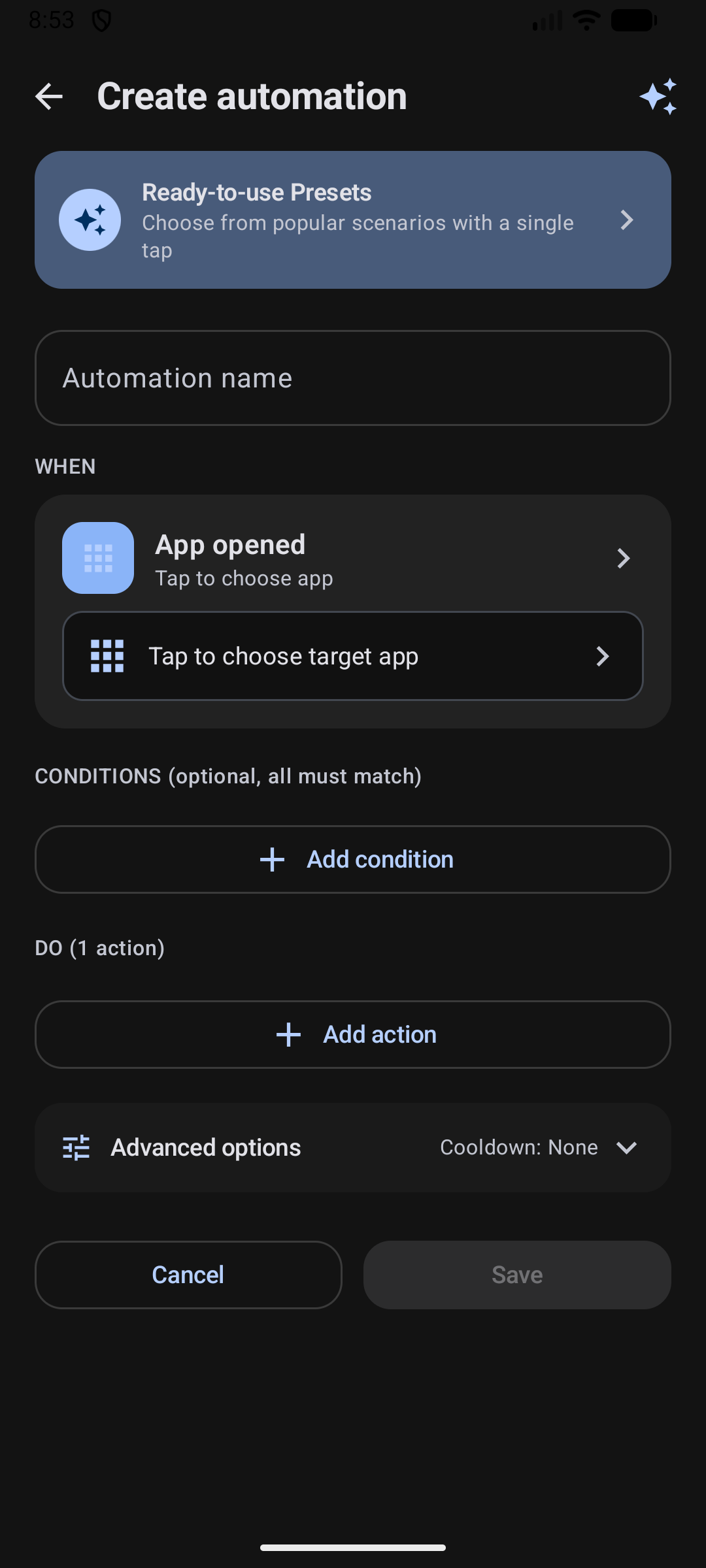 | 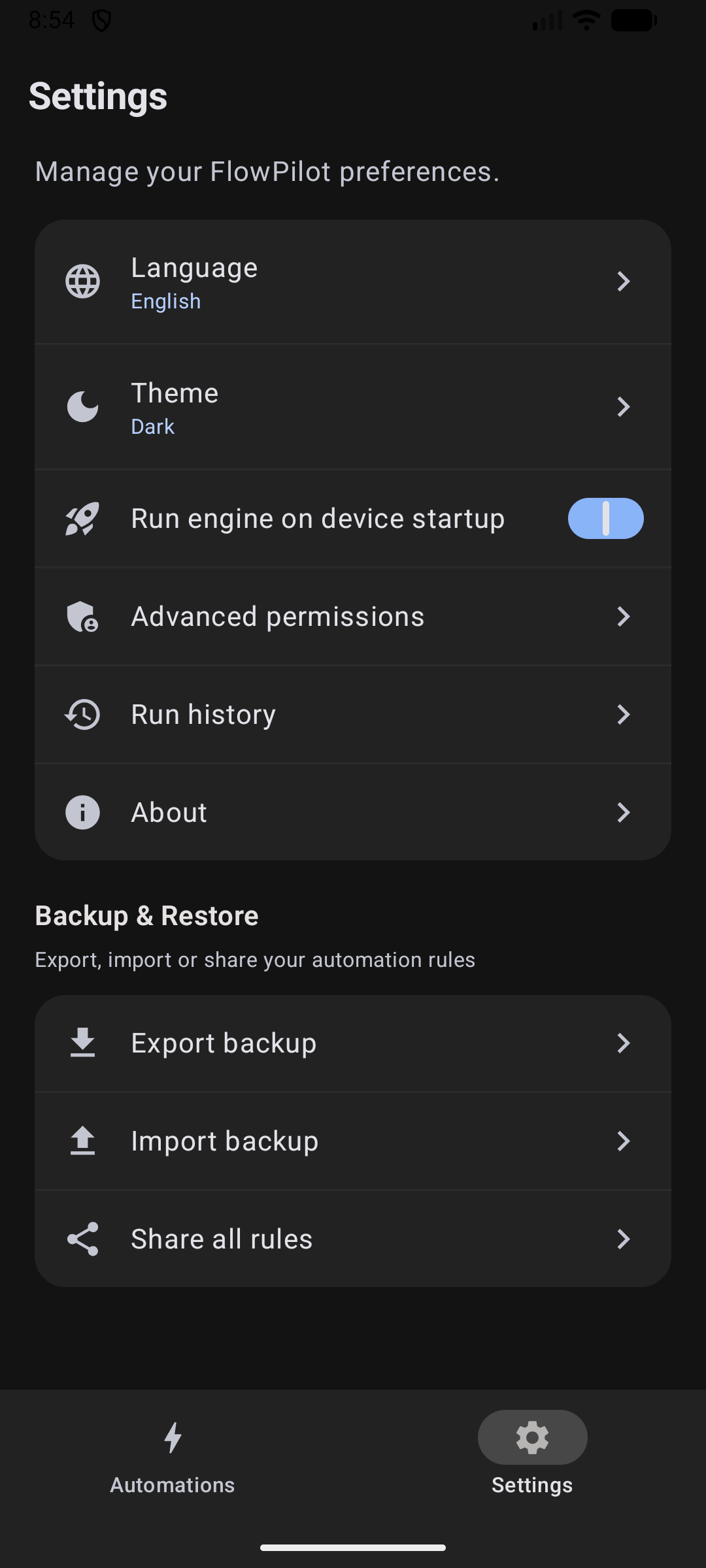 |  |
💡 How FlowPilot Works
FlowPilot follows a clear, intuitive 3-step mental model:
┌───────────────────────────┐      ┌───────────────────────────┐      ┌───────────────────────────┐
│       1. TRIGGER          │      │       2. CONDITIONS       │      │        3. ACTIONS         │
│     "When this happens"   │ ───► │    "Only if all match"    │ ───► │    "Do this in order"     │
│   (e.g., Arrive at Work)  │      │     (e.g., Weekdays Only) │      │  (Silent + Turn on Wi-Fi) │
└───────────────────────────┘      └───────────────────────────┘      └───────────────────────────┘
Relatable Examples:
- 🌙 Bedtime Routine: When the clock strikes 23:30 ➔ Only if charging ➔ Turn on Silent Mode, enable Dark Theme, and dim brightness to 10%.
- 🔋 Full Charge Alert: When battery reaches 100% ➔ Speak "Phone is fully charged, please unplug" and show notification.
- 🔕 Flip to Silence: When phone is placed face-down on a desk ➔ Immediately enable Do Not Disturb with a subtle confirmation pulse.
⚡ 1-Tap Ready Presets
Start automating instantly with built-in recipes designed for everyday life:
| Preset | Trigger | Key Actions |
|---|---|---|
| 🌙 Bedtime Routine | Time reaches 23:30 | Enables Dark Mode, sets Silent profile, turns on DND, dims screen to 10% |
| 🔋 Full Battery Protection | Battery reaches 100% while charging | Speaks an unplug reminder, shows a notification, and plays a sound |
| ⚡ Battery Saver Emergency | Battery drops below 15% while unplugged | Turns on Battery Saver, disables Bluetooth, lowers brightness, enables Dark Mode |
| ☀️ Morning Wake Up | Charger unplugged OR screen on (weekdays 05:00–10:00) | Turns off DND, restores normal sound, sets brightness to 70% |
| 🌙 Night Quiet | 23:00 schedule OR screen off (22:00–08:00) | Turns on DND, silences sound profile, drops media volume to 20% |
| 🚗 Morning Commute | Home Wi-Fi lost OR charger unplugged (06:00–10:00) | Enables Mobile Data, restores normal sound, sets media volume to 80% |
| 🎯 Focus / Work Mode | Weekdays 09:00, not on home Wi-Fi | Turns on DND and switches sound to vibrate |
| 🌃 Night Screen Dimming | Screen on 00:00–06:00 with battery below 60% | Dims brightness to 10%, enables Dark Theme |
| 🔕 Flip to Silence | Phone placed face-down | Dual sensor check (Proximity + Gravity Z-axis) enables DND with a haptic pulse |
| 🔦 Shake for Flashlight | Firm phone shake | Toggles rear camera torch with tactile haptic feedback |
| 🎬 Cinema / Night Reading | Ambient light drops < 5 lx | Dims brightness to minimum and switches system to Dark Theme |
| 🚗 Leaving Home Mode | Disconnected from Home Wi-Fi | Enables Mobile Data (Shizuku), sets Normal ringer, raises volume to 80% |
| 🏠 Welcome Home Mode | Connected to Home Wi-Fi | Disables Mobile Data (Shizuku) and sets brightness to 50% |
| 📍 SMS Emergency Responder | Incoming SMS with secret phrase | Enables location and replies with a location link if a fix is available; a fix is not guaranteed |
🎛️ Feature Matrix
1. Triggers (Events)
FlowPilot listens to a rich spectrum of hardware, radio, and system events:
A rule can combine up to five independently configured triggers with OR semantics (for example App opened OR Wi-Fi connected). Add, remove and reorder them in Create/Edit. All sources share one rule cooldown and execute the same ordered actions; history identifies the matched source. Existing single-trigger rules and JSON stay compatible.
- 📱 App Lifecycle: App launched or closed (lightweight
UsageStatsManagertransitions). - 🔌 Power & Battery: Charger plugged in / unplugged, battery level rises above or drops below custom percentage.
- 💡 Screen & State: Screen turned on/off, device unlocked.
- ⏰ Schedule & Time: Daily, weekdays, weekends, or specific days and exact times.
- 📶 Connectivity: Wi-Fi connected/disconnected (any or target SSID), Bluetooth device connected/disconnected.
- 🔄 Sensors & Motion:
- Device Flip: Face-down on table or turned face-up (Proximity + Gravity Z-axis with 500ms debounce).
- Shake: Shake detection with a per-rule strength slider (6–32 m/s²) under the trigger settings; one shake produces one trigger.
- Ambient Light: Lux drops below or rises above target threshold.
- 📍 Hardware Geofencing: Enter or exit defined geographical zones using Google Play Services
GeofencingClient. Uses no idle CPU wake-lock, keeps up to 50 queued events across engine restarts, and reuses recent transition coordinates for location template variables. Older coordinates trigger a fresh lookup or leave location values empty. - 🏷️ NFC Tags: Instant hex UID matching on physical scans. Foreground ReaderMode scans run matching rules automatically; background Android discovery opens FlowPilot and requires explicit confirmation before any matching NFC automation runs.
- 📞 Phone & SMS: Call ringing, answered, outgoing dialed, call ended; SMS received with keyword, prefix, regex, or exact sender matching.
- 🔔 Notifications: Incoming notifications from selected apps with keyword filtering. FlowPilot's own status notifications and HyperOS volume/headphone UI notifications are ignored, and notification rules ask the system to rebind the listener if Android leaves it unbound after an in-place update or OEM process kill. Notification access alone does not guarantee the listener is connected. If FlowPilot reports it disconnected, try turning its notification access off and back on in Android settings. Reconnection is controlled by Android and missed notifications are not replayed.
- 🎵 Media: Playback starts, pauses, or the track changes, optionally filtered by media app. These triggers need notification access and are monitored only while enabled rules need them. Sessions already present when the tracker starts are silently seeded, without startup events; a newly observed session that is already playing after startup produces a playing event.
${media.title}and${media.artist}are transient event values; they are not written to logs or execution history. Template-enabled actions can explicitly send or display them.
2. Conditions (Logic Gates)
Rules execute only when their conditions pass. Combine them with AND or OR, nest groups, and negate any group with NOT:
- ⏳ Time Window: Run only between specific hours (e.g., 23:00 to 07:00), with full midnight-crossing support.
- 📅 Days of the Week: Restrict to weekdays, weekends, or custom individual days.
- 🔋 Battery Level: Require battery to be $\ge$ or $\le$ a specific threshold.
- ⚡ Charging State: Require device to be currently charging or discharging.
- 📲 Screen State: Require screen to be on or off.
- 📶 Wi-Fi Network: Require connection to a specific Wi-Fi network (SSID).
- 🧩 Nested Logic: Group conditions with per-group AND/OR, negate a group, and nest up to four levels.
3. Actions (Executors)
Chain multiple actions in any custom sequence with drag-and-drop ordering and individual delays (0–300s):
When a rule is incomplete, Save points to the invalid trigger or action and explains what to correct.
- 🌐 Connectivity (via Shizuku): Toggle Wi-Fi, Mobile Data, Airplane Mode, Bluetooth, GPS Location, and Wi-Fi Hotspot (Android 16+).
- 🖥️ Display & Device: Toggle Flashlight (Torch), Dark Theme (Shizuku), Auto-rotate, Brightness level, Lock Screen (Shizuku), and Force Stop App (Shizuku).
- 🔊 Sound & Alerts: Do Not Disturb (DND) toggle, Sound Profiles (Normal / Vibrate / Silent), Media Volume (0–100%), Custom Audio playback (1–60s duration), Haptic Patterns (Pulse, Double Tap, Alert, Heartbeat, Triple Tap, SOS), and Rich Notifications.
- 🎵 Media Controls: Play, pause, play/pause toggle, next track, or previous track, optionally targeting a selected media app. Notification access is required to access media sessions; availability depends on the player.
- 🎵 Find or open a song: Search Spotify or YouTube Music by title, or open a supported song link in the selected app. Both fields support trigger variables such as
${notification.text}; a resolved link must match the selected service. YouTube Music links are trimmed at both ends before validation. Automatic playback is not guaranteed and depends on the player, account and Android background-launch restrictions. The editor marks missing or disabled music apps; saving and manual execution require the selected app to be installed and enabled. - 🗣️ Offline Speech (TTS): Speak custom messages using Android's on-device TTS engine with speech rate control. The voice picker includes System default (the phone's offline TTS voice, or the best offline fallback) and previews sample text in the selected voice's language. Templates can include trigger data such as
${notification.text|stripPrefix:"tts"|trim},${sms.otp},${call.state}, and${batteryPercent}; audio is synthesized on demand and cached. - ⏱️ Clock & Timers: Request a system alarm with an optional templated label and selected repeat days, or start a timer (1s–24h). The Clock app controls confirmation, actual scheduling, and post-dismissal deletion.
- 📅 Calendar event: Create an event directly in a selected writable calendar with templated details, optional daily, weekly, monthly or yearly recurrence and a preset or custom reminder up to four weeks before. Each trigger creates a new event or series; the calendar provider controls reminders and synchronization. Calendar permissions and an explicit selection are required.
- 🚀 Apps & Web: Launch installed app or open web URL.
- 💬 Phone & SMS: Open dialer, place direct phone call, send automated background SMS, or prepare SMS draft.
- 🔗 HTTPS Webhook: Send outbound HTTP requests (
GET,POST,PUT,PATCH,DELETE,HEAD) with custom headers, JSON body, AES-256-GCM Keystore encrypted secrets, and dynamic template variables. - 🧾 JSON commands: Run a bounded, versioned command from a notification, SMS, or another template source. All normal actions are supported; nested
EXECUTE_JSON_COMMANDis rejected. Existing action permissions and capability checks still apply, but the receiver does not authenticate senders: matching content can trigger SMS or calls (potentially incurring charges), network changes, or device locking. Use trusted sources and restrictive filters. Subsequent webhook or SMS actions can report the result; notification title and message filters are independent. See the command contract and installable agent skill for the detailed schema and safety guidance. This expansion is unreleased; device verification is pending. - 🧩 Template Variables: Use
${...}in speech, notification, webhook, SMS, phone, URL, alarm, and timer text. Every template-capable action field opens the same trigger-aware picker with filters (trim,stripPrefix,drop,truncate,lower,upper,default,urlencode,jsonescape). Global values include${trigger},${trigger.index},${batteryPercent},${isCharging},${wifiSsid},${time},${timestamp}, and${rule.name}.
4. Smart Productivity & Controls
- Quick Settings Tile & Engine Notification: Toggle the automation engine or inspect live status directly from Android's notification shade. Engine status and startup-failure notifications follow FlowPilot's English, Turkish, or system-language setting even after a background restart.
- Material 3 Home Screen Widget: Native
AppWidgetProvider(RemoteViews) widget displaying active rule counts with a one-tap pause/resume button. - In-App Live Test Run: Test any rule action directly inside the editor before saving to verify parameters.
- Per-Rule Home-Screen Shortcuts: Pin a launcher shortcut from Edit → Advanced. Tapping it reloads the rule and asks before running, with disabled or deleted rules blocked; no silent execution. On HyperOS, FlowPilot opens the Home screen shortcuts permission page when that permission is denied.
- Safe Rule Duplication: Clone any rule into an immediately editable disabled copy with freshly encrypted webhook credentials.
- Execution Run History & Troubleshooting: Local persistent audit trail of the last 100 executions with masked sensitive details, repeated-failure grouping (when a failed run has a single failed action with a structured
ActionDiagnosticReason), structured music-link failure reasons (including bounded expected/observed video ID lengths), and content-free per-action template diagnostics (notification.text/notification.bigTextmissing/empty/present state, syntax or unknown-variable flags, and empty rendered output). Raw provider errors, private URIs, local paths, URLs, credentials, notification text, and phone numbers are never persisted. History does not record events that never execute a rule. Where an action can identify the cause, history also shows safe reasons for Shizuku, permissions, system commands, state readback, target apps or handlers, media sessions, invalid input, and network failures. It does not infer an unobserved cause: other failures remain generic, and older records remain readable. Activity launch requests can be blocked without an error; history labels their outcome unverified. Older JSON command records are also unverified because the nested action was not retained. For recognized webhook failures, history also displays the HTTP response status without displaying the stored message; unrecognized messages stay generic. - Conflict Warnings: Automatic non-blocking analysis warning you when opposite state actions target the same trigger.
- First-Launch Guided Tour: A six-step spotlight walkthrough (welcome, presets, create, engine status, settings, done) highlights each area on first launch and skips the create step when rules already exist. Skip it at any time; completion is remembered on the device and the tour can be replayed from Settings → Replay tutorial.
🛡️ Shizuku Setup Guide
FlowPilot uses Shizuku to perform elevated actions (Mobile Data, Airplane Mode, GPS, Dark Mode, App Killing) safely without needing root.
- Install Shizuku: Get it from Google Play or GitHub.
- Start Shizuku Service:
- On Android 11+ (Wireless Debugging): Start directly on your phone using Developer Options > Wireless Debugging (no PC required).
- Via PC (ADB): Run the following command:
adb shell sh /sdcard/Android/data/moe.shizuku.privileged.api/start.sh
- Authorize FlowPilot: Open FlowPilot and tap Grant when prompted for Shizuku access.
- Authorized elevated actions can be used when supported by the device and system; authorization does not guarantee success.
🔒 Privacy & Zero-Trust Promise
FlowPilot is engineered with an uncompromised commitment to user privacy:
- 🚫 Zero Telemetry: No Firebase Analytics, no Sentry, no remote crash reporters, and zero tracking SDKs.
- 🔄 Optional Update Checks: Release builds automatically check the public GitHub Releases API by default, at most once a day, without sending an account or device identifier. Disable automatic checks in Settings; manual checks remain available. Debug builds do not check.
- 📵 No Cloud Synchronization: FlowPilot does not automatically synchronize rules, logs, or secrets to a cloud account. User-configured actions can send selected data to external recipients.
- 🛡️ Android Keystore Protection: Webhook secrets, tokens, and sensitive headers are encrypted with AES-256-GCM using Android Keystore keys, hardware-backed when supported by the device.
- 🙈 Log & Diagnostic Sanitization: Execution history and logs mask or exclude sensitive content; persistent diagnostics store non-content enums and bounded numeric metadata. Configured values, including phone numbers and webhook fields, can remain visible in the editor.
Transparent Permission Disclosures
FlowPilot declares sensitive permissions solely to power explicit automation features:
QUERY_ALL_PACKAGES: Required to list installed apps in the App Trigger and App Launcher pickers on Android 11+.SYSTEM_ALERT_WINDOW: Optional special access that may allow background automations to open other apps. It also permits drawing over other apps; Android or device restrictions can still block launches, and playback is not guaranteed.- Notification access: Required for notification triggers and media-session triggers and controls; enable FlowPilot in Android's notification access settings.
RECEIVE_SMS&SEND_SMS: Used exclusively by the SMS trigger and direct SMS responder actions.ACCESS_BACKGROUND_LOCATION: Supports Google Play Services geofencing (GeofencingClient) and location values in user-configured automations; power use depends on device and conditions.FOREGROUND_SERVICE_LOCATION: Required by Android 14+ to keep geofencing and active location tasks compliant while running in the background.REQUEST_INSTALL_PACKAGES: Used only to open Android's installer for an APK downloaded from the official FlowPilot GitHub release after the user taps Download & Install. FlowPilot never downloads or installs unattended.
Note: FlowPilot does not seek Google Play approval because these uncompromised permissions are essential for core automation functionality. Download verified APKs directly from GitHub Releases.
🔐 Verify a Release APK
Releases built by GitHub Actions publish a build provenance attestation for the signed APK. Verify the artifact you downloaded against this repository:
gh attestation verify FlowPilot-vX.Y.Z.apk --repo emi-ran/flowpilot
apksigner verify --print-certs FlowPilot-vX.Y.Z.apk
sha256sum FlowPilot-vX.Y.Z.apk
gh attestation verify(GitHub CLI 2.49+) confirms that this repository's release workflow attested the APK digest, and prints the source commit. Releases published before the attestation step was added have no attestation.apksigner verify --print-certsmust reportSigner #1 certificate SHA-256 digest: f1e45d3a669954ddfb858d5d3a964a2fa7ba3d00bcb0e65b5ced1ca6d5a79f2b.sha256summust match the published.sha256asset and the checksum in the release notes.
If any check fails, do not install the APK. Gradle dependency checksums, repository filters, and the complete procedure are documented in docs/security/supply-chain.md.
📦 Backup & Recovery
| Mode | Format | Security | Ideal For |
|---|---|---|---|
| Sanitized JSON | Plain JSON | Webhook URL, headers and body stripped; other personal data may remain | Export after reviewing remaining content before sharing |
| Encrypted Backup | Encrypted Container | AES-256-GCM + PBKDF2 (100k iterations, salt + IV) | Full backup including secrets, phone numbers, and enabled states |
Restoring is effortless: choose your file, enter your password, and select Merge or Replace. Secrets are automatically re-encrypted with your new device's local Android Keystore.
Imported plain JSON rules are disabled; encrypted restores retain their enabled state. TTS audio is not included in backups. Speech templates are portable and synthesize on first play; legacy rules with no text need a new message after import.
🛠️ Tech Stack & Architecture
FlowPilot follows modern Android architecture guidelines:
FlowPilot
├── app/src/main/java/com/flowpilot/app/
│   ├── actions/          # Executors: Shizuku, Audio, TTS, Webhook, SMS, System
│   ├── analysis/         # AutomationConflictAnalyzer and logic checks
│   ├── data/             # Models, JSON Serialization, DataStore Repositories, Backups
│   ├── engine/           # Foreground AutomationService, Receivers, Sensor Trackers
│   ├── permission/       # Capability checks and setup state
│   ├── quicksettings/    # System Quick Settings Tile Service
│   ├── shortcut/         # Per-rule home-screen shortcuts
│   ├── ui/               # Jetpack Compose UI (Material 3 Theme, Screens, Components, Tutorial Overlay)
│   ├── update/           # In-app update check, download, and install flow
│   └── widget/           # Home Screen widget (AppWidgetProvider + RemoteViews)
└── app/src/test/         # Deterministic JUnit unit test suites
- Language: Kotlin 2.2.10
- UI Toolkit: Jetpack Compose & Material 3
- Async Runtime: Kotlin Coroutines & StateFlow
- Storage: Jetpack DataStore (Preferences & JSON)
- Encryption: Android Keystore (AES-256-GCM)
- Privileged Bridge: Shizuku AIDL IPC
- Widgets: Native AppWidget (
AppWidgetProvider+RemoteViews) - Target SDK: Android 16 (API 36) • Min SDK: Android 8.0 (API 26)
📥 Build from Source
Prerequisites
- JDK 17 (OpenJDK or Eclipse Temurin)
- Android SDK (Platform 36, Build-Tools 36.0.0+)
- Python 3 (for the SDK-free contract checks)
- Git
# Clone the repository
git clone https://github.com/emi-ran/flowpilot.git
cd flowpilot

# Run unit tests
./gradlew testDebugUnitTest

# Run all SDK-free contract checks
for script in scripts/*.py; do python "$script" || exit 1; done

# Assemble debug APK
./gradlew assembleDebug
Compiled APK output:
app/build/outputs/apk/debug/app-debug.apk
Install directly to your connected device:
adb install -r app/build/outputs/apk/debug/app-debug.apk
Debug builds install as FlowPilot Dev with application ID com.flowpilot.app.debug; the release app keeps com.flowpilot.app, so both can stay installed side by side. Grant Shizuku, notification access, and any other privileged permission to the debug app separately. Debug builds skip release update checks.
🤝 Contributing
Contributions, bug reports, and ideas are welcome!
- Check out CONTRIBUTING.md to get started.
- Found a bug? Open a Bug Report.
- Want to propose a new trigger or action? Submit a Feature Request.
📄 License
FlowPilot is free and open-source software licensed under the GNU General Public License v3.0 (GPL-3.0).
Made with ❤️ for Android Power Users
Release Notes & Changelog
FlowPilot 2.3.0 brings JSON-driven automation, more precise notification filters, media controls, calendar events and alarm improvements, with clearer feedback about what Android has actually confirmed.
🤖 JSON Commands & Notifications
- Run JSON command accepts a version 1 JSON object from a configured template, including notification text or an SMS body. It supports normal FlowPilot actions without bypassing their existing permissions and capability checks. See JSON commands for the exact schema, supported actions, limits and an installable agent skill.
- For example, an external AI agent could send JSON through ntfy; a separately configured ntfy notification and FlowPilot rule could then control the phone. FlowPilot does not embed an AI agent or an ntfy integration. Notification content must contain the complete JSON object, and delivery and execution depend on Android and the rule configuration.
- Notification rules can combine the selected app with independent title and message filters using contains or exact matching. Existing keyword rules keep their earlier OR matching behavior. Filters route messages; they do not authenticate senders. Anyone able to provide matching content may trigger actions, including calls, SMS or disruptive device changes. Use trusted sources, restrictive filters and a local recovery path; obtain explicit permission before potentially billable calls or SMS.
- Subsequent actions can use the current command's transient status and message, for example in a separately configured HTTPS webhook reply. A webhook's successful HTTP response is not proof of subscriber delivery. JSON source templates are encrypted on the device; normal exports clear them, while encrypted exports preserve them.
🎵 Media, Calendar & Alarms
- Control media sessions and react to playback or track changes, with optional app selection. Notification access and an active session are required for media controls.
- Search Spotify or YouTube Music and open supported song links. The target app and Android determine whether the request opens or plays; background launches can be blocked. Optional display-over-other-apps access may help on supported devices but grants overlay capability and guarantees neither launch nor playback.
- Create events in an explicitly selected writable calendar, with recurrence and reminders up to four weeks before the event. Calendar read/write permissions and an available provider are required.
- Alarm requests support optional repeat weekdays and templated labels. The clock app controls the actual alarm behavior and interface.
🛡️ Reliability & Safety
- Activity launches are reported as unverified when Android accepts a request without confirming the outcome; older JSON history is conservatively marked unverified where the nested action is unknown.
- Permission status distinguishes notification access from an active listener connection. Android controls reconnection; retries do not guarantee recovery or replay missed notifications.
- More actionable, content-free diagnostics help explain failures without retaining notification text, URLs, phone numbers or raw errors. Saved-rule shortcuts recheck enabled state and revisions; alphanumeric SMS sender filters use case-insensitive exact matching, not sender authentication.
- Remote connectivity changes and device locking can interrupt access. JSON commands do not bypass Android permissions, Shizuku authorization, background restrictions or device capabilities; command IDs do not authenticate or deduplicate requests.
🧪 Verification
- The release workflow requires successful main-branch CI for
d3b003be0a2d3d39bfa7d03f1753e392bb8f766c, runs unit tests and lint, and verifies the signed APK's package, version, signing certificate and checksum before publication. Historical development-device observations below do not imply that the signed release APK was tested on a device. - On a Xiaomi 15T Pro, the user reported ntfy-driven torch on/off and toggle, vibration, notification, speech, sound and an alarm working in specific trials. A manually run JSON command also passed its status to a subsequent notification. These observations are partial: they do not verify every action, device or build, automatic filter rejection, webhook/SMS delivery, long notification payloads or listener recovery after disconnection. One alarm attempt did not create an alarm; its cause was not established.
- The user reported that the calendar flow and a custom reminder worked, but the exact reminder-delivery scope was not independently established. An earlier background music launch experiment succeeded under specific device conditions; it does not establish general playback or background-launch reliability. Development and device verification will continue.
📥 Installation
- Download
FlowPilot-v2.3.0.apkand its accompanying checksum from the release assets when available. - Compare the APK's SHA-256 with the published checksum before installing. A matching checksum alone does not establish signer identity; see supply-chain verification.
- Install on Android 8.0+ (API 26 and later). Configure Shizuku only for actions that require privileged access, and grant other permissions only as needed.
SHA-256 Checksum
SHA256 (FlowPilot-v2.3.0.apk) = 8705b93dddc0f38acb085e0f09981d6cff0f4c28619215e8d312f6633ff5339f
📱 Compatibility
Android behavior varies by device, OS version, permissions, installed apps and OEM background restrictions. Physical-device observations above are limited to the specific Xiaomi HyperOS trials described; they do not imply coverage of all supported Android versions. Music, alarm and other activity requests can be blocked in the background or accepted without confirming their outcome.
🇹🇷 Türkçe Özet
- JSON komutları, bildirim veya SMS gibi mevcut tetikleyicilerden alınan tam bir nesneyle FlowPilot eylemlerini çalıştırabilir. Örneğin harici bir AI ajanı ntfy üzerinden komut gönderebilir; ayrıca yapılandırılmış ntfy bildirimi ve FlowPilot kuralı telefonu kontrol edebilir. Uygulamaya AI ajanı veya ntfy entegrasyonu gömülü değildir.
- Uygulama, başlık ve mesaj filtreleri birlikte kullanılabilir; filtreler gönderenin kimliğini doğrulamaz. Eşleşen içerik gönderebilen kişiler eylem başlatabilir. Güvenilir kaynaklar ve dar filtreler kullanın, yerel kurtarma yolu bırakın; ücret doğurabilecek arama veya SMS öncesinde açık izin alın. Android izinleri ve Shizuku sınırları geçerlidir.
- Medya kontrolleri ve tetikleyicileri, Spotify/YouTube Music arama ve bağlantıları, seçilen yazılabilir takvime etkinlik ve hatırlatma, haftanın günleriyle tekrar eden alarm istekleri eklendi. Android ve hedef uygulama açılmayı veya oynatmayı garanti etmez; ekran üstü erişimi isteğe bağlıdır ve overlay yetkisi verir.
- Android'in sonucunu doğrulamadığı activity istekleri doğrulanmamış gösterilir. Bildirim erişimi ile canlı dinleyici bağlantısı ayrıdır; yeniden bağlanma veya kaçırılan bildirimlerin tekrarı garanti edilmez.
- Yayın akışı
d3b003be0a2d3d39bfa7d03f1753e392bb8f766ciçin başarılı main CI gerektirir; birim testlerini ve lint kontrolünü çalıştırır, yayınlamadan önce imzalı APK'nın paketini, sürümünü, imza sertifikasını ve checksum değerini doğrular. Aşağıdaki cihaz gözlemleri imzalı yayın APK'sının cihazda test edildiği anlamına gelmez. - Xiaomi 15T Pro'da kullanıcı bazı ntfy JSON fener, titreşim, bildirim, konuşma, ses ve alarm denemelerinin çalıştığını bildirdi. Takvim ve özel hatırlatma için kullanıcı gözlemleri de kısmi; tüm eylemler, cihazlar, uzun bildirimler, webhook/SMS teslimi ve kopma sonrası dinleyici kurtarma doğrulanmış değildir. Geliştirme ve cihaz doğrulaması sürecek.
- Kurulumdan önce
FlowPilot-v2.3.0.apkdosyasının SHA-256 değerini8705b93dddc0f38acb085e0f09981d6cff0f4c28619215e8d312f6633ff5339file karşılaştırın; checksum tek başına imzalayanın kimliğini doğrulamaz.
Declared Android Permissions
35 totalShizuku API Permissions
This application connects to the Shizuku service to execute system-level operations with ADB elevated privileges.
Standard Android Permissions
Specifications
Install via ShizuStore to enable automatic updates and silent installations using Shizuku.
More in Automation
Other applications in this category

vFlow
ChaoMixian
Visual automation tool that combines tapping, recognition, branching, and system actions into approachable workflows