

Hail
Featuredv1.11.0Screenshots
(4)About Application
Hail 雹




Hail is a free-as-in-freedom software to freeze Android apps. GitHub Releases

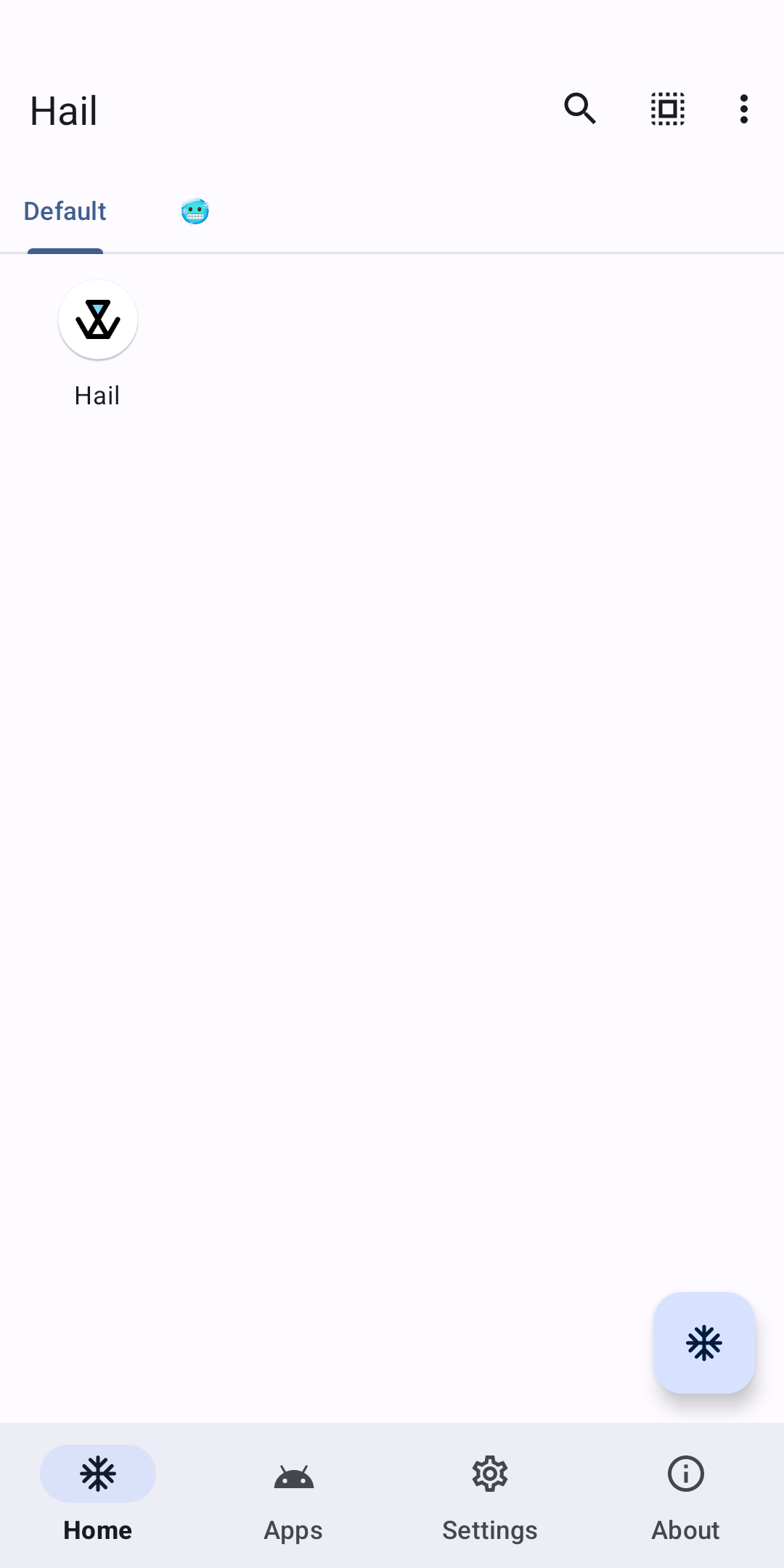
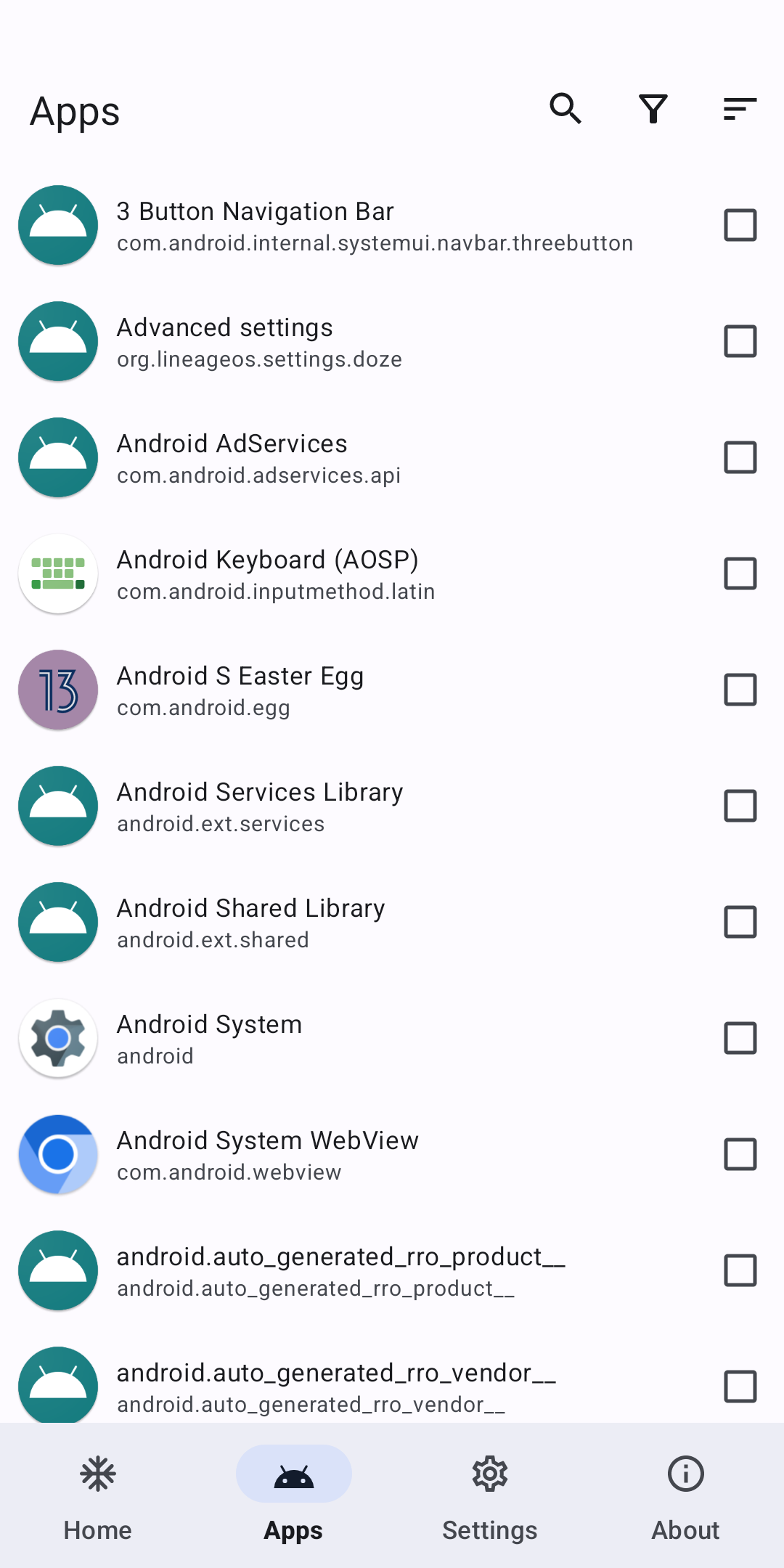
Freeze
Freeze is a word that describes the action of blocking (immediately stopping) apps when they are not needed/in-use ( on-demand request) which in turn helps the device to cut down on the usage of RAM and save power. Users can also unfreeze them to revert to their original state.
In general, "freeze" means disable, but also Hail can "freeze" apps by hiding and suspending them.
Disable
Disabled apps will not be shown in the launcher and will be shown as "Disabled" in the installed apps list. Enable them to revert the action.
Hide
Hidden apps will not be shown in the launcher and in the installed apps list. Unhide them to revert the action.
While in this state, which is almost like an uninstalled state, the package will be unavailable, however, the application data and the actual package file will not be removed from the device.
Suspend (Android 7.0+)
Suspended apps will have their icons shown in grayscale within the device's launcher. Unsuspend them to revert the action.
While in this state, the application's notifications will be hidden, any of its started activities will be stopped and it will not be able to show toasts, dialogs or even play audio. When the user tries to launch a suspended app, the system will, instead, show a dialog to the user informing them that they cannot use this app while it is suspended.
Suspend only prevents the user from interacting with the app, it does NOT prevent the app from running in the background.
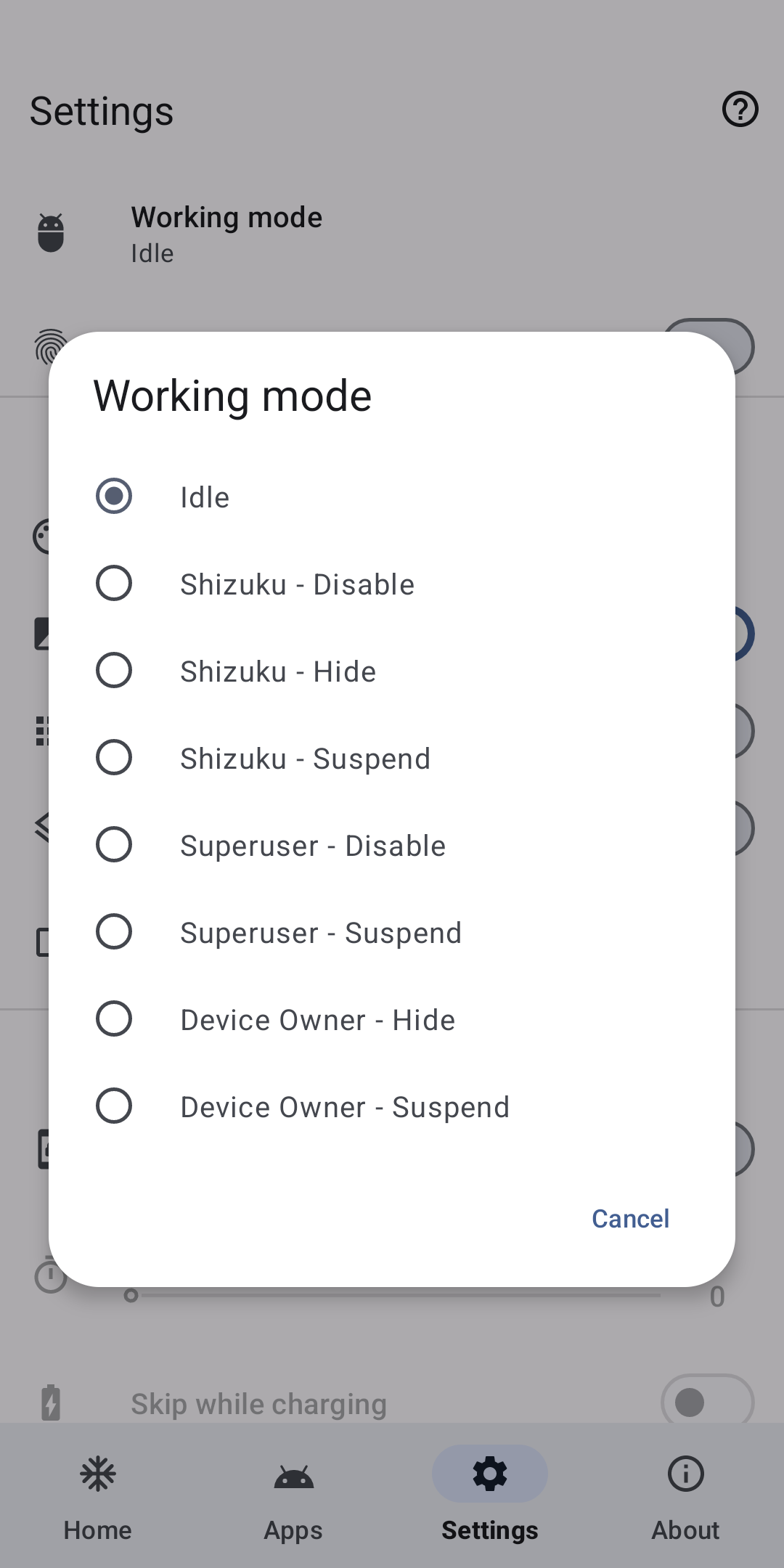
Working mode
Any app that has been frozen on Hail will need to be unfrozen by the same working mode.
-
For devices supporting wireless debugging (Android 11+) or rooted devices,
Shizukuis recommended. -
For rooted devices,
Rootis an alternative. It is slower.
| Privilege | Force Stop | Disable | Hide | Suspend | Uninstall/Reinstall (System Apps) |
|---|---|---|---|---|---|
| Root | ✓ | ✓ | ✓ | ✓ | ✓ |
| Device Owner | ✗ | ✗ | ✓ | ✓ | ✗ |
| Privileged System App | ✓ | ✓ | ✗ | ✗ | ✗ |
| Shizuku (root)/Sui | ✓ | ✓ | ✓ | ✓ | ✓ |
| Shizuku (adb) | ✓ | ✓ | ✗ | ✓ | ✓ |
| Dhizuku | ✗ | ✗ | ✓ | ✓ | ✗ |
| Island/Insular | ✗ | ✗ | ✓ | ✓ | ✗ |
Device Owner
You must remove Hail as a device owner before you can uninstall it
Set device owner by adb
Android Debug Bridge (adb) Guide
Download Android SDK Platform-Tools
Issue adb command:
adb shell dpm set-device-owner com.aistra.hail/.receiver.DeviceAdminReceiver
In response, adb prints this message if device owner has been successfully set:
Success: Device owner set to package com.aistra.hail. Active admin set to component {com.aistra.hail/com.aistra.hail.receiver.DeviceAdminReceiver}
Search the message by search engine otherwise.
Remove device owner
Settings > Remove Device Owner
Privileged System App
The following privapp-permissions is required:
<?xml version="1.0" encoding="utf-8"?>
<permissions>
    <privapp-permissions package="com.aistra.hail">
        <permission name="android.permission.PACKAGE_USAGE_STATS"/>
        <permission name="android.permission.FORCE_STOP_PACKAGES"/>
        <permission name="android.permission.CHANGE_COMPONENT_ENABLED_STATE"/>
        <permission name="android.permission.MANAGE_APP_OPS_MODES"/>
    </privapp-permissions>
</permissions>
To use this mode, you should install Hail as a privileged system app.
The recommended approach is to import Hail when building your ROM, here's an example for Android.bp:
android_app_import {
    name: "Hail",
    apk: "Hail.apk",
    privileged: true,

    dex_preopt: {
        enabled: false,
    },
    presigned: true,
    preprocessed: true,

    required: ["privapp-permissions_com.aistra.hail.xml"]
}

prebuilt_etc {
    name: "privapp-permissions_com.aistra.hail.xml",
    src: "privapp-permissions.xml",
    sub_dir: "permissions",
}
Revert
By adb
Replace com.package.name to the package name of target app.
# Enable app
adb shell pm enable com.package.name
# Unhide app (root required)
adb shell su -c pm unhide com.package.name
# Unsuspend app
adb shell pm unsuspend com.package.name
Modify file
Access /data/system/users/0/package-restrictions.xml, this file stores the restrictions about apps. You can modify,
rename or just delete it.
-
Enable app: Modify the value of
enabledfrom 2 (DISABLED) or 3 (DISABLED_USER) to 1 (ENABLED) -
Unhide app: Modify the value of
hiddenfrom true to false -
Unsuspend app: Modify the value of
suspendedfrom true to false
Wipe data by recovery
None of my business :(
API
adb shell am start -a action -e key value
action can be one of the following constants:
-
com.aistra.hail.action.LAUNCH: Unfreeze and launch target app. If it is unfrozen, it will launch directly.key="package"value="com.package.name" -
com.aistra.hail.action.FREEZE: Freeze target app. It must be checked at Home.key="package"value="com.package.name" -
com.aistra.hail.action.UNFREEZE: Unfreeze target app.key="package"value="com.package.name" -
com.aistra.hail.action.FREEZE_TAG: Freeze all non-whitelisted apps in the target tag.key="tag"value="Tag name" -
com.aistra.hail.action.UNFREEZE_TAG: Unfreeze all apps in the target tag.key="tag"value="Tag name" -
com.aistra.hail.action.FREEZE_ALL: Freeze all apps at Home.extrais not necessary. -
com.aistra.hail.action.UNFREEZE_ALL: Unfreeze all apps at Home.extrais not necessary. -
com.aistra.hail.action.FREEZE_NON_WHITELISTED: Freeze all non-whitelisted apps at Home.extrais not necessary. -
com.aistra.hail.action.FREEZE_AUTO: Auto freeze apps at Home.extrais not necessary. -
com.aistra.hail.action.LOCK: Lock screen.extrais not necessary. -
com.aistra.hail.action.LOCK_FREEZE: Freeze all apps at Home and lock screen.extrais not necessary.
or use following schema:
-
hail://launch?package=xxx -
hail://freeze?package=xxx -
hail://unfreeze?package=xxx -
hail://freeze_tag?tag=xxx -
hail://unfreeze_tag?tag=xxx -
hail://freeze_all -
hail://unfreeze_all -
hail://freeze_non_whitelisted -
hail://freeze_auto -
hail://lock -
hail://lock_freeze
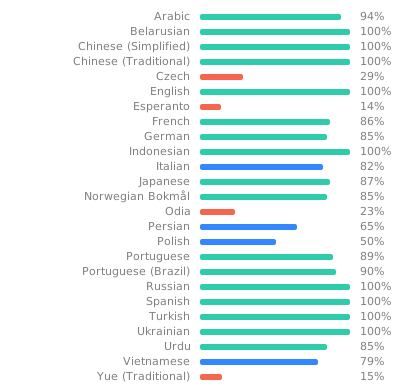
Help Translate
To translate Hail into your language, or to improve an existing translation, use Weblate.
License
Hail - Freeze Android apps
Copyright (C) 2021-2026 Aistra
Copyright (C) 2022-2026 Hail contributors

This program is free software: you can redistribute it and/or modify
it under the terms of the GNU General Public License as published by
the Free Software Foundation, either version 3 of the License, or
(at your option) any later version.

This program is distributed in the hope that it will be useful,
but WITHOUT ANY WARRANTY; without even the implied warranty of
MERCHANTABILITY or FITNESS FOR A PARTICULAR PURPOSE.  See the
GNU General Public License for more details.

You should have received a copy of the GNU General Public License
along with this program.  If not, see <https://www.gnu.org/licenses/>.
Release Notes & Changelog
- 修复 Root 工作模式在低版本 Android 上失效的问题,感谢 @LuoYunXi0407
- 修复
Island/Insular - Hide模式在部分系统上无法启动应用的问题,感谢 @andy-math - 修复界面空指针异常,感谢 @lerdb
- 使用 libxposed 并澄清了模块描述
- Fix Root modes not working on old Android versions, thanks to @LuoYunXi0407
- Fix
Island/Insular - Hidemode can not launch apps in some stock ROM, thanks to @andy-math - Fix a NullPointerException, thanks to @lerdb
- Use libxposed and clarify the module description
Declared Android Permissions
20 totalShizuku API Permissions
This application connects to the Shizuku service to execute system-level operations with ADB elevated privileges.
Standard Android Permissions
Specifications
Install via ShizuStore to enable automatic updates and silent installations using Shizuku.
More in Software management
Other applications in this category



Blocker
lihenggui
Enable/disable Android components such as activities, services, receivers, and providers