

Pixel-IMS-5G
v2.1.0Screenshots
(12)About Application
Pixel IMS 5G [5G Works! : Sri Lanka]
An experimental root- or Shizuku-powered IMS and radio configuration app for Google Tensor Pixel phones. It uses model-independent Android telephony interfaces for Pixel 6 through Pixel 10, supports Android 16 and Android 17, and is developed and tested on a rooted Pixel 7 Pro running Android 17. [Note : You need root access to work 5G, with shizuku : VoLTE, LTE+, Bandlocking, Fieldtest, Other options are working]
Android application ID: com.nirmala.pixel5gims.
Current public release: 2.1.0 (v2.1.0). The app now opens on the answer: a Setup screen that says
whether 5G is working on this SIM, which check is blocking it, and offers the fix for that check. The one-time uninstall/reinstall notice applies specifically
to version 0.12.6, where the application ID changed. Existing 0.12.6 installations
can update normally to later versions.
Changelog
2.1.0 - task-first setup
The app opens on the question you actually have. Every version until now opened on a settings list, which assumes you already know which of twenty switches is holding 5G back.
- Setup screen. Runs the checks that have to pass for 5G on this SIM, in dependency order, and names the single one that is blocking: privilege, IMS support, VoLTE, NR architecture, band selection, VoNR, the Magisk modem region patch, whether an NR cell is actually registered, and whether IMS registered.
- One-tap fixes. Each failing check carries its own action - enable VoLTE, set NR to NSA + SA, enable VoNR, apply the modem patch, restart IMS, or jump to band selection.
- Outcomes, not just settings. The last two checks report what the radio is actually doing, so the screen ends with evidence rather than intent.
- Nothing was removed. Every individual switch is one tap away under Expert settings, and the previous overview keeps its own route.
The panels are visible now. 2.0's glass was ported from a web prototype where every panel also had
backdrop-filter: blur() behind it. Android has no backdrop blur, and the alpha values came across without
it - a 7% white fill over a near-black ground lands about ten levels above the background, which is an
outline, not glass. The fill now carries roughly three times the alpha, the ground is lifted off the void
so panels have something to sit above, and a one-pixel sheen along the top edge stands in for the highlight
the blur used to give.
2.0.0 - live network monitor, new interface
Network monitoring. The app could already read every field a cell monitor shows, but only as a one-shot snapshot taken when a page happened to open. 2.0 turns that into an actual monitor.
- Live sampling. A new Network tab samples the radio every three seconds. Serving cell with the full parameter set, the LTE anchor when the phone is on NSA, and every cell in view sorted by strength.
- Signal history. A rolling plot of the last ninety RSRP samples with min, mean and max. A dropout has a shape, and the shape is the diagnosis.
- Cell log. Handover, band change, NR leg up and down, service lost, and drops of 12 dB or more - each timestamped. Only real transitions are logged; a log that records every sample is a log nobody reads.
- Parameter grid. PCI, EARFCN / NR-ARFCN, TAC, cell ID, RSRQ, SINR, CSI-RSRP, CSI-SINR, RSSI, CQI, bandwidth and timing advance.
- Nothing was removed. The attach trace, physical channels, TelephonyRegistry log and CarrierConfig diff keep their own route, reachable from Network under Deep diagnostics.
Interface. Rebuilt again, this time with depth.
- A lit navy-teal ground with frosted panels over it. 1.0.9 was flat and neutral; translucency needs something to be translucent over, which is what the original glass theme lacked.
- An animated swept-arc gauge for the headline reading, with the quality ramp driving its colour.
- Chakra Petch and JetBrains Mono now ship with the app, so display type and measurements have real faces instead of whatever the device happened to substitute.
- Corner radii return to 18-26dp, and the navigation bar floats again - as frosted glass with a lit edge, matching the panels rather than the opaque pill of earlier versions.
- Instrument tokens (panel fill, hairline, the good/fair/poor ramp) live in their own theme layer rather than being squeezed into approximate Material roles.
1.0.9 - new interface
- A completely new look. The violet/blue/cyan glassmorphism is gone: no gradient backdrop, no colour blobs behind the content, no translucent cards. The app now uses a neutral instrument palette — grey carries the structure, one blue is the accent, and colour is spent only on signal state, so a green reading means something.
- Readings are monospaced. Band numbers, physical-channel captures, diagnostic values, the TelephonyRegistry event log and root evidence use a fixed-width face, so digits keep their columns as a live measurement updates.
- Organised, not cluttered. Property rows no longer each draw their own floating card. Related controls are grouped into panels with hairline dividers — SIM Config is now Network, Calling, Status bar, quick tiles and miscellaneous rather than one undifferentiated scroll.
- Navigation bar redesigned. The floating 28dp rounded pill with its shadow and spring-animated icons is now a flush bar with a hairline above it, with selection shown by colour alone.
- Better light mode. Signal colours are tuned per theme instead of one value serving both, and four hard-coded greens that were never in the palette are gone.
- Pages open faster. The page-header entrance animation is removed; it delayed the first reading by roughly 400 ms on every page open.
- Corner radii top out at 16dp, where the old scale began. Dynamic colour is deliberately not offered: the palette carries meaning, and wallpaper-derived hues would decide the signal colours.
1.0.8 - honest SIM Config controls
- Switches tell the truth. Every SIM Config control now writes, reads the value back, and only
then settles. A setting the modem refuses reports why, instead of quietly moving to the position
you asked for. This is the same class of problem as the
1.0.6fix, one layer up. - No more freezing on toggle. Privileged writes no longer run on the interface thread. Toggling a setting cannot hang the app or trip an ANR while the root or Shizuku call is out.
- Settings survive rotation. The page state moved into a
ViewModel, so rotating the phone or switching light/dark no longer throws away the page — or a change still being applied. - Tidier page. Controls are grouped into Network, Calling, and Status bar sections rather than one undifferentiated scroll, and each shows an Applying… state while its write is in flight.
- Faster load. The page reads the carrier configuration once instead of roughly thirty times, and
the reflection scan over every
CarrierConfigManagerfield is gone — its result was never used. - The privileged operations that pause mid-sequence (easy mode, root force, Google-defaults restore,
the Shizuku regional patch, Tensor CA, undo) are now
suspend, so the compiler enforces that they stay off the main thread rather than each caller having to remember. - Please re-check your settings after updating. Every SIM Config control was rewritten here. Open SIM Config once and confirm your VoLTE, VoNR, and band choices still read correctly.
1.0.7 - internal cleanup
- Much smaller download. Code shrinking (R8) and resource shrinking are now enabled, and fourteen unused libraries have been removed. The release package drops from about 54 MB to roughly 3 MB.
- No feature changes. Root and Shizuku behaviour, band selection, the regional modem patch, and field test are all unchanged. Nothing about the 5G workflow is different.
- Automated build checks. Every push is now compiled, linted, and unit tested on GitHub before a release can be cut.
- One test-only dependency was added so unit tests keep a real
org.jsonimplementation on the JVM.
1.0.6 - small bug fixes
- Fixed VoNR, VoWiFi, enhanced-data-icon, and other Root SIM controls replacing one another when changed separately.
- Root mode now saves one complete CarrierConfig profile per SIM and restores it after reboot, user unlock, app update, or Root service reconnect.
- Restore Google defaults also clears the saved Root profile.
- Shizuku remains session-only and may reset after reboot, as intended.
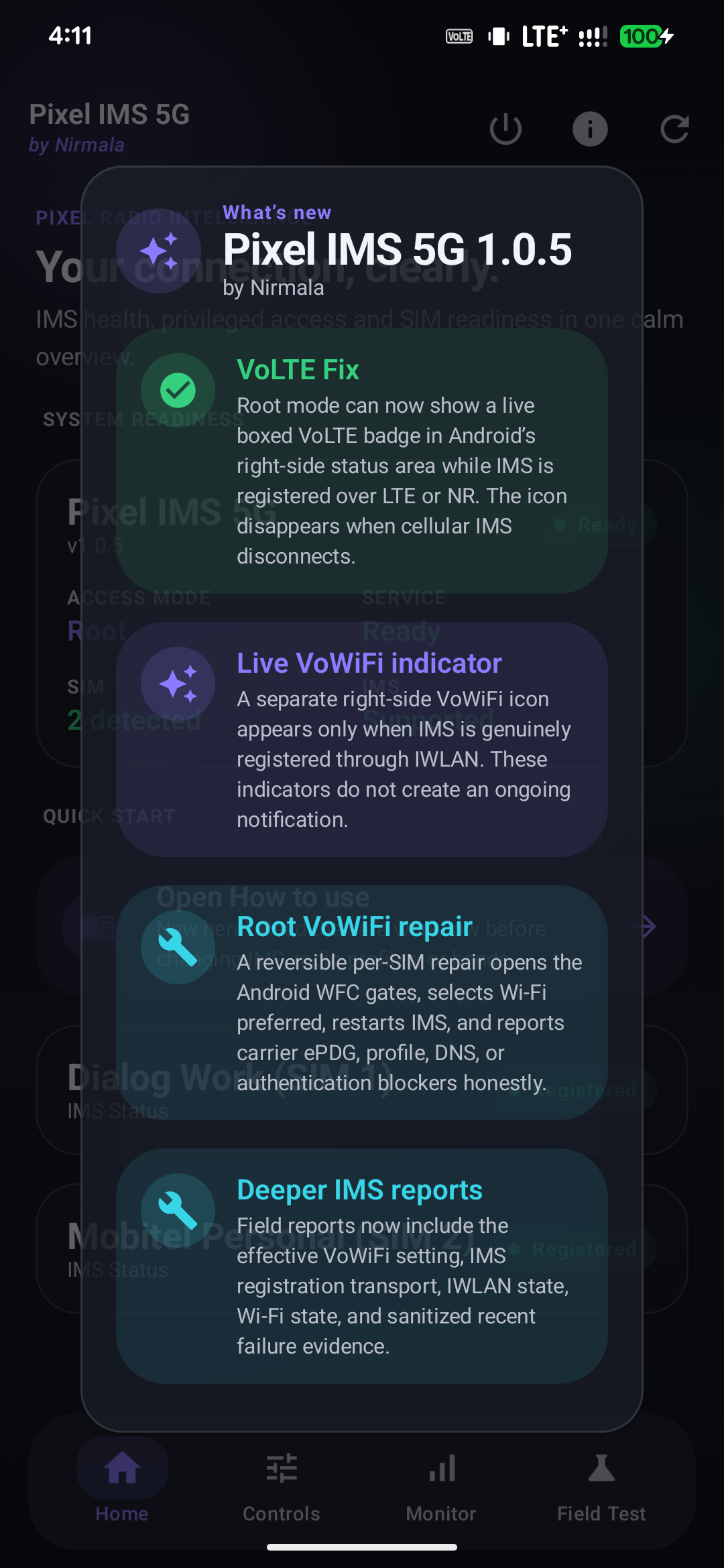
1.0.5 — small update
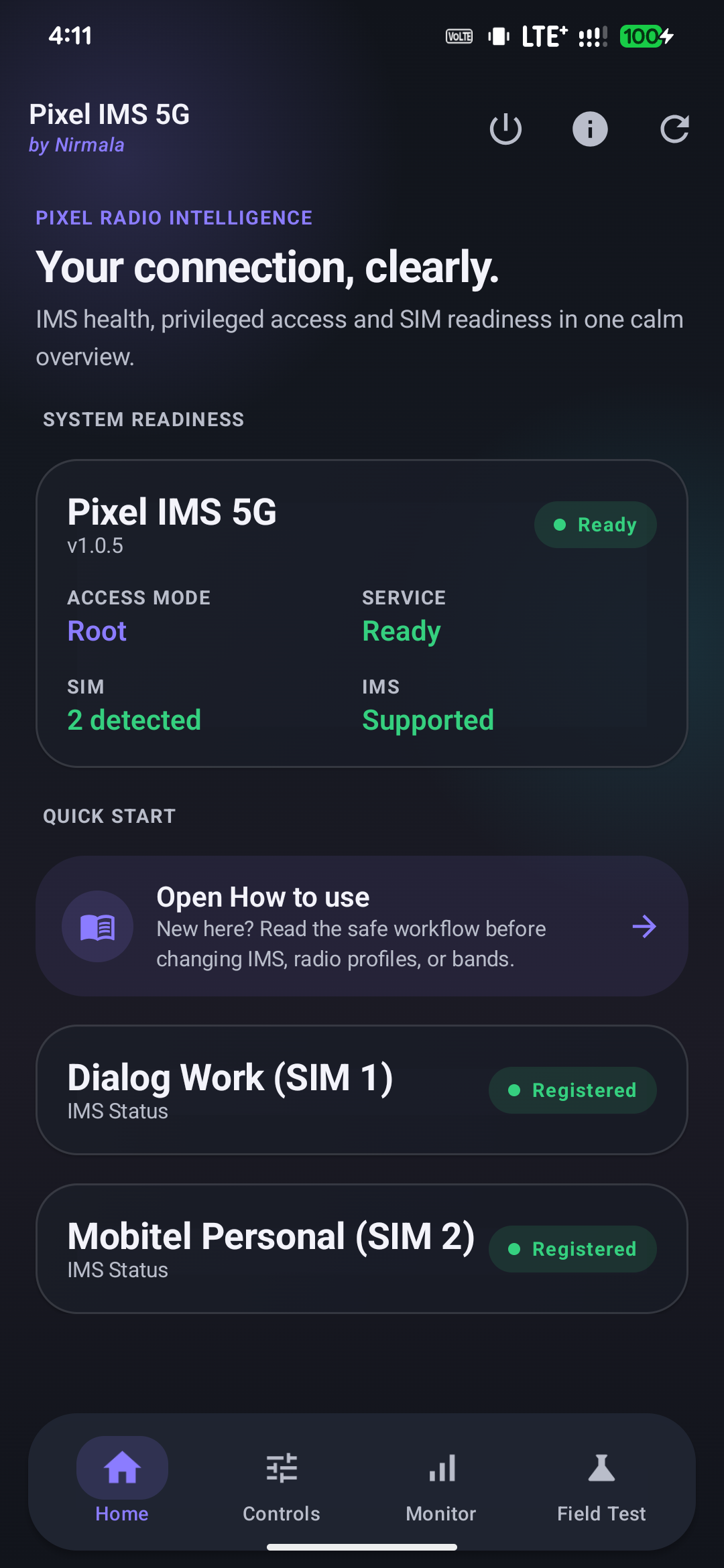
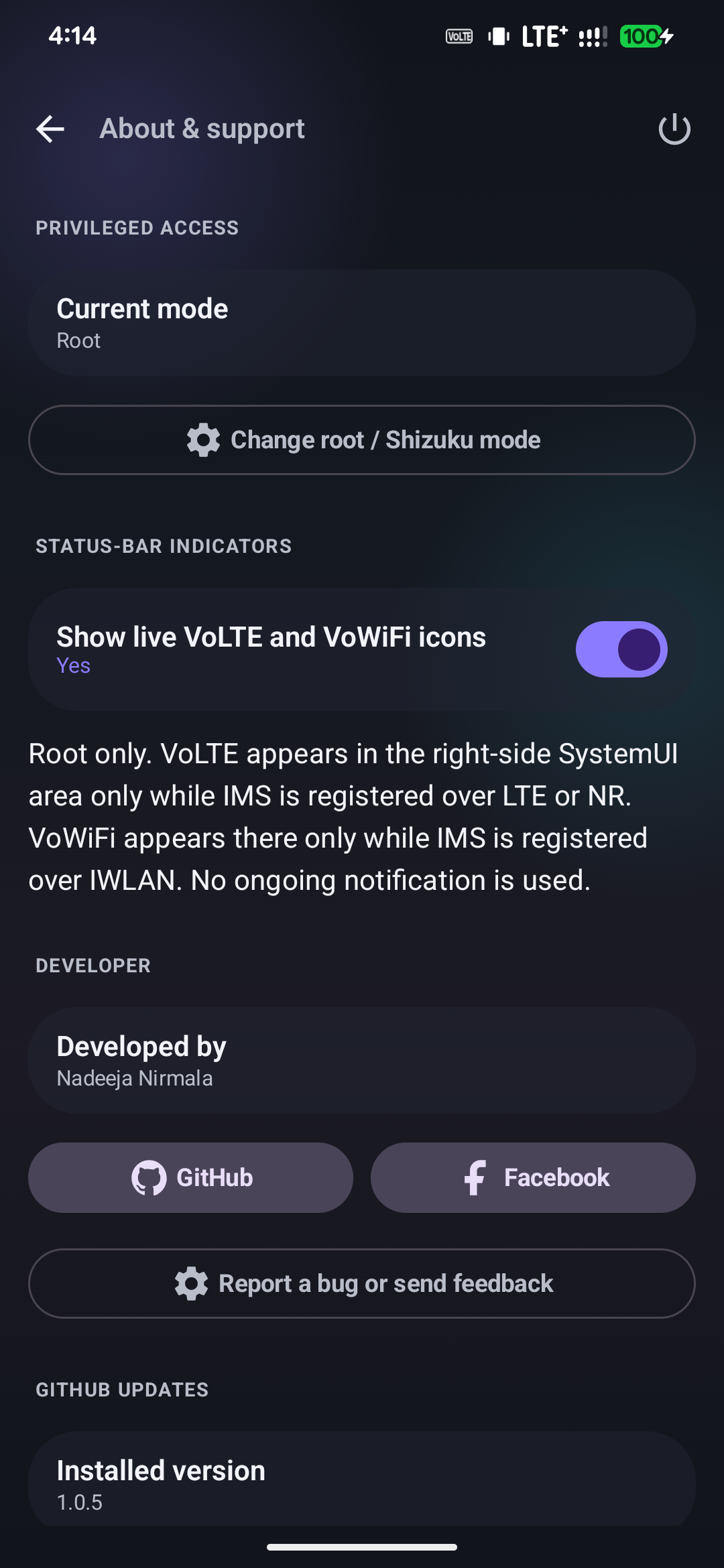
- Added the VoLTE Fix: Root mode now displays a compact boxed VoLTE badge in Android's right-side status area only while IMS is registered over LTE or NR.
- Added a separate live VoWiFi indicator that appears only for real IMS over IWLAN. Neither indicator creates an ongoing notification.
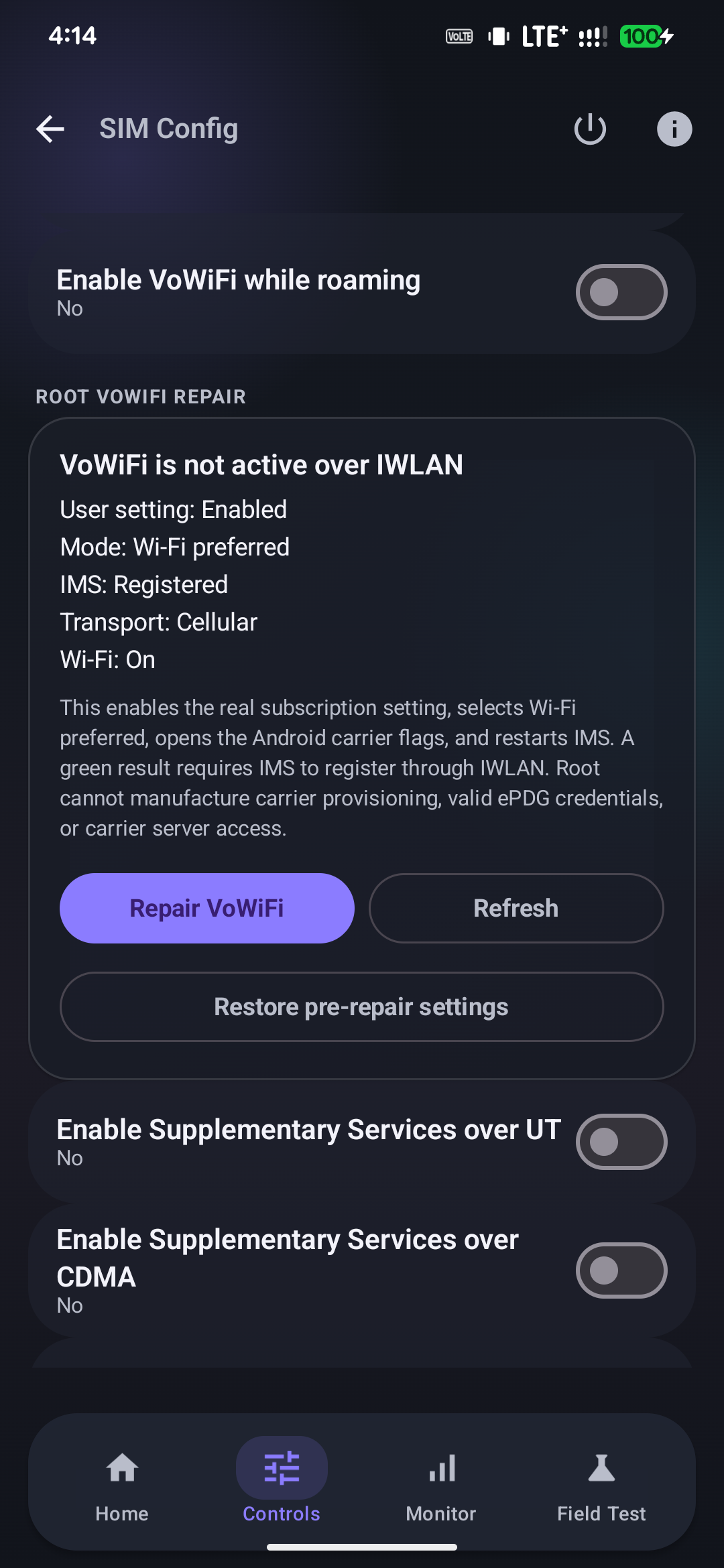
- Added a reversible, per-SIM Root VoWiFi repair that opens Android WFC gates, selects Wi-Fi preferred, restarts IMS, and reads the result back.
- Added actionable VoWiFi diagnostics for missing IMS data profiles, ePDG timeouts, DNS failures, and carrier IKE authentication rejection.
- Expanded field reports with the effective VoWiFi setting, IMS transport, IWLAN state, Wi-Fi state, and sanitized recent failure evidence.
1.0.4 rev
- Added prominent, step-by-step How to enable 5G instructions inside the app for Root and Shizuku users.
- Documented the complete Root path: Automatic bands, Force NSA, Root Force, Magisk regional modem compatibility install, reboot, and field verification.
- Documented the complete Shizuku path: Automatic bands, Force NSA, Easy Mode, reversible regional profile, Monitor, and Field Test.
- Clarified that Shizuku opens Android-side gates but cannot replace Tensor
cfg.db; modem-policy rejection may still require the Root/Magisk patch. - Fixed OTA comparison so
1.0.4ris recognized as newer than1.0.4.
1.0.4
- Added a versioned liquid-glass What’s New experience after OTA updates, with semantic colors highlighting features, improvements, fixes, and important limitations. The current changelog can be reopened from About.
- Persisted the GitHub target version and release notes across Android’s installer, with an embedded structured fallback for sideloaded or interrupted updates.
- Redesigned the complete interface with premium typography, calmer spacing, semantic radio-status colors, refined glass surfaces, and restrained motion.
- Replaced the Material bottom navigation with fixed, perfectly centered icon slots and stable labels, and added the by Nirmala app signature.
- Added reversible Wi-Fi isolation for Monitor and Field Test, with fail-closed behavior and automatic restoration.
- Expanded reports with OS/build identity, operational PLMN, evidence provenance, NR/EN-DC semantics, IMS/callback coverage, readable policy gates, and sanitized root modem deltas.
- Added an honest regional-5G Shizuku limitation notice for stock Pixel OS and alternative Pixel operating systems.
1.0.3
- Added automatic GitHub release checks at startup and periodically in the background.
- Added a polished New version x.x.x is available Android notification, shown once for each newer release.
- Added an Update now notification action that opens the in-app GitHub updater directly.
- Added live download percentage and pending, paused, completed, and failed states inside the app.
- Added a secure installer handoff after the signed APK finishes downloading, including Android's unknown-app-source permission flow when required.
- Preserved the established package name and OTA signing identity, allowing existing installations to update without uninstalling.
1.0.2r
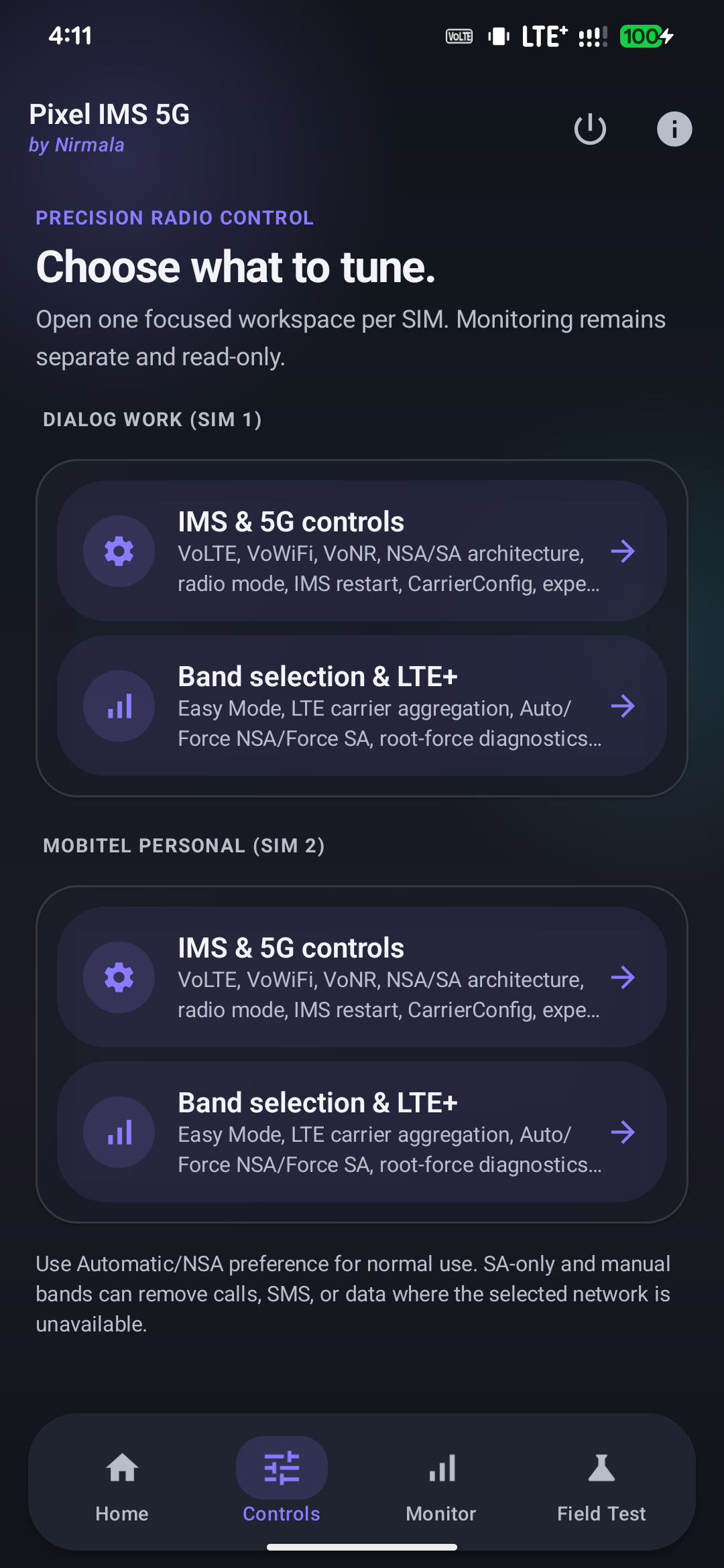
- Reorganized the app into Home, Controls, Monitor, and Field Test so IMS/5G and band controls are easier to find.
- Restored the complete IMS, 5G, LTE+, carrier aggregation, radio-profile, and LTE/NR band-selection controls in their dedicated sections.
- Added standard and Aggressive 5G field-test modes with detailed evidence capture, small connectivity checks, automatic restoration, and sanitized report export.
- Prevented Pixel 6 band-page crashes when Android rejects system-selection channel readback. Callback-confirmed selection remains usable on supported Android 16 and Android 17 builds.
- Made Shizuku Automatic Bands failures non-fatal and clearly report modem or Android restrictions instead of closing the complete regional profile.
- Added the in-app How to use guide and updated interface screenshots.
1.0.1
- Added the reversible Shizuku regional compatibility profile for Android 16 and Android 17.
- Added verification of effective NR modes and network gates instead of treating a successful Binder call as proof that the modem accepted a change.
- Added documented Dialog Sri Lanka n78 NSA field results and a real-world speed-test example.
- Clarified which Android-side VoLTE, VoWiFi, LTE+, band, and field-test functions work with Shizuku and which Tensor modem changes remain root-only.
1.0.0
- Promoted the project to its first stable release under
com.nirmala.pixel5gims. - Expanded the privacy-labelled 5G field-test dump with NR frequency, registration, CarrierConfig, callback, cell, IMS, and sanitized privileged evidence.
- Added the validated, reversible Magisk Tensor regional modem compatibility patch with schema checks, database integrity verification, backup, and restoration safeguards.
- Added signed GitHub release APK support for future in-app updates.
Upgrade note: version
0.12.6changed the application ID tocom.nirmala.pixel5gims, so users of the older package had to uninstall it once. Updates from0.12.6onward, including1.0.5, install normally.
Version 1.0.5 interface
Version 1.0.5 keeps the four focused Home, Controls, Monitor, and Field Test areas, while adding live right-side VoLTE/VoWiFi indicators and a reversible Root VoWiFi repair:
| What's new | Home with live VoLTE |
|---|---|
 |  |
| Controls | Root VoWiFi repair |
 |  |
The indicator switch and its Root-only behavior are documented inside About:
How to use
Enable 5G with Root
- On Home, choose Root and grant superuser access. The regional modem compatibility patch specifically requires Magisk.
- Open Controls → Band selection & LTE+. Leave bands on Automatic, choose Force NSA, and tap Force all local 5G gates.
- Under Regional modem compatibility (root), confirm compatibility, tap Install patch, approve the warning, and reboot.
- Return near a known 5G site with mobile data enabled. Open Monitor or run the standard Field Test and verify EN-DC/NR attachment. Use SA only when the carrier actually offers SA.
After a Pixel firmware update, remove the old regional patch before updating, reboot, then validate and install a fresh patch for the new baseband.
Try 5G with Shizuku
- Start the separate Shizuku app, choose Shizuku on Home, and grant Pixel IMS 5G permission.
- Open Controls → Band selection & LTE+. Leave bands on Automatic and select Force NSA. Easy Mode can open VoLTE, LTE+, LTE+NR, and CA together.
- Tap Apply Shizuku regional profile to open and verify every reversible Android-side user/carrier NR gate accessible to the shell.
- Test near a known 5G site with mobile data enabled. Use Monitor or Field Test to check NR Available, EN-DC Available, NR state, the LTE anchor, and reported modem limitations.
Shizuku cannot replace Tensor cfg.db or modify the vendor modem profile. If
every Android-side gate is open but EN-DC remains rejected, regional 5G may
still require the Root/Magisk compatibility patch.
General workflow
- Open Home and confirm the intended Root or Shizuku backend is running, privileged access is granted, and the correct SIM is detected.
- Open Controls. Use IMS & 5G controls for VoLTE, VoWiFi, VoNR, NSA/SA, CarrierConfig and recovery. Use Band selection & LTE+ for Easy Mode, automatic/NSA/SA preference, carrier aggregation and band selection.
- Leave bands on Automatic first. A selected band is only an allow-list; the modem and network still decide the serving band and CA combination.
- Use Monitor for read-only live IMS, IWLAN/VoWiFi, LTE+, 5G, serving-cell, neighbor-cell, signal-history and attach-trace evidence.
- At a known 5G site, open Field Test. Run the standard two-minute test first. If needed, run Aggressive 5G test; it temporarily opens supported Android-side LTE/NR gates, makes small connectivity requests and restores the captured settings when it completes or is stopped.
- Review exported reports before sharing: phone numbers, IMSI and ICCID are excluded, but cell IDs and radio measurements can indicate approximate location.
- If service disappears after a change, use the offered Undo action. Use the power-button recovery only when you want to restore all active SIMs, clear the app recovery state and reboot.
Aggressive mode cannot lower network-controlled RSRP/RSRQ/SINR attachment thresholds, create coverage, grant carrier entitlement, or make an LTE cell advertise EN-DC. Do not run it during an emergency call.
Verified 5G field result
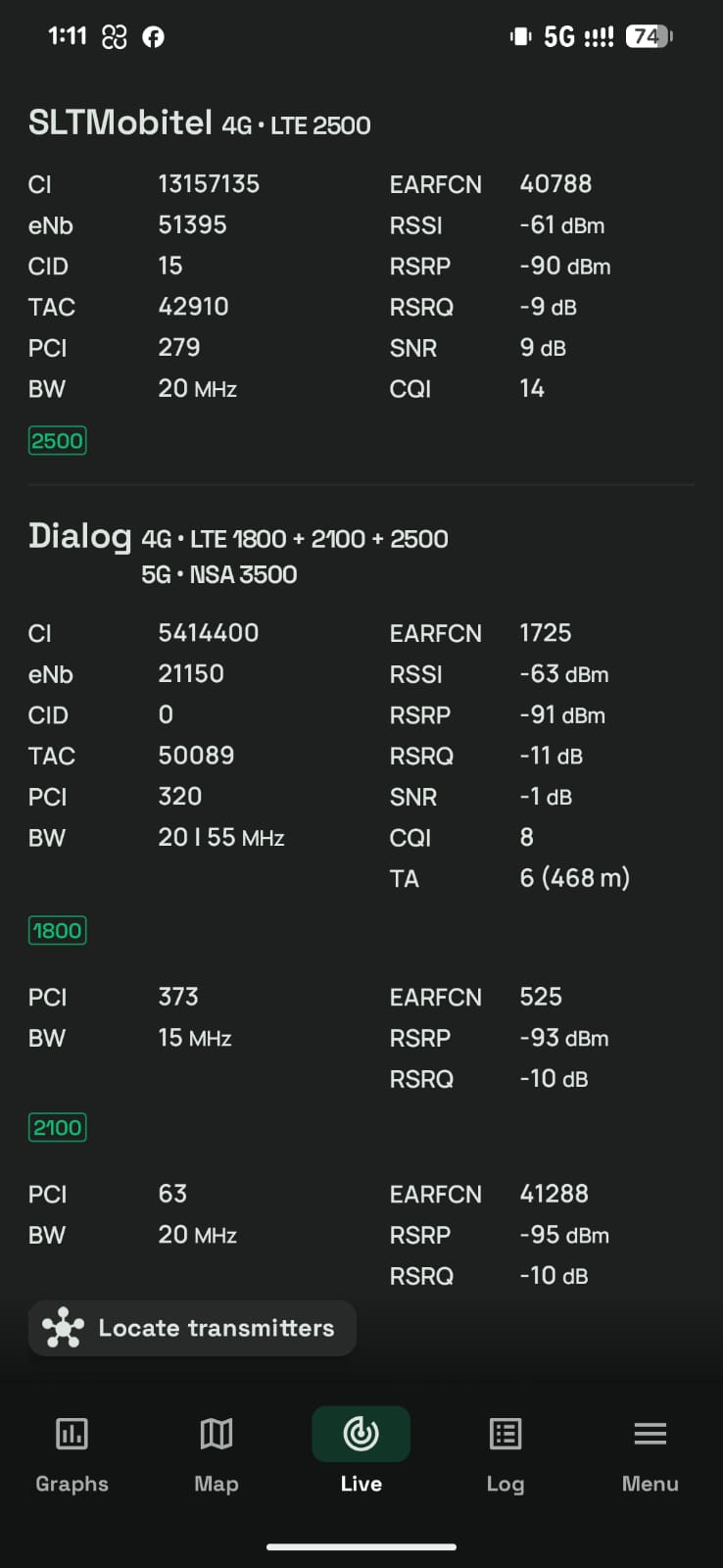
Dialog Sri Lanka 5G NSA was verified on a Pixel 7 Pro near a live site. The capture shows LTE B3 + B1 + B41 carrier aggregation with an n78 (3500 MHz) NSA secondary cell. The matching field-test report exposed physical NR band 78, NRARFCN 628896, PCI 883, approximately 3433.44 MHz downlink, and 100 MHz NR bandwidth.
| Live NSA connection | One field speed result |
|---|---|
 | 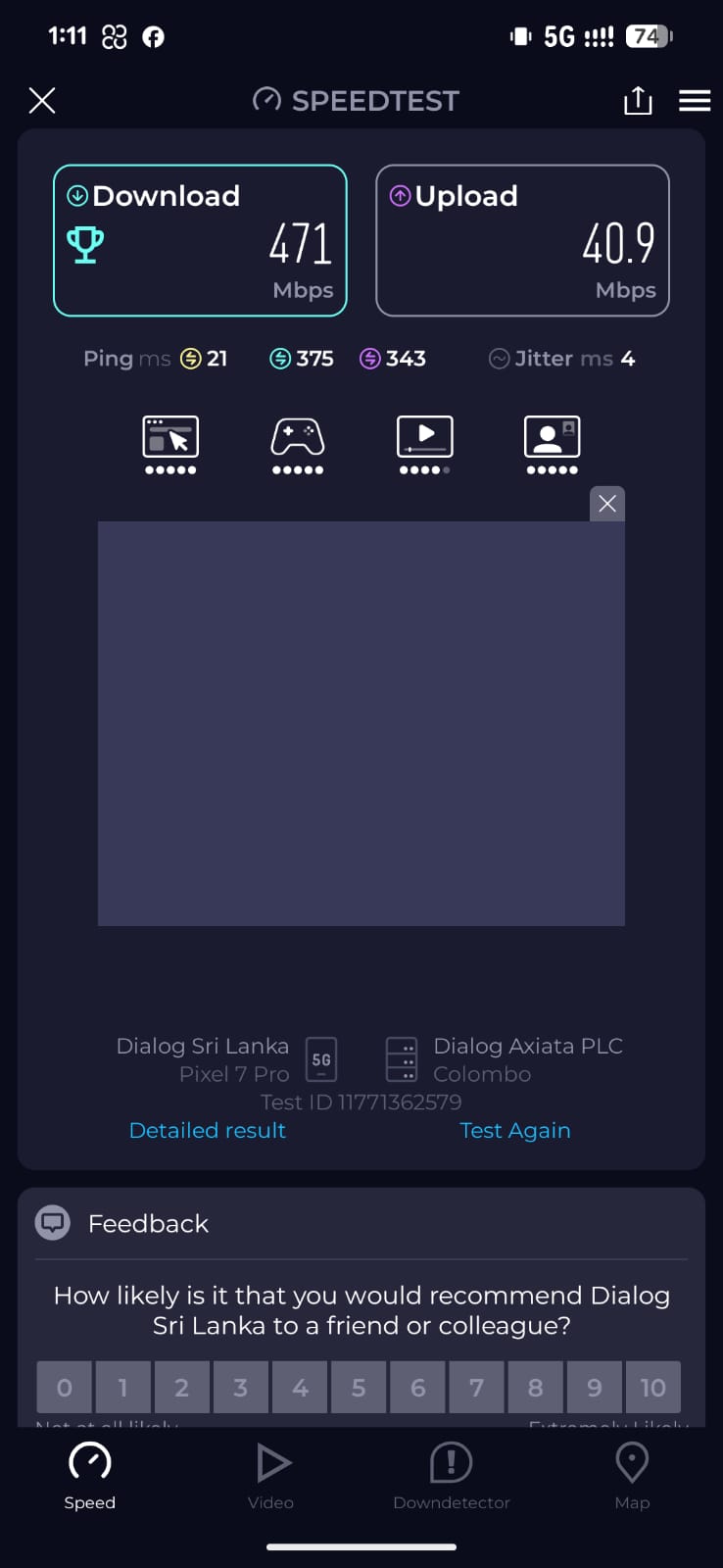 |
The speed screenshot is one real-world result (471 Mbps down / 40.9 Mbps up), not a performance guarantee. Coverage, site load, radio conditions, plan entitlement and carrier policy all affect whether 5G attaches and how fast it runs.
Features
- Enable VoLTE, VoNR, VoWiFi, NSA and SA carrier configuration.
- In Root mode, display live VoLTE and VoWiFi indicators in Android's right-side SystemUI status area without an ongoing notification.
- Apply and restore a per-SIM Root VoWiFi repair, verify the real IMS registration transport, and explain common carrier/ePDG blockers.
- Apply NSA/LTE+NR preference or experimental SA/NR-only mode.
- Show live serving radio, LTE/NR bands, NR advertisement and EN-DC eligibility.
- Actively refresh cell measurements and infer omitted bands from EARFCN/NR-ARFCN.
- Request LTE/NR band restrictions and detect when Pixel firmware rejects them.
- On Pixel 6 modems without live band readback, apply restrictions through Android's result callback and retain the last callback-confirmed selection.
- Select LTE and NR bands using chips; every currently reported band stays green, including in Automatic mode.
- Enable per-SIM Easy Mode to apply VoLTE, enhanced LTE/LTE+, automatic bands, LTE+NR allowance, and verified Tensor CA enablement together.
- Lock advanced radio and band controls while Easy Mode is active, then unlock them without disabling calling settings.
- Preserve the original Tensor CA state so Undo and Restore All can return the modem to its previous value.
- Configure and recover each active SIM independently.
- Explain common IMS registration failures and restore Google/carrier defaults with one tap.
- Detect loss of service after an app change and undo the exact previous radio state.
- Restore every active SIM, clear the app's recovery state, and reboot from a guarded recovery action.
- Read the Tensor modem's LTE carrier-aggregation enablement status.
- Material 3 Expressive interface with dynamic Pixel colors and glass surfaces.
- Check GitHub Releases and download signed updates inside the app with live percentage/status, followed by Android's normal installation confirmation.
- Check GitHub Releases on launch and periodically in the background, then send one Android notification per newer signed release. Tapping Update now opens the in-app updater; notification permission and channel settings remain under the user's control.
- Choose Root or Shizuku at first launch and change the backend later from About.
- Monitor both SIMs live: IMS registration transport, VoWiFi/IWLAN state, Wi-Fi frequency, LTE/NR cells, signal metrics and history, and NSA/EN-DC advertisement.
- Detect Dialog, SLT-MOBITEL, Airtel Lanka, and Hutch SIM identities and show conservative Sri Lankan band and activation guidance.
- Apply a safe Sri Lankan/global compatibility profile without locking bands or claiming to bypass carrier provisioning.
- Use a per-SIM Root Force Lab to snapshot, force, audit, verify, and restore every Android-side LTE/NR gate exposed on Android 17.
- In Magisk Root mode, validate and stage a reversible systemless Tensor
cfg.dbwildcard/PTCRB compatibility mapping using the phone's own firmware database. The app refuses unknown schemas and never spoofs the SIM, PLMN, or Wi-Fi country. - Run a two-minute, 24-sample 5G field test and export a privacy-labelled report to
Downloads/Pixel IMS 5Gwith NRARFCN/frequency, SS/CSI measurements, registration/reject state, callback events, PCC/SCC history, CarrierConfig gates, and sanitized root evidence. - Run a separate Aggressive 5G field test that temporarily opens supported Android-side LTE/NR gates, keeps data active with small connectivity checks, captures the same detailed evidence, and restores the pre-test settings even when stopped.
- Field Test and Monitor now create a reversible mobile-radio-only session: Wi-Fi must disable successfully before capture begins and is restored when the test, page, or foreground monitoring session ends. VoWiFi/IWLAN is intentionally unavailable during this isolated mode.
- Detect stock Pixel OS, GrapheneOS, and common Pixel custom-OS build markers in reports. Every Pixel user choosing Shizuku receives a one-time glass warning that Android-side overrides cannot guarantee regional 5G without a vendor modem configuration change.
- Use the separate Monitoring section for TelephonyRegistry events, evidence-based 5G attach tracing, effective-vs-Android-default CarrierConfig differences, NR capability decoding, and root-only PCC/SCC physical channels.
- In Root mode, capture sanitized TelephonyRegistry, phone-service, and radio-log evidence. Shizuku mode clearly marks phone-process and
READ_PRECISE_PHONE_STATEinternals as unavailable. - Display LTE+ only when Android confirms carrier aggregation, 5G NSA/SA only from connected NR state, and VoWiFi only from active IMS-over-IWLAN registration.
Shizuku regional compatibility on Android 16 and 17
The dedicated Shizuku regional profile applies and verifies the strongest reversible Android-side changes available to UID 2000: automatic bands, LTE + NR user/carrier policies, NSA + SA CarrierConfig, VoLTE, VoWiFi, VoNR, LTE+ and IMS visibility. The result screen reads the effective NR modes and network gates back instead of treating a Binder call as proof of success.
On Pixel 6 firmware that rejects current-band readback, 1.0.2r keeps the Bands page open, uses callback-confirmed selection state, and treats an unavailable Automatic Bands reset as a clearly reported limitation instead of failing the complete Shizuku regional profile.
This profile is not the Tensor cfg.db modem patch. The paired field-test reports show
that the modem profile change—not the identical Android CarrierConfig—was the decisive
difference in the tested Dialog NSA attach. Android 17 SELinux and verified vendor
partitions do not allow a normal Shizuku UID 2000 process to install a Magisk/vendor
overlay. If all Shizuku gates pass but the modem still rejects EN-DC, that exact modem
database fix remains root-only.
Install
- Have either a compatible root manager (Magisk, KernelSU, or APatch) or install and start Shizuku.
- Download the latest APK from Releases.
- Install Pixel IMS 5G, choose Root or Shizuku, and approve that backend.
Changing radio modes can remove calls, SMS, or data. The app can change modem preferences and carrier configuration, but cannot create network coverage, EN-DC support, carrier authorization, or SA registration.
Root Force deliberately does not write modem NV/EFS. Those values are device- and baseband-specific; a mismatched Shannon NV profile can crash or disable the modem. The safe extension path is an exact-model, exact-baseband signed profile with backup and recovery—not a universal NV script.
The regional modem compatibility tool is experimental and Magisk-only. It validates the stock database, patches a copy, performs SQLite integrity checks, and installs it as a removable systemless module for the next reboot. It cannot create n78 coverage, make an LTE cell advertise EN-DC, bypass subscriber/device entitlement, or force the network to accept an SCG addition.
Developer and support
Developed by Nadeeja Nirmala.
Origin and license
Pixel IMS 5G is based on the original GPL project kyujin-cho/pixel-volte-patch and the work of its community contributors. Tensor wildcard/PTCRB cfg.db mapping research is credited to vchikalkin/Pixel-Modem-Fix and Displax/modem-fix. This app independently validates and patches the current firmware database and does not redistribute either project's database or binary tools. This modified project remains licensed under the GNU General Public License v3.0. See LICENSE.
This is an unofficial community project and is not affiliated with Google or any mobile carrier.
Band scan limitations
The app requests a fresh cell-information measurement and lists every LTE/NR band the Android radio layer returns. When the radio omits a band but exposes an EARFCN or NR-ARFCN, the app derives the band using Android's radio-frequency mapping. No Android app can display a transmitter the modem does not measure or deliberately withholds from the framework.
IWLAN means the IMS service is registered through Wi-Fi; it is not an LTE/NR band. The monitor deliberately shows IMS transport, Wi-Fi frequency, and any cellular anchor as separate values.
Release Notes & Changelog
What's Changed
- 2.1 — task-first Setup, and panels you can actually see by @barrylk in https://github.com/barrylk/Pixel-IMS-5G/pull/12
Full Changelog: https://github.com/barrylk/Pixel-IMS-5G/compare/v2.0.0...v2.1.0
Declared Android Permissions
13 totalShizuku API Permissions
This application connects to the Shizuku service to execute system-level operations with ADB elevated privileges.
Standard Android Permissions
Specifications
Install via ShizuStore to enable automatic updates and silent installations using Shizuku.
More in Vendor-specific - Google Pixel
Other applications in this category

Smartspacer
KieronQuinn
Customizable widget, can upgrade the built-in 'At a glance' widget on Pixel devices using Shizuku

carrier-ims-for-pixel
ryfineZ
Maintained Pixel IMS toolkit: tune VoLTE/VoWiFi/VoNR, 5G display and carrier config via Shizuku