YoukiDEX
Featuredv3.5Screenshots
(3)About Application
⚠️ Development on this project has been discontinued. This repo is archived — no further updates, but everything below still describes it accurately.
YoukiDEX
A full desktop experience for Android




What is this?
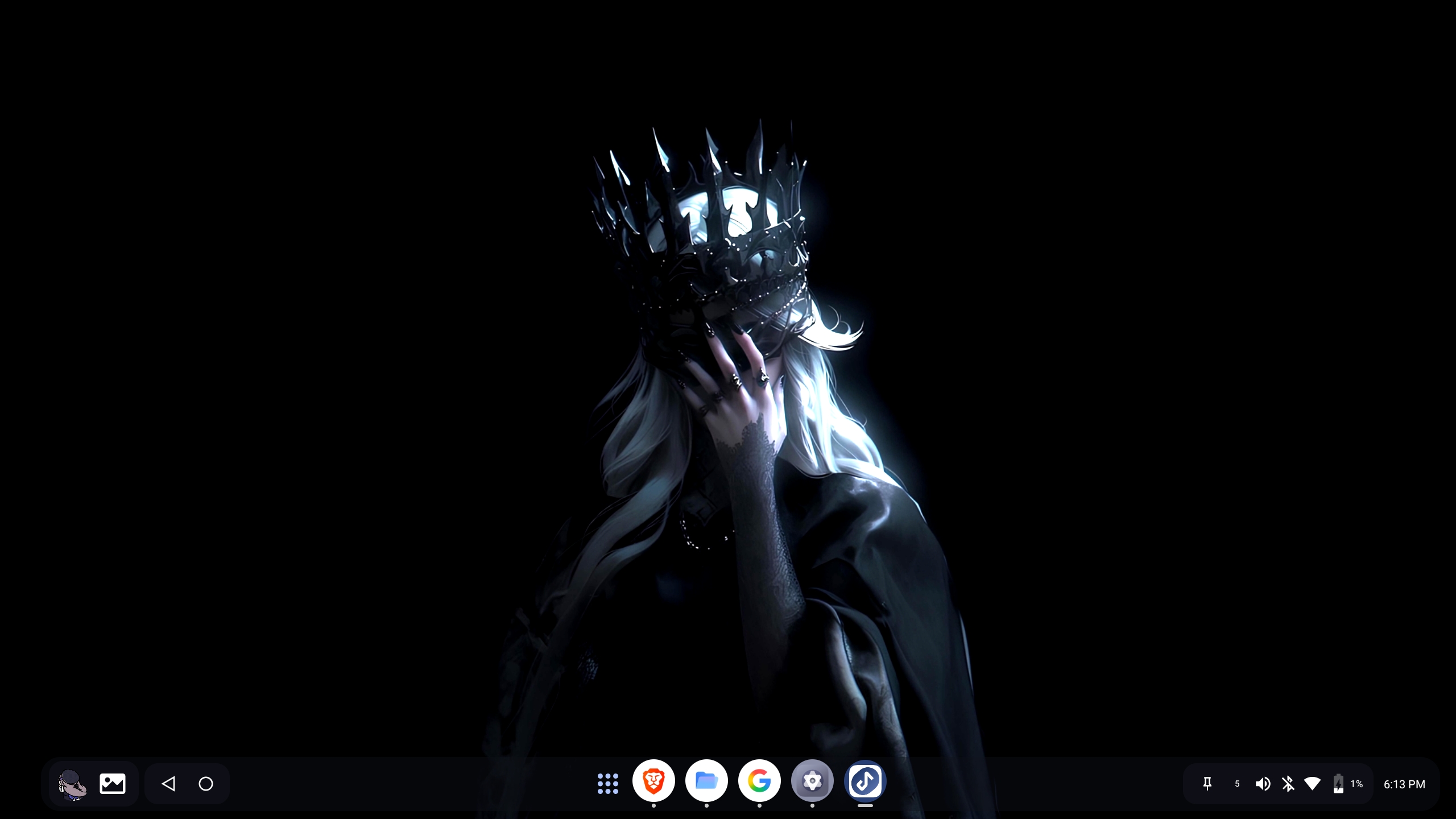
YoukiDEX turns your phone into something closer to a desktop — a taskbar, an app dock, windows you can resize and move around, hot corners, the whole thing. It runs as an Accessibility Service overlay, so it doesn't have to become your default launcher (though most people end up setting it as one anyway, just so it loads automatically instead of having to open it every time).
A few features — custom display size, freezing background apps, that kind of thing — need Root or Shizuku. Everything else works out of the box.
About the project
Just one person building this in their free time — no team, no company. Everything, including the native engine, gets written and built directly on a phone (a mid-range one — Unisoc T606, 8GB RAM) using Android code studio (acs). No laptop involved at any point. It also gets tested on a itel S23, mostly to make sure nothing that only shows up on a budget-tier phone slips through.
That setup naturally shapes how things move: updates go out when something's actually ready, not on a schedule, and how fast bugs get fixed depends on how much free time there is that week.

btw. Beta updates, beta source code, drama, and 3 AM debates about app icons all move faster on the Discord server — GitHub Issues is where bugs go to nap.
For release notes and version history, check the GitHub Releases page — every release has its own detailed changelog.
Features
Desktop
- Accessibility-based overlay — works as your launcher or on-demand from a Quick Settings tile / shortcut
- Centered floating dock (KDE-style) or classic edge-pinned dock (Windows-style)
- 3 ready-made dock presets (Minimal / Default / Gesture) that set up everything — nav buttons, quick settings, running-app limits — in one tap, instead of tuning 15 different settings by hand
- Resizable floating windows for any app, plus real window tiling (maximize, snap left/right/top/bottom)
- Multiple app windows group under one dock icon, the way Windows or macOS does it
- Hot corners (top-right / bottom-right, each mappable to its own action)
- Multi-display support
- Mouse right-click and hardware keyboard shortcuts work the same as long-press/touch
- An inline calculator in the app search — type "12+7", get a tappable "19"
Power menu
- Settings, lock, power off, restart
- Restart or fully close just YoukiDEX itself, without touching the rest of the phone
- Switch to another user directly from the same menu
Apps
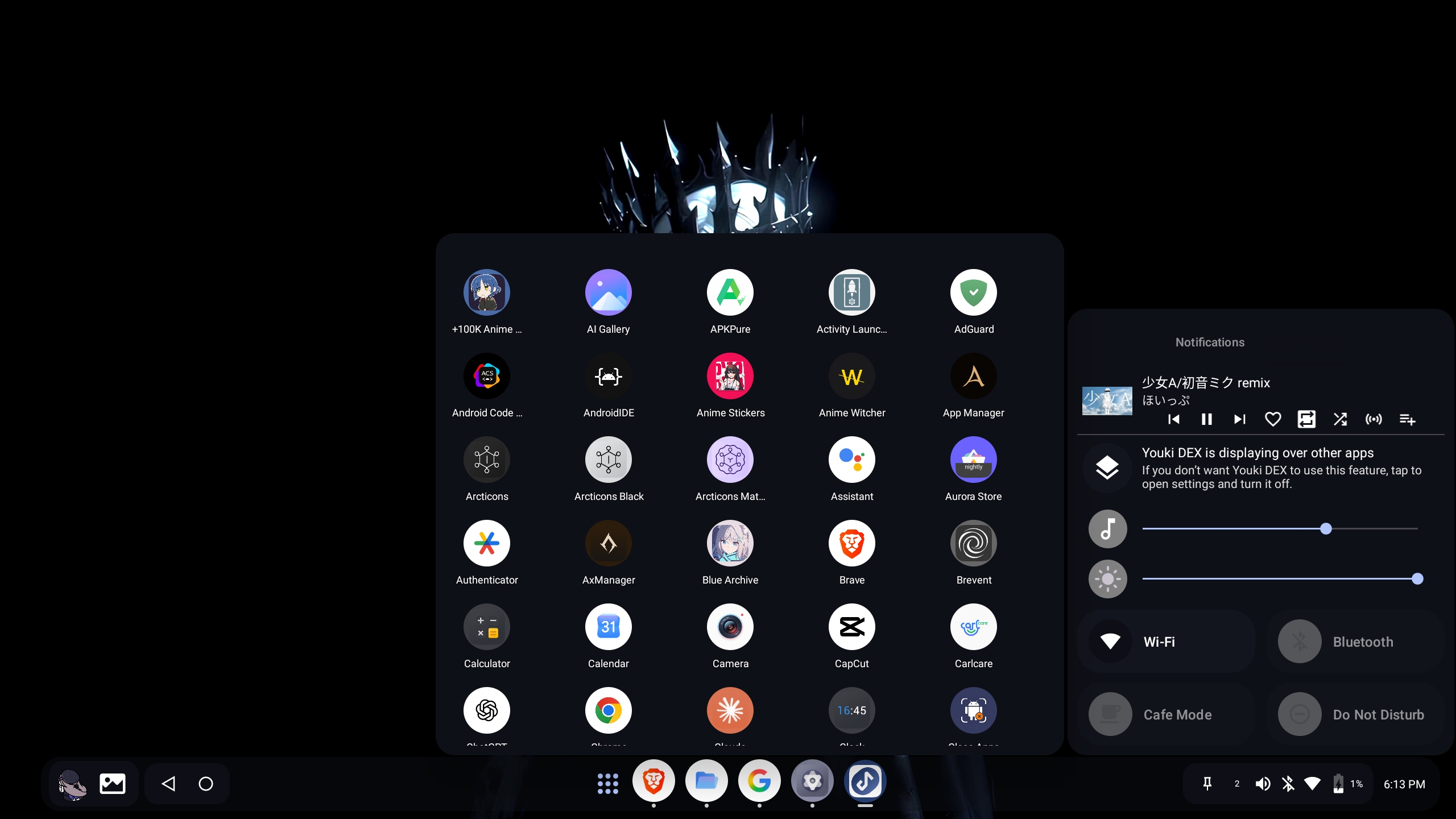
- Full app drawer with search and sorting, plus the option to hide apps
- Deep shortcuts (long-press for quick actions)
- Icon pack support
- Per-app launch mode (windowed or fullscreen), remembered per app
- Optional forced landscape
Taskbar & tray
- Running apps, tap to minimize/restore
- Live CPU and RAM usage
- Battery, Wi-Fi, Bluetooth, volume, date
- Notifications, with per-app silencing
- A Quick Settings-style panel with brightness/volume sliders
Live wallpaper
- Animated video wallpaper with its own gallery and a built-in editor — crop, pinch/rotate/pan directly with your fingers, brightness/contrast/saturation, background color
- Portrait and landscape get fully separate settings (scale, position, rotation, even audio speed/pitch), so adjusting one never messes up the other
- Rendered natively — OpenGL ES or Vulkan, your choice, picked once during setup
- Desktop grid for icons and widgets, with Nova-style drag-and-drop that pushes things out of the way
Workshop
- A built-in browser for finding wallpapers and fonts, with its own ad blocker (strips ads/popups live as the page loads) and automatic font capture — browse Google Fonts and it grabs and installs whatever font file the page loads, no separate download step
- Comes with a few sources out of the box (MotionBGs, DesktopHut, MoeWalls for wallpapers; Google Fonts, DaFont, Fontesk for fonts) — add your own by URL
Plugins
- Installs plugin ZIPs (its own format, or actual Magisk modules) the same way a Magisk-style manager would — install, uninstall, and a running-service toggle per plugin
Performance tweaks
- A separate, clearly-labeled tab for the riskier stuff — GPU/thermal/FPS tweaks with names like "Thermal Killer" and "HardCoreGT," each doing exactly what it says on the tin. Not something you need to touch; it's there if you want to push a specific device further and know what you're doing
Multi-user
- Add and switch between device users right from the app, either from a quick popup in the dock or a full management screen
Cast
- Send the desktop or media playback to a Cast device
Sound & look
- Custom sounds for lock/unlock, charging, notifications, etc.
- Material You colors or fully custom dock bubble color, with adjustable opacity, plus a fully transparent dock option
- Custom fonts — pick one file for Arabic and another for Latin text, and the app switches between them automatically as you type or scroll, no separate language setting needed
- Text size scaling, per-app or app-wide, plus a custom number badge you can put on any icon
With Root or Shizuku
- Custom display size/resolution, disabling heads-up notifications, freezing background apps, uninstalling system apps, soft reboot
- Auto-grant — the moment either is detected, the app grants itself everything it needs in one shot (over 20 permissions and system settings) instead of asking permission by permission. Accessibility stays a manual step on purpose, so it's always something you turn on yourself
- A built-in shell terminal
Self-test tool
- A QA feature (mostly for me) that opens every screen in the app on an isolated virtual display to catch crashes before a release goes out
Under the hood
Mostly Kotlin, with a Rust engine underneath handling the live wallpaper rendering, some math-heavy stuff, and text parsing — anything that's pure computation and doesn't need to talk to Android directly. Roughly 80/20 Kotlin to Rust. Everything that touches Android's actual APIs — the services, the UI, the database — stays in Kotlin, since that's what it's built for.
Runs on Android 8.0 and up, built with Gradle and Cargo, all of it compiled on-device through Termux.
Screenshots
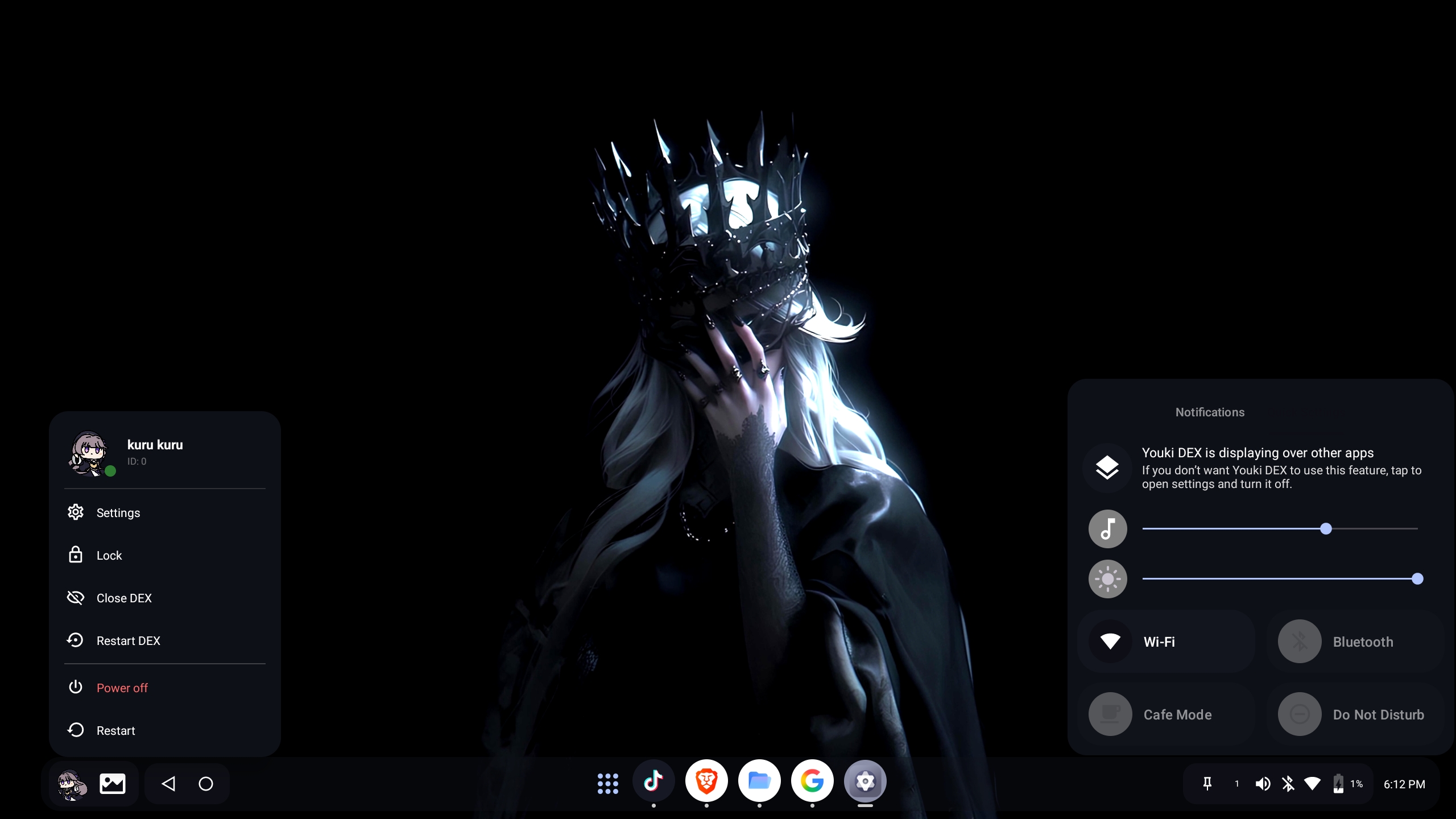
Quick Start
- Install the APK and open YoukiDEX
- Grant the permissions it asks for — Accessibility is the one that actually matters, nothing draws without it
- Then either add the Quick Settings tile and tap it, set YoukiDEX as your launcher, or use the home-screen shortcut it offers on first launch
Optional: Root or Shizuku
A few features need WRITE_SECURE_SETTINGS-level access. Three ways to get there:
- Shizuku (easiest long-term) — install it, start it once, then grant YoukiDEX permission when it asks.
- Root — Magisk or KernelSU, detected automatically, nothing to set up.
- ADB, if you'd rather do it manually and don't have either:
adb shell pm grant com.youki.dex android.permission.WRITE_SECURE_SETTINGS
adb shell appops set com.youki.dex GET_USAGE_STATS allow
Without any of these, the app still works — you just won't have the handful of features that need system-level access.
Permissions
| Permission | What it's for |
|---|---|
SYSTEM_ALERT_WINDOW | Draw the dock and floating windows over other apps |
| Accessibility Service | The core of how the overlay works |
PACKAGE_USAGE_STATS | Show recent and running apps |
WRITE_SECURE_SETTINGS / WRITE_SETTINGS | System-level settings (Root/Shizuku/ADB only) |
QUERY_ALL_PACKAGES | List installed apps |
| Notification Listener | Show and manage notifications from the dock |
MANAGE_USERS | Multi-user switching |
MANAGE_EXTERNAL_STORAGE / media permissions | Wallpapers, Workshop downloads, backup/restore |
BLUETOOTH* | Bluetooth indicator in the tray |
CAPTURE_VIDEO_OUTPUT | Self-test tool's virtual display (Root/Shizuku only) |
Known issues
RedMagic & ZTE phones don't do floating windows out of the box. These brands turn Freeform Windows off by default. Fix:
- Enable Developer Options (tap Build Number 7 times)
- Turn on Force activities to be resizable and Enable freeform windows
- Go to Settings → Display → Desktop Mode and enable it
- Reboot
Not a YoukiDEX bug — that's just how those phones ship.
Forced landscape doesn't work on some apps. If an app hardcodes portrait mode, there's no way to override that without root or system-level access — that's an Android limitation, not something fixable from a regular app.
Desktop widgets are temporarily disabled. The code's there, but it's switched off while a few crash edge cases get sorted out first.
The built-in file manager is disabled. It exists in the code but it's broken and unreliable right now, so it's turned off until it's rebuilt properly. Use any regular file manager app in the meantime.
FAQ
Do I have to set it as my default launcher? No, it works either way — but if you don't, you'll need to open it by hand each time instead of it loading on boot. Most people just set it as default.
The dock disappeared after a reboot. Check that Accessibility is still turned on, and that your phone's battery settings aren't killing it in the background — common on MIUI, ColorOS, and similar.
Is this fully open source? Yes. Everything is built and pushed straight from a phone through Termux — no computer involved anywhere in the process. Contributions and bug reports are always welcome.
Accessibility won't turn on for me on Android 13+. That's Android blocking it because the app wasn't installed from the Play Store. One-time fix:
adb shell appops set com.youki.dex REQUEST_INSTALL_PACKAGES allow
Then go back to Settings → Accessibility and it should work. Installing via adb install instead of a regular APK also skips this entirely.
Not planned
| Feature | Why not |
|---|---|
| Background blur on windows | Android doesn't allow real-time blur on overlays without system privileges |
| Play Store release | The permissions this needs aren't allowed there |
| iOS support | Different OS, not something this codebase can do |
| Cloud sync for settings | Local backup/restore already covers it |
Disclaimer
Independent, one-person project. Not affiliated with or endorsed by anyone.
Credits
Started from Smart Dock, but it's been rebuilt from the ground up since then — new package, new architecture, a native engine that didn't exist before. Not much of the original is left besides the initial idea.
Thanks to the open-source Android community for the tools and libraries this leans on.
Made by mrYouki
Release Notes & Changelog
fix issues & bug and more features
Full Changelog: https://github.com/mrYouki/YoukiDex-Android-Desktop/compare/3.0...3.5
Declared Android Permissions
32 totalShizuku API Permissions
This application connects to the Shizuku service to execute system-level operations with ADB elevated privileges.
Standard Android Permissions
Specifications
Install via ShizuStore to enable automatic updates and silent installations using Shizuku.
More in Customization
Other applications in this category

TapTap
KieronQuinn
Port of the double tap on the back of the device feature from Android 12 to any Android 7.0+ device

essentials
sameerasw
Essential tools, mods and workarounds for Pixels. Also compatible with other devices