
Minimal Kernel Manager
v1.10Screenshots
(8)About Application


Minimal Kernel Manager (MKM)
Package: com.ivarna.mkm
Android kernel management and system monitoring application
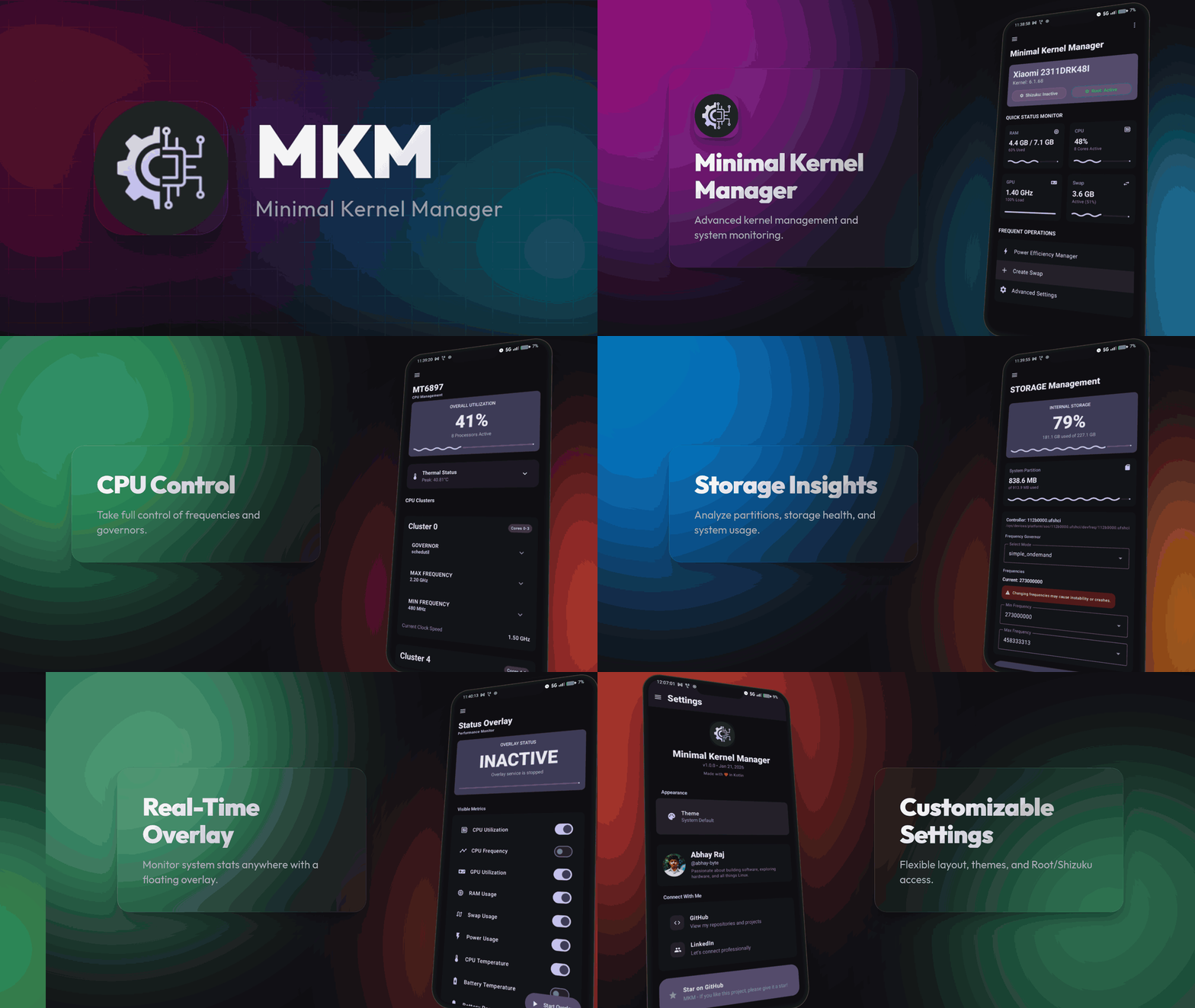




🚀 Features
📊 Real-Time Performance Overlay
- Customizable Floating Overlay: Always-on-top system monitor with real-time metrics
- Advanced Reordering: Intuitive drag-and-drop component reordering with haptic feedback
- Multiple Layout Modes:
- Vertical (default)
- Grid View (1-4 columns with smart packing)
- Horizontal Bar Layout
- Visual Customization:
- 8 Material Design accent colors (Primary, Green, Blue, Red, Yellow, Pink, Purple, Cyan)
- Background opacity control (20%-100%)
- Icons-only mode for minimal footprint
- Progress bars toggle (wavy Material 3 indicators)
- Real-time Sparklines (historical trend charts)
- Monitored Metrics:
- CPU Utilization (%)
- CPU Frequency (per-cluster)
- GPU Utilization (%)
- RAM Usage (%)
- Swap Usage (%)
- Power Consumption (Watts)
- CPU Temperature (°C)
- Battery Temperature (°C)
- Battery Percentage (%)
- Overlay Control:
- Adjustable update frequency (100ms - 5000ms)
- Movable or fixed positioning (9 anchor points)
- Multi-stage warning colors (Normal, Warning 70%+, Critical 90%+)
💾 Persistent Swap Management
- Swap File Creation: Create persistent swap files with customizable sizes
- Boot Persistence: Automatically activates swap on device boot
- Multiple Access Methods: Works with Shizuku (non-root) or Root access
- Swap Monitoring: Real-time swap usage tracking and visualization
⚙️ System Management
- CPU Control: Per-cluster frequency and governor management
- GPU Control: Frequency scaling and governor configuration
- Memory Monitoring: Detailed RAM, cache, and buffer statistics
- Thermal Monitoring: Real-time temperature tracking for CPU and battery
🎨 Modern Material Design 3 UI
- Jetpack Compose: Fully native Compose UI with Material 3 components
- Dark Theme: Optimized dark color scheme
- Expressive Animations: Smooth transitions and interactive feedback
- Navigation Rails: Efficient multi-section navigation
🛠️ Technical Stack
- Language: Kotlin
- UI Framework: Jetpack Compose with Material 3
- Build System: Android Gradle Plugin 8.13.2
- SDK: Compile/Target SDK 36
- NDK: Version 29
- Min SDK: 24 (Android 7.0+)
Building
- Ensure Android SDK platform 36 and build tools plus NDK 29 are installed and configured in
ANDROID_HOME/ANDROID_SDK_ROOT. - Make the wrapper executable if needed:
chmod +x ./gradlew. - Build the app:
./gradlew assembleDebug.
Note: AGP 8.13.2 and SDK 36 may not be available in standard repos; if the build fails resolving them, adjust to available versions.
📱 Requirements
MKM requires elevated system access via one of the following methods:
| Method | Requirements | Notes |
|---|---|---|
| Shizuku | Android 11+ (wireless debugging) or Root | Recommended for non-root users |
| Root | Magisk, KernelSU, or other root solution | Full access without additional apps |
| Sui | Magisk module | Auto-detected with Shizuku API |
Setting Up Shizuku (Non-Root)
- Install Shizuku from GitHub or Play Store
- Follow the in-app setup guide (wireless debugging on Android 11+)
- Grant MKM permission when prompted
📄 License
This project is licensed under the GNU General Public License v3.0 - see the LICENSE file for details.
💬 Join the Community

Join our Discord server for support, feature requests, and discussions!
Release Notes & Changelog
Release 1.10

Version 1.10 (November 2026)
Features Added
- CPU: throttling indicator, governor tunables editor, CPU core online/offline control.
- Thermal: restore button for the original thermal configuration.
- RAM/Storage: zram and VM tunables panel, UFS health (wear/EOL), I/O scheduler, read-ahead, fstrim and a swap file manager.
- Battery: health card (cycles, health trend), charge limit, top battery drainers.
- FPS: frame-time stats (1% / 0.1% lows, jank) and session CSV/JSON export.
- Game Boost: per-app auto boost and a Quick Settings tile.
- Overlay: Quick Settings tile; status bar icon shows up to 2 metrics, including network speed.
- Settings: tuning profile export/import.
Fixes & Improvements
- Charging power sign is correct; the battery current sign convention is learned per device (#15).
- Overlay FPS fixed: pending-fence frames, Android 12+ BLAST layers, idle shows 0, FPS source badge (#16).
- Overlay update interval honored and overlay paused while the screen is off (#17).
- Overlay battery temperature fixed with unit handling and a BatteryManager fallback (#19).
- Theme and language are saved (#20).
- Shizuku permission prompt shown once, denial remembered, backend errors shown (#21).
- Swap creation explains that it needs root; safer swap create/resize/delete (#25).
- CPU min/max snap to supported frequencies with a clear error when a kernel/vendor limit wins (#23, #27).
- Much lower MKM self-drain: pages poll only while visible, fewer shell calls (#3).
- Safety: thermal disable no longer stops logd, thermal limit only on CPU zones, swap path validation, FPS layer-name shell injection fix, boot-apply deadlock with Game Boost fixed, boot safe mode with Cancel and auto-disable after a failed boot, no chmod on probes, root command timeouts, validated devfreq/UFS writes, RAM frequency no longer locked at boot.
- Battery stats reset on unplug/full works, battery tracker ANR fixed, deep-sleep and drain math fixed.
- Exynos/Tensor GPU support and UFS detection on Qualcomm.
- Build date now comes from the commit date so F-Droid reproducible builds match.
Past Releases
- v1.7 (June 2026) - Quick Access grid, overlay appearance options and CPU frequency modes, Discord card, Adreno/Turnip device support.
- v1.6 (June 2026) - Battery stats automation, navigation drawer fixes, shell timeout fixes, Settings crash fix, monochrome icon.
- v1.5 (June 2026) - Battery monitoring fixes, duplicate notification cleanup, live capacity and ETA improvements.
- v1.4 (June 2026) - Battery settings page, configurable update interval, massive battery self-drain reductions (<1%), and improved awake drain logic.
- v1.3 (May 2026) - Battery monitor, Apply on Boot, Shizuku Hidden App Support.
- v1.2 (February 2026) - Power monitoring, calibration, battery stats.
- v1.1 (February 2026) - Non-root access via Shizuku, UI improvements.
- v1.0 (January 2026) - Initial release with root-only access, persistent swap, and performance overlay.
Declared Android Permissions
7 totalShizuku API Permissions
This application connects to the Shizuku service to execute system-level operations with ADB elevated privileges.
Standard Android Permissions
Specifications
Install via ShizuStore to enable automatic updates and silent installations using Shizuku.
More in Software management
Other applications in this category


Hail
aistra0528
Freeze, hide, or disable any app. Create and organize app groups that can be frozen with one click.