
OpenMinis
Featuredv1.15Screenshots
(1)About Application
OpenMinis


Your private, on-device AI agent.
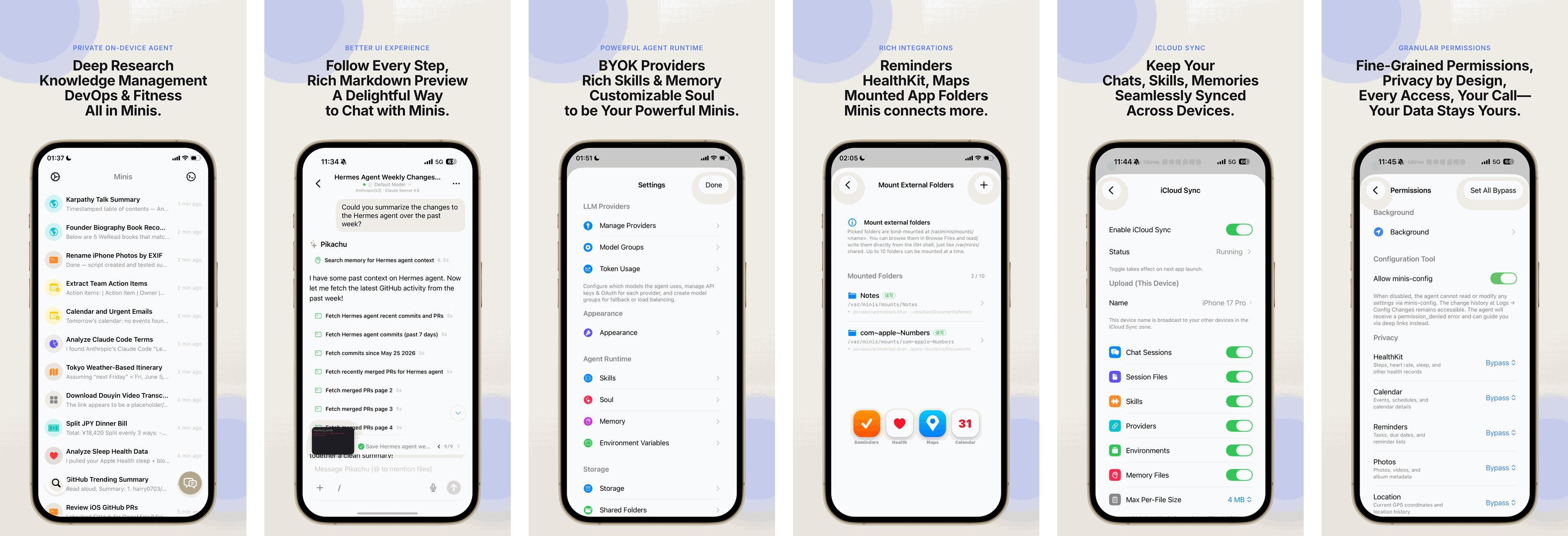
OpenMinis brings leading models — Claude, GPT, Gemini and more — into a native mobile experience, and gives them a real computer to work with: a full Linux shell running on your device, browser automation, extensible skills, persistent memory, and deep system integration.
It is free, and fully open source.
We believe that in the age of AI, technical design and code are no longer where a product's advantage lies. The best agent emerges from a tight feedback loop with the people who use it — their expectations and their reports are what converge on the product.
Official website: openminis.app


What it does
| Bring your own model | Claude, GPT, Gemini and other providers, via your own API keys or account sign-in. |
| A real Linux shell | A sandboxed Alpine Linux environment runs on-device — the agent can install packages, run scripts, and work with real files. |
| Device integration | Health, Calendar, Reminders, Contacts, HomeKit, Bluetooth, Clipboard, Media, Alarms and more, exposed to the agent as tools. |
| Browser automation | The agent can browse and interact with the web on your behalf. |
| Skills & memory | Extensible skills plus persistent memory across sessions. |
| Workspaces | Organise work into separate contexts, addressable via minis://workspace/. |
| Native offloads | Heavy or platform-specific work is handed to native code instead of the sandbox. |
What you can do with Minis
A few things people actually use it for:
- Photograph a meal, log the nutrition — Minis identifies the dishes, estimates calories and macros, and writes them to Apple Health.
- Wake up to your timeline — Shortcuts triggers Minis to fetch your X timeline, summarise it, synthesise speech, and play it as your alarm.
- Turn group chatter into tasks — pull messages from a Telegram group, extract bugs and action items, deduplicate them, and file them into Apple Reminders.
- Mount your Obsidian vault — research, clean up and write Markdown notes back into the vault as a normal workspace.
- Share anything into a calendar event — send a page or message to Minis via the iOS Share Sheet and it creates the event, time and place included.
→ OpenMinis/AwesomeMinis — a curated, community-contributed collection of use cases and workflows across health, productivity, research, finance and developer tooling.
Skills
A skill is a folder with a SKILL.md file — instructions, and optionally scripts,
references and assets — that the agent loads on demand when a request matches it.
Metadata stays in context for triggering; the body and bundled resources load only
when the skill is actually used.
Minis has its own tool system, but it does not require skills written specifically for it: skills built for Claude, Codex, OpenClaw or Hermes Agent generally run in Minis as-is. Skills that have been adapted to Minis' tools simply run better — they can reach the Linux shell, device integrations and native offloads directly.
→ OpenMinis/MinisSkills — skills adapted for Minis alongside ones built for it from scratch, covering TTS, search, media downloads, health analysis, cloud APIs and more.
Press
"the most impressive indie app I've seen in a while"
— Federico Viticci, Open Minis Is the iOS Agent I Wish Siri AI Could Be, MacStories (July 2026)
"在很大程度上实现甚至局部超越了 Apple Intelligence"
— Ye Han, 这可能是 iPhone 最强 Agent 软件,没有之一 丨Open Minis 入门指南, 知乎 / Zhihu (June 2026)
"可能是 iOS 端最强 AI Agent"
— Open Minis:可能是 iOS 端最强 AI Agent, 小众软件 / Appinn (March 2026)
Beta programme
App Store releases can lag behind: every update waits on review, and we hold builds back when stability warrants it. The TestFlight build is where fixes and new features land first.
On Android, the releases page always carries the latest APK.
Building from source
Minis ships a Linux sandbox inside the app, so the native dependencies (iSH on iOS, PRoot on Android, FFmpeg, LAME, rclone) and the Alpine rootfs are built from source rather than committed as binaries.
→ See BUILDING.md for the full first-build guide.
The short version:
git clone --recurse-submodules https://github.com/OpenMinis/OpenMinis.git
cd OpenMinis

# iOS  — needs Go 1.25+ and Xcode's Metal Toolchain
#        (xcodebuild -downloadComponent MetalToolchain)
#        order matters: FFmpeg links against LAME
./deps/build_lame.sh && ./deps/build_ffmpeg.sh
./deps/build_ish.sh && ./deps/prepare_alpine_rootfs.sh
./deps/build_rclone_ios.sh
open src/ios/Minis.xcodeproj

# Android — needs NDK r28+, Go 1.25+ and gomobile
./deps/build_proot.sh && ./scripts/prepare_android_sandbox.sh
./deps/build_rclone_android.sh
mkdir -p src/android/app/libs && cp deps/build/rclone/rclone.aar src/android/app/libs/
cd src/android && ./gradlew :app:assembleDebug
BUILDING.md covers the toolchain requirements per platform, the build-time
customization templates, and a troubleshooting section for the failure modes
you are most likely to hit.
Repository layout
src/ios/          iOS app (Swift / SwiftUI) + share, widget and file-provider extensions
src/android/      Android app (Kotlin / Compose) + JNI native code
src/shared/       Assets shared by both platforms
deps/             Native dependency build scripts and vendored sources
docs/specs/       Architecture and interface specifications
scripts/          Rootfs preparation and developer tooling
Acknowledgements
OpenMinis stands on a great deal of open-source work. Our thanks to the maintainers of these projects — the full inventory, with versions and license terms, is in THIRD_PARTY_LICENSES.md.
The sandbox — the heart of the product:
- iSH (GPLv3) — Linux usermode emulation on iOS. We run an ARM64 fork.
- PRoot (GPLv2) — user-space chroot for the Android sandbox, via our fork; talloc (LGPLv3+) underpins it.
- Alpine Linux — the minirootfs the sandbox boots.
Media & text — FFmpeg (LGPL-2.1+), LAME (LGPL), cppjieba (MIT), KaTeX (MIT).
iOS — SwiftAnthropic, SwiftMath, RealTimeCutVADLibrary (all MIT), swift-cmark (BSD-2-Clause), and the Apple / Swift Server Workgroup packages (Apache-2.0).
Android — AndroidX & Jetpack Compose, OkHttp, Coil, kotlinx serialization & coroutines, multiplatform-markdown-renderer, Reorderable, ACRA (all Apache-2.0), and Shizuku (MIT).
License
OpenMinis is licensed under the GNU General Public License v3.0.
The app links GPL-licensed components — iSH (GPLv3) and PRoot (GPLv2) — so the combined work is distributed under GPLv3. Bundled third-party licenses are listed in THIRD_PARTY_LICENSES.md.
Community
- Telegram: Join the group
- Issues: Bug reports, feature requests and discussion via GitHub Issues
This repository is a mirror of a private development tree, so it does not accept pull requests — there is nowhere for them to land. Issues are the way to shape the product, and AwesomeMinis and MinisSkills both do take contributions. See CONTRIBUTING.md.
Release Notes & Changelog
English
New features
- Added Settings > Network — Tailscale (one-tap sign-in), upstream proxies (HTTP or SOCKS5) and per-scope routes for model requests, MCP, the shell, WebViews and backups, with Network Diagnostics and "Restore Direct Connections". Every request the app makes follows them, and each provider's page has its own Network row. In the shell, programs that ignore proxy variables (ssh, nc, database clients) follow the routes too, for TCP, UDP and DNS, and tailnet names (MagicDNS, short names like "nas") resolve there. Small pills under the home title show whether Tailscale and the proxy are up.
- Added in-app updates with Stable and Beta channels — Minis checks for a new version when you open it (switch it off in About), shows a dot on Settings › About when one is waiting, lets you skip a version, and verifies the download before it installs. Choose Beta in About › Update channel to get test builds.
- Added questions from the assistant — the assistant can ask on an in-chat card (options, confirmation, multi-question wizard) and waits for your answer. In the background the question arrives as a notification you can answer in place, and a pending question can still be answered after the app restarts.
- Added provider quota & balance — remaining balance or subscription usage on the provider page, in the model picker and Model Groups, and in the composer. Supports DeepSeek, Moonshot, SiliconFlow, OpenRouter, Kimi Code, relay services (Sub2API / New API / OpenAI-style) and Claude / ChatGPT subscriptions.
- Added a Usage page — Today / 7 days / 30 days / All, with totals, a stacked trend chart and a drill-down by provider and model.
- Improved long agent runs — old reasoning, large tool outputs and old steps are trimmed a little at a time before a summary is needed, so a long task stays within the context window. The turn limit per run is now 500 (was 200).
- Added sub agent cards — they show the task, its tool calls and latest output, with Steer and Stop. Up to 6 chats, and 3 sub agents per chat, can run at once.
- Improved scheduled tasks — a chat with a scheduled follow-up stays active between runs; a pill under the chat title counts down in the last minute before a run, and its long-press menu has "Run now". A timed task fires on time while Minis is open.
- Added Search in Chat — find text in the open chat from the "…" menu, a long-press or a text selection, with matches highlighted. Session search groups results by folder and matches any of several keywords.
- Added Share Chat… — share any messages as one long image or a PDF with searchable text.
- Improved groups on the home screen — a group's avatar is a tile of its newest chats, a comet runs round it while one of them is working, and an unread reply shows a red dot on its chat and on the group.
- Added folding of consecutive tool calls into one "Ran N tools" row that opens on tap (on by default; Settings › Appearance › Tool Calls).
- Added Stop choices — "Stop Current Tool Only / Stop All" when sub agents or scheduled tasks are running; long-press the stop button to choose whether it confirms first.
- Added a "Show current model" button to the model picker that jumps to the chat's group or model in a long list. Hidden models are collected in a "Hidden models (N)" group, and any model can be deleted from its long-press menu.
- Added browser sign-in (OAuth) for remote MCP servers, and search and Enable All / Disable All in the in-chat MCP sheet.
- Added editing of saved backup servers, and ZIP64 for backups over 4 GB or 65,535 files.
- Also added: turning environment variables off; Codex speed tiers and GPT-6.1 Sol; a per-provider response timeout for slow local models; read-aloud volume up to 200%; "Show full thinking";
<br>and simple HTML in Markdown; minis-config for Network and more settings; Italian, Dutch, Hungarian, Czech and Persian.
Fixes
- Fixed crashes: running out of memory mappings in a long session, very large files, a refused foreground service, the first shell start on Android 8-10, an unavailable file picker, and copying a very large text preview (it now suggests Share).
- Fixed Stop for a shell command that is still waiting (delay countdown, queue, sandbox boot): Stop now cancels it before it starts. Fixed a short freeze when pressing Stop.
- Fixed provider changes on an open chat: a new API key, API type or base URL takes effect on the next turn. Fixed the context window of relay and custom endpoints, which now use the size the endpoint reports. Refresh model list now reports its result and falls back to the built-in models. Tool-only turns now carry
"content": ""for OpenAI-compatible providers that require it. - Fixed model handling: DeepSeek tool calls written into thinking and empty replies are retried; an empty reply from a model-group member switches to the next member; "Thinking off" on Claude 5 turns thinking off; fixed Gemini 3+ thinking settings and Anthropic refusals.
- Fixed sign-in getting stuck after authorizing on some devices (e.g. Huawei). Fixed Tailscale browser sign-in retries, and "Sign Out and Clear" now signs the device out of the tailnet.
- Fixed network routes when the local entry of a proxy or Tailscale is down: requests on that route now fail closed.
- Fixed traffic through a Tailscale exit node: model requests, the shell, the browser and MCP now leave through the exit node over IPv4 when IPv6 cannot, local addresses stay on the device, and an offline exit node blocks the connection.
- Fixed reading position: while you scroll up, the text you are reading stays in place as a reply grows or the keyboard opens. Fixed scrolling interrupting IME voice typing. A streaming thinking block follows its newest line, and a Search in Chat jump keeps its position while a reply streams.
- Fixed the shell: garbled Chinese output, git in the sandbox, and hangs in
yes … | headand busyboxip addr. - Fixed backup and restore: restore applies the backup's settings and API keys, OAuth logins are restored completely, local backups keep compact records, and iOS can read Android backups.
- Fixed Bailian, iFlytek and Doubao speech recognition for each service's current protocol, and a late AI correction overwriting newer dictation.
- Fixed Select All / Deselect All during a search: they apply to the results shown.
- Improved battery use: decorative animations pause while Minis is in the background.
- Fixed one unreadable encrypted store wiping every saved credential.
- Fixed
$5and$HOMErendering as formulas, tables nested in lists, deleting a symlink deleting its target, and the "Deep Thinking" title's language.
Polish
- The time under a reply shows its date for earlier days.
- The model-fallback notice, compaction progress and Stop choice now use the iOS style; a large chat fades in its messages when opened.
- The floating capsule stays fully on screen and remembers its position per orientation.
- Updated the About tagline: an AI agent on your device; your keys and files stay here, and conversations go only to the AI provider you choose.
Full changelog: https://github.com/OpenMinis/OpenMinis/compare/1.14...1.15
中文
新功能
- 新增「设置 > 网络」 —— 支持 Tailscale(一键登录)、上游代理(HTTP 或 SOCKS5),以及按范围设置路由(模型请求、MCP、Shell、WebView、备份),附带网络诊断和「恢复直连」。App 发出的所有请求都遵循这些设置,每个服务商页面也有自己的「网络」一行。Shell 中不读代理变量的程序(ssh、nc、数据库客户端)同样按路由走,TCP、UDP 和 DNS 都包括在内,也能解析 tailnet 名称(MagicDNS,以及「nas」这样的短名)。首页标题下方的小标签显示 Tailscale 和代理的状态。
- 新增应用内更新,支持正式版 / 测试版渠道 —— 打开 Minis 时自动检查新版本(可在「关于」里关闭),有新版本时在「设置 › 关于」上显示小红点,可以跳过某个版本,下载的安装包会先校验再安装。在「关于 › 更新渠道」选择测试版即可收到测试版本。
- 新增助手提问 —— 助手可以在对话里用卡片提问(单选、确认、多题向导)并等待回答。App 在后台时问题以通知形式出现,可直接在通知里作答;App 重启后仍可继续回答待回答的问题。
- 新增服务商额度与余额 —— 在服务商页面、模型选择器、模型组和输入框上方显示剩余余额或订阅用量。支持 DeepSeek、Moonshot、SiliconFlow、OpenRouter、Kimi Code、中转站(Sub2API / New API / OpenAI 兼容)以及 Claude / ChatGPT 订阅。
- 新增用量页面 —— 支持今天 / 7 天 / 30 天 / 全部,带汇总数字、堆叠趋势图,并可按服务商和模型下钻。
- 优化了长任务的上下文管理 —— 在需要摘要压缩之前,先逐步清理旧的思考、卸载大的工具输出、合并旧步骤,让长任务保持在上下文窗口内。每次运行的轮数上限提高到 500(原为 200)。
- 新增子代理卡片 —— 显示任务、工具调用和最新输出,可以引导或停止。最多可同时运行 6 个对话,每个对话最多 3 个子代理。
- 优化了定时任务 —— 有定时任务的会话在两次运行之间保持运行中;下次运行前的最后一分钟,对话标题下方的胶囊会倒计时,长按菜单可以「立即执行」。Minis 打开时定时任务准时触发。
- 新增聊天内搜索 —— 从「…」菜单、长按或选中文字即可在当前对话中搜索,匹配处高亮。会话搜索按文件夹分组显示结果,支持多个关键词。
- 新增分享会话 —— 任选消息,导出为一张长图或可搜索文字的 PDF。
- 优化了首页分组 —— 分组头像由最近的会话拼成宫格,组内有会话在运行时边缘有彗星环绕,有未读回复时会话和分组上显示红点。
- 新增连续工具调用折叠,合并为一行「运行了 N 个工具」,点击展开(默认开启,可在 设置 › 外观 › 工具调用 中修改)。
- 新增停止选项 —— 有子代理或定时任务在运行时,可选「仅停止当前工具 / 全部停止」;长按停止按钮可选择是否先确认。
- 模型选择器新增「定位到当前模型」按钮,在长列表中直接跳到当前的分组或模型。已隐藏的模型收进「已隐藏模型 (N)」,长按任意模型都可以删除。
- 新增远程 MCP 服务器的浏览器登录(OAuth),对话中的 MCP 面板新增搜索和全部启用 / 停用。
- 新增编辑已保存的备份服务器;超过 4 GB 或 65,535 个文件的备份使用 ZIP64 格式。
- 其他新增:环境变量可停用;Codex 速度档位与 GPT-6.1 Sol;可为慢速本地模型单独设置响应等待时间;朗读音量最高 200%;「显示完整思考」;Markdown 支持
<br>和简单 HTML;minis-config 支持网络等更多设置;新增意大利语、荷兰语、匈牙利语、捷克语和波斯语。
修复
- 修复了多处闪退:长会话耗尽内存映射、超大文件、系统拒绝前台服务、Android 8-10 首次启动 Shell、文件选择器不可用,以及复制超大文本预览(现在会提示改用分享)。
- 修复了停止对仍在等待中的 Shell 命令(延迟倒计时、排队、沙盒启动中)无效的问题,现在停止会在命令开始前取消它;修复了点停止时的短暂卡顿。
- 修复了已打开对话中修改服务商后不生效的问题:更换 API Key、API 类型或 Base URL 后,下一轮即生效。修复了中转站和自定义端点的上下文窗口,现在使用端点返回的数值。刷新模型列表现在会说明结果,并可回退到内置模型。只调用工具的回合现在带上
"content": "",兼容要求此字段的 OpenAI 兼容服务商。 - 修复了模型相关问题:DeepSeek 把工具调用写进思考或返回空回复时自动重试;模型组成员返回空回复时切换到下一个成员;Claude 5 关闭思考时正确关闭;修复了 Gemini 3+ 的思考参数和 Anthropic 拒绝回答的处理。
- 修复了部分设备(如华为)授权后登录卡住的问题。修复了 Tailscale 浏览器登录的重试;「退出并清除」现在会让设备退出 tailnet。
- 修复了代理或 Tailscale 本地入口不可用时的路由问题:该路由上的请求现在会直接失败并阻断。
- 修复了经 Tailscale 出口节点的连接:模型请求、Shell、浏览器和 MCP 在出口节点无法使用 IPv6 时改走 IPv4,本机地址始终留在设备上,出口节点离线时连接会被阻断。
- 修复了阅读位置问题:向上翻阅时,回复变长或键盘弹出,正在看的文字保持原位。修复了滚动打断输入法语音输入的问题。流式思考内容跟随最新一行,聊天内搜索跳转后在回复流式输出时保持位置。
- 修复了 Shell 问题:中文输出乱码、沙盒中的 git,以及
yes … | head和 busyboxip addr卡住。 - 修复了备份与恢复:恢复时应用备份中的设置和 API Key,OAuth 登录完整恢复,本地备份记录保持精简,iOS 可以读取 Android 备份。
- 修复了阿里云百炼、讯飞和豆包语音识别,适配各自最新协议;修复了迟到的 AI 纠正覆盖更新听写内容的问题。
- 修复了搜索时「全选 / 取消全选」的范围,现在只作用于显示的结果。
- 优化了耗电:Minis 在后台时暂停装饰动画。
- 修复了单个加密存储读取失败时清空所有已保存凭据的问题。
- 修复了
$5、$HOME被渲染为公式、列表中嵌套表格的显示、删除符号链接时误删目标内容,以及「深度思考」标题的语言。
视觉打磨
- 回复下方的时间在非当天时显示日期。
- 模型回退提示、压缩进度和停止选项改为 iOS 风格;打开大会话时消息淡入显示。
- 悬浮胶囊始终完整显示在屏幕内,并按横竖屏分别记住位置。
- 更新了「关于」页介绍:Minis 是运行在你设备上的 AI Agent,密钥和文件留在本机,对话只发送给你选择的 AI 服务商。
完整变更:https://github.com/OpenMinis/OpenMinis/compare/1.14...1.15
Declared Android Permissions
30 totalShizuku API Permissions
This application connects to the Shizuku service to execute system-level operations with ADB elevated privileges.
Standard Android Permissions
Specifications
Install via ShizuStore to enable automatic updates and silent installations using Shizuku.
More in AI agents
Other applications in this category

Operit AI
AAswordman
The most powerful AI agent and AI chat software on Android. Can run commands using Shizuku

roubao
Turbo1123
Open-source on-device AI phone automation assistant based on vision-language models that performs tasks via Shizuku system permissions, no PC needed.