roubao
Featuredv1.4.2About Application
Roubao 2.0 for iPhone — Open-source iPhone AI Agent
Let AI operate your iPhone: see the screen, tap, type, and work across apps, including owner-authorized Micro-X UI control.
No Wi-Fi, jailbreak, computer, or extra hardware required at runtime. Run the agent independently on your iPhone, including over cellular data.
简体中文 · Android below · Step-by-step setup · User guide · Validation and limits · Architecture


Initial setup requires a Mac and USB to build, sign, install, enable Developer Mode, and create/import a device-specific pairing file. Then unplug USB and shut down the Mac. Signing expiration or invalid pairing may require maintenance. The agent loop and device control run on the phone; model inference uses your configured online API, rather than an offline local LLM. This release is a developer source preview.
Real iPhone demo (3× speed)
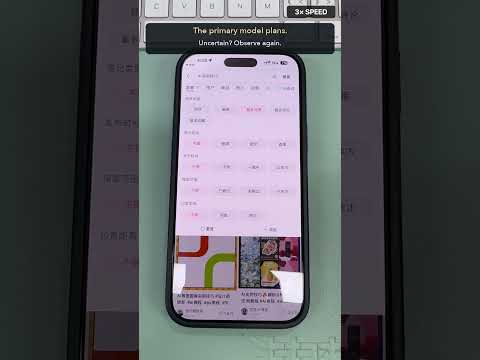
▶ Watch the full demo on YouTube · About 1 min 18 sec · English captions and background music
A real-device walkthrough of app research, PDF reports, and native iOS sharing. The full action order is preserved and shown at 3× speed. Click the thumbnail to watch.
Platform versions and entry points
| Platform | Status | Source and guides | License |
|---|---|---|---|
| iPhone · Roubao 2.0 | Current developer preview | iOS source · Setup · User guide | AGPL-3.0 |
| Android · legacy | Not updated alongside iPhone 2.0 | Root app/ · Legacy Android guide · Android V1.4.2 | MIT |
The content below describes Roubao 2.0 for iPhone. Existing Android source and build layout are retained; iPhone 2.0 features do not imply an Android update. License scopes
Give your existing iPhone an AI operator
Keep your iPhone. Choose your models, operate Micro-X, resume tasks, and create/share PDF reports—all from the phone you already own.
Describe a goal. Roubao observes the screen, plans, and operates apps. When it needs your preference or approval, it notifies you, shows question cards, and resumes with your answer. It brings the idea of a Doubao-style AI phone experience to an existing iPhone without replacing the phone or attaching a controller. This independent project has no official affiliation with Doubao, ByteDance, or Apple, and makes no claim of feature equivalence.
Roubao is an open-source iPhone AI agent, iOS automation client, and phone-use harness, built on iphone-use-app with upstream credits and AGPL-3.0 licensing preserved. Legacy Android source remains at this repository’s root; current iOS source lives in ios/.
What it can do
| Capability | How it works |
|---|---|
| Cross-app control | Launch apps, capture screens, tap, long-press, swipe, enter Unicode text, and return Home |
| Micro-X control (experimental) | Owner-authorized UI operation and file sharing; development testing delivered a generated PDF to a specified chat |
| Research and comparison | Read map listings or product pages and organize visible information across apps |
| PDF reports | Compare matching products and visible price conditions; create reports with tables and screenshot evidence |
| Follow-up conversations | Revise a completed report or add a platform, retaining the conversation and files |
| Human-in-the-loop questions | One card at a time, back navigation, final review, and local waiting notifications |
| Long tasks and continuation | Default 100 steps; ask to add 50 rather than discard progress; checkpoints and resume |
| Dynamic Island | View stages/steps and stop tasks; iOS controls refresh frequency |
| Files and sharing | Native PDF creation, file list, dismissible QuickLook preview, and the iOS share sheet |
| Streaming voice drafts | Optional Doubao/Volcengine ASR; partial text appears in the composer, editable before sending |
| Bring your own models | Configure an OpenAI-compatible endpoint, key, and model; optional TypeSafe JEV acceleration |
| Visual recovery | OCR assists grounding; two failed locating attempts require fresh primary-model image grounding |
These are implemented capabilities, not a guarantee of successful completion for every workflow. Calculator, research, PDF, and voice development checks exist; reliable unattended messaging, checkout, and payment have not been established. Validation and limits
Micro-X support, too
Roubao can operate Micro-X with your authorization through the same screenshot, tap, input, and native sharing tools used across apps. A physical-device development flow delivered a generated PDF to a specified chat. Example: “Share the PDF from this conversation to the Micro-X chat I specify. Let me verify the recipient and file before sending.”
Micro-X support remains experimental. Verify recipients, files, and content before sending. Historical tests also exposed duplicate delivery and an unintended tap. General authorization/duplicate-action protections were added, but the full sending flow has not been revalidated afterward. Reliable unattended sending or coverage of every Micro-X screen is not claimed. See validation and known limits. Login, verification, and system permissions are not bypassed.
Do I need WebDriverAgent?
No. This version does not require WDA, Appium, or an XCTest runner.
Control path: AgentRunKit → CoreDevice / RemoteXPC → idevice → local loopback VPN. Developer Mode, this phone's Remote Pairing record, and a local VPN are required. An ESP32, Raspberry Pi, second phone, or continuously running Mac is not. Architecture
Install from scratch
Follow the complete English installation guide:
- Prepare an iOS 26+ iPhone, Mac, full Xcode supporting its OS, Rust, and model API. Development devices were iPhone 15/17 Pro Max on iOS 27.0.1. iOS 26 is the deployment target, not a tested compatibility matrix.
- Connect USB, unlock, and trust the Mac. Enable Settings → Privacy & Security → Developer Mode, restart, and confirm. If missing, first let Xcode recognize the device.
- Clone this repository, run
scripts/build-idevice.sh, and configure your signing team and unique Bundle ID. - A paid team with Network Extension provisioning can use the built-in VPN. A free Personal Team must use
BUILTIN_VPN=NOand separately install/enable LocalDevVPN. Free profiles normally expire after seven days. - Build/install and generate this phone's Remote Pairing file over USB. Import it into Roubao. Pairing records are private trust credentials; do not share or borrow them.
- Allow VPN configuration and Local Network permissions; wait for the initial Developer Disk Image (DDI) download and mount.
- For cellular-only use, add “[iPhone Use] Toggle Cellular” from connection settings, then use the helper reconnect action. It briefly disables cellular to establish the local tunnel, then restores it. No Wi-Fi network is needed.
- Configure/test your model. Try “Open Calculator, clear it, calculate 23×17, and read the result.” Expected: 391.
- Disconnect USB, turn off the Mac, keep the phone unlocked and online, and run again. Validate independent execution and cellular reconnection on your own device.
Example tasks
Open Calculator, clear it, calculate 23×17, and read the result.
Find three nearby coffee shops in Maps and summarize distance and opening information. Do not order.
Compare the same phone model and storage size on three specified shopping apps, record price conditions and screenshots, and create a PDF.
Continue the report: flag membership/coupon requirements and save a revised version.
Share the PDF to the Micro-X chat I specify. Let me verify the recipient and file before sending.
Missing choices such as locations or accounts should be asked inside Roubao. Review destinations and content before final actions. Do not use a real payment as your first connection test.
Build and develop
git clone https://github.com/Turbo1123/roubao.git
cd roubao/ios
rustup target add aarch64-apple-ios
scripts/build-idevice.sh
open iPhoneUse.xcodeproj
# Offline harness/protocol tests: no API keys or phone actions
swift test --scratch-path .build/ModelTests
The Xcode project, target, and module remain iPhoneUse. Set ROUBAO_BUNDLE_ID to configure app and extension identifiers together. The setup guide covers signing, free-team builds, CLI installation, pairing, unsigned IPA packaging, and troubleshooting. No developer credentials, keys, certificates, or device trust records are distributed.
Privacy and limits
- Keys are stored in the device Keychain. Your model receives task text, screenshots, and relevant context. Optional JEV/ASR services receive the data required by those features.
- Conversations, screenshots, checkpoints, and reports live in the app sandbox. Check personal information before sharing. This is iOS app storage, not a general code-execution sandbox.
- The local VPN may conflict with other VPNs. iOS can show a “viewed remotely from Mac” notice even when the phone controls itself.
- Keep the phone unlocked. Background limits, signing expiration, OS updates, and app UI changes can interrupt execution. Resume does not guarantee exactly-once external actions; verify ambiguous outcomes before retrying.
- Login, CAPTCHA, payment authentication, and system permissions are not bypassed. Approval and duplicate-action protection do not prove coverage of every business button. Supervise important operations.
Security · Contributing · Third-party credits
License and acknowledgments
Distributed under the upstream AGPL-3.0 license with original notices retained. Thanks to iphone-use-app, idevice, StikDebug, LocalDevVPN/StosVPN, AgentRunKit, SwiftOpenAI, ESP32 iPhone Agent, and the JEV community. Archived upstream documentation and demo assets describe upstream work, not Roubao 2.0 acceptance tests.
Discovery terms: iPhone AI agent, iOS automation, mobile AI agent, phone use, computer use, no-jailbreak iPhone automation, cellular-data agent, standalone iPhone agent, on-device agent harness, on-device orchestration, SwiftUI, Rust, CoreDevice, multimodal automation.
Legacy Android: retained, not updated alongside iPhone 2.0
Android has not been removed or merged into the iPhone app. Its Kotlin source, Gradle project, MIT license, and historical APK releases remain in this repository. iPhone 2.0 updates do not imply an Android upgrade.
Download Android V1.4.2 APK · Full Android guide · 中文文档 · Android source · MIT license
What the Android version offers
- Native Kotlin and Material 3 UI, Chinese/English interfaces, and light/dark themes.
- Vision-language-model screen observation and natural-language phone tasks.
- Shizuku-based screenshots, taps, swipes, text entry, and app launching.
- Multi-agent / Tools / Skills architecture, execution history, overlay progress, and manual Stop.
- Custom model endpoints and model configuration with your own API key. The legacy design includes configuration encryption and sensitive-screen detection; verify compatibility and actual behavior on your setup.
Android setup
- Prepare an Android 8.0 / API 26 or later phone and your own vision-model API.
- Install/start Shizuku. Android 11+ supports wireless debugging; the legacy wireless guide requires Wi-Fi. Computer ADB startup is an alternative following Shizuku's official guidance.
- Download and install the Android V1.4.2 APK linked above. The iPhone source archive is not an Android installer.
- Open Roubao, authorize it in Shizuku, and configure your model endpoint, model ID, and API key in Settings.
- Verify a simple task and its actual results before complex workflows. See the full legacy Android guide for permissions, configuration, building, and examples.
The runtime “four no-requirements” statement, CoreDevice, loopback VPN, and Dynamic Island sections above concern iPhone. Android follows its separate setup. Old personal demo screenshots were removed during privacy cleanup; the APKs, source, and documentation remain available.
Release Notes & Changelog
更新日志 v1.4.2
中文
修复
- 修复应用启动时 ANR(无响应)问题
- 预编译正则表达式,避免重复创建对象
- 应用扫描改为后台异步执行,不阻塞主线程
- 修复 fetchModels URL 格式错误导致的崩溃
优化
- 默认主题改为"跟随系统"
English
Fixes
- Fixed ANR (App Not Responding) issue on app startup
- Pre-compiled regex to avoid repeated object creation
- App scanning now runs asynchronously in background thread
- Fixed crash caused by malformed fetchModels URL
Improvements
- Default theme changed to "Follow System"
Declared Android Permissions
16 totalShizuku API Permissions
This application connects to the Shizuku service to execute system-level operations with ADB elevated privileges.
Standard Android Permissions
Specifications
Install via ShizuStore to enable automatic updates and silent installations using Shizuku.
More in AI agents
Other applications in this category
Operit AI
AAswordman
The most powerful AI agent and AI chat software on Android. Can run commands using Shizuku
OpenMinis
OpenMinis
AI-powered agent with Linux shell, browser automation, and system control via Shizuku